
POHL SCHMITT P+S BM - SS
POHL SCHMITT Stainless Steel Bread Machine
Model: P+S BM - SS
Introduction
Welcome to the POHL SCHMITT Stainless Steel Bread Machine user manual. This appliance is designed to simplify the process of making delicious homemade bread with its versatile functions and user-friendly interface.

Figure 1: POHL SCHMITT Stainless Steel Bread Machine Overview
Key Features:
- Versatile Functions: With 14 settings, including gluten-free options and the ability to incorporate fruits and nuts, this bread maker provides a wide range of options for creating delicious homemade bread to suit various dietary preferences.
- Large Capacity: This bread maker has a 2lb capacity, allowing you to bake bread in different sizes, accommodating small or large gatherings or satisfying varying hunger needs.
- Easy to Use: The intuitive control panel and clear LCD display make it simple to navigate and select the desired settings. The nonstick pan ensures easy removal of the finished bread for hassle-free baking.
- Keep Warm Function: The bread maker features a convenient keep warm function which keeps your freshly baked bread warm for extended periods, ensuring it stays fresh until you're ready to enjoy it.
- Recipes Included: It comes with a recipe book, offering a variety of bread and jam recipes to try. Additionally, the built-in nut dispenser enables you to add nuts and dried fruits at the appropriate time to improve its flavor and texture.
Setup
Unpacking and Placement:
- Carefully remove all packaging materials and accessories from the box.
- Place the bread machine on a stable, flat, and heat-resistant surface. Ensure adequate ventilation around the appliance.
- The dimensions of the bread machine are approximately 10"D x 14"W x 12.5"H. Ensure sufficient space for operation and heat dissipation.
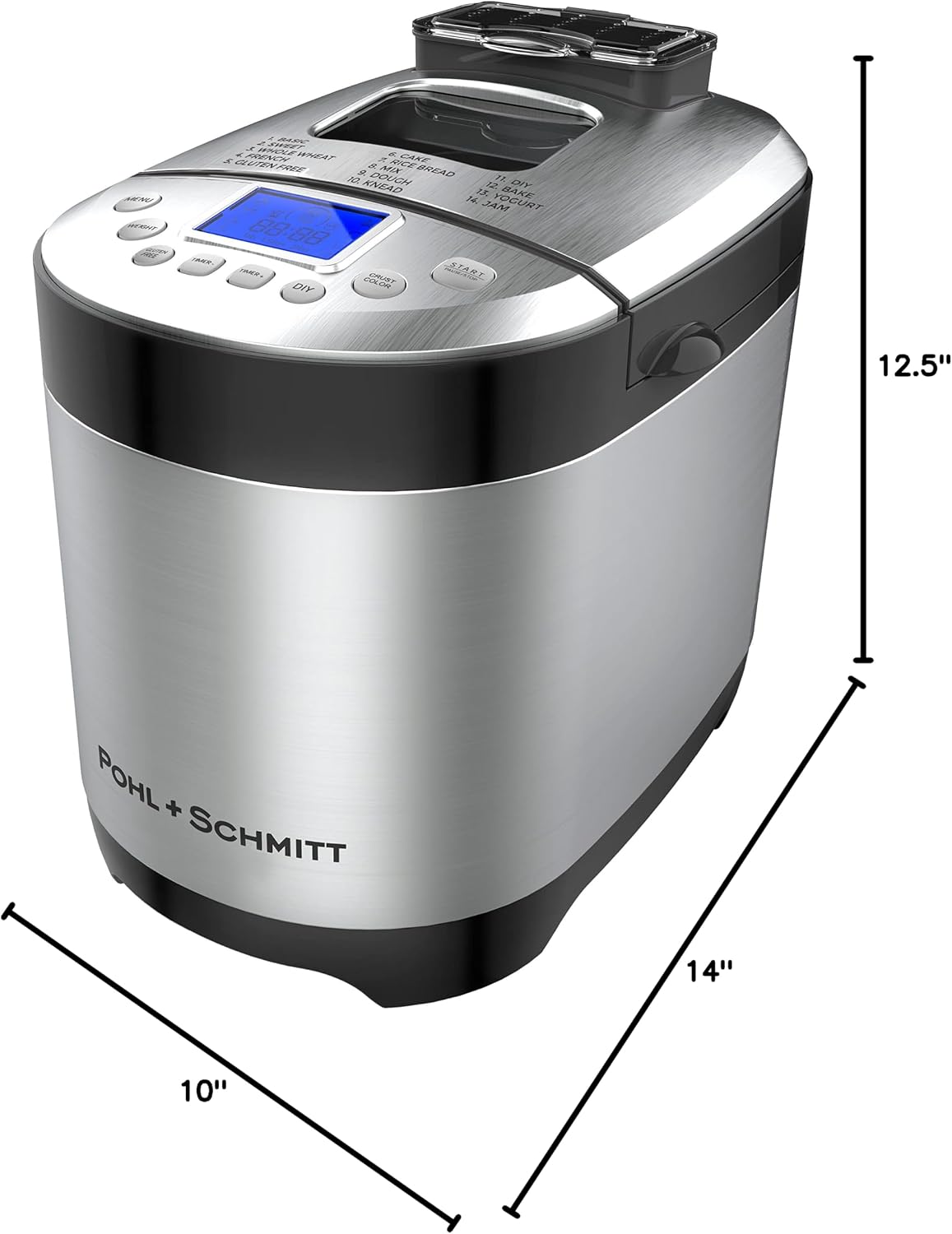
Figure 2: Product Dimensions
Initial Cleaning:
- Before first use, wipe the exterior of the bread machine with a damp cloth.
- Wash the nonstick bread pan and kneading paddle with warm, soapy water. Rinse thoroughly and dry completely.
- Ensure the interior of the baking chamber is clean and dry before inserting the bread pan.

Figure 3: Nonstick Bread Pan for Easy Cleaning
Operating Instructions
Control Panel Overview:

Figure 4: Intuitive Control Panel with LED Display and 14 Settings
- Menu Button: Press to cycle through the 14 preset programs (Basic, Sweet, Whole Wheat, French, Gluten Free, Cake, Rice Bread, Mix, Dough, Knead, DIY, Bake, Yogurt, Jam).
- Weight Button: Select your desired loaf size (1lb, 1.5lbs, 2lbs).
- Crust Color Button: Choose from Light, Medium, or Dark crust.
- Timer +/- Buttons: Adjust the delay timer for delayed baking.
- Start/Pause/Stop Button: Initiates, pauses, or stops the selected program.
- DIY Button: Allows for custom programming of kneading, rising, and baking times.
Baking a Loaf of Bread:
- Add ingredients to the bread pan according to your chosen recipe. Ensure liquids are added first, followed by dry ingredients, with yeast placed last and not touching liquids or salt initially.
- Place the bread pan securely into the baking chamber.
- Close the lid.
- Press the 'Menu' button to select the desired program (e.g., Basic for standard white bread).
- Press the 'Weight' button to select the loaf size.
- Press the 'Crust Color' button to choose your preferred crust shade.
- If using the nut dispenser, add nuts or fruits to the dispenser. The machine will automatically release them at the appropriate time.
- Press the 'Start/Pause/Stop' button to begin the baking process.

Figure 5: Customize your bread with 3 loaf sizes and 3 crust colors.
Using the Delay Timer:
The 15-hour delay timer allows you to prepare ingredients in advance and have freshly baked bread ready at a specific time. After selecting your program, loaf size, and crust color, use the 'Timer +/-' buttons to set the desired delay time. Press 'Start' to activate the delay timer.

Figure 6: Set the 15-hour delay timer for fresh bread anytime.
Keep Warm Function:
After the baking cycle is complete, the bread machine automatically enters a 1-hour 'Keep Warm' phase. This ensures your bread remains warm and fresh until you are ready to remove it.

Figure 7: The bread machine automatically keeps bread warm for 1 hour.
Included Recipes:
The bread machine comes with a recipe book containing various bread and jam recipes. These recipes are optimized for the machine's programs and settings.

Figure 8: Explore various recipes with the included recipe book.
Maintenance
Cleaning:
- Always unplug the bread machine and allow it to cool completely before cleaning.
- The nonstick bread pan and kneading paddle should be hand washed only with warm, soapy water. Avoid abrasive cleaners or scouring pads that could damage the nonstick coating.
- Wipe the exterior of the appliance with a soft, damp cloth. Do not immerse the main unit in water.
- Clean the nut dispenser regularly to prevent residue buildup.
Troubleshooting
Common Issues and Solutions:
- Bread Not Rising:
- Ensure yeast is fresh and active.
- Check water temperature; it should be lukewarm (around 105-115°F / 40-46°C).
- Verify correct ingredient measurements, especially flour and liquid ratios.
- Ensure yeast does not come into direct contact with salt or liquids before mixing begins.
- Bread Too Dense or Heavy:
- Too much flour or not enough liquid. Adjust measurements carefully.
- Old or inactive yeast.
- Machine Not Responding/Display Issues:
- Ensure the machine is properly plugged into a working power outlet.
- Try unplugging and plugging it back in to reset the system.
- Bread Sticks to Pan:
- Ensure the nonstick pan is clean and undamaged.
- Allow the bread to cool slightly in the pan after baking before attempting to remove it.
Specifications
| Brand | POHL SCHMITT |
| Model Number | P+S BM - SS |
| Color | gray |
| Product Dimensions | 10"D x 14"W x 12.5"H |
| Item Weight | 11.88 pounds |
| Wattage | 650 watts |
| Number of Programs | 14 |
| Product Care Instructions | Hand Wash Only |
| Manufacturer | POHL SCHMITT |
| UPC | 880260909998 |
Warranty & Support
For warranty information and customer support, please refer to the documentation included with your product or visit the official POHL SCHMITT website.
You can also visit the POHL SCHMITT Store on Amazon for more information.
Ask a question about this manual
Ask about setup, troubleshooting, compatibility, parts, safety, or missing instructions. Manuals+ will review the question and use this page’s manual context to help answer it.