
1. Introduction
This manual provides detailed instructions for the safe and effective use of your Sndway SW-M40 Digital Laser Rangefinder. Please read this manual thoroughly before operating the device and retain it for future reference.
The Sndway SW-M40 is a compact and precise digital laser distance meter designed for various measurement tasks, including single distance, area, volume, and Pythagorean calculations. It features a measuring range of up to 40 meters.
2. Safety Information
WARNING: Laser Radiation
- Do not stare into the laser beam.
- Do not point the laser beam at people or animals.
- Avoid direct eye exposure to the laser beam.
- This device emits Class 2 laser radiation.
- Keep the device out of reach of children.
- Do not attempt to modify or disassemble the device.
Always use the device in accordance with the instructions provided to prevent injury or damage.
3. Product Overview
The Sndway SW-M40 Digital Laser Rangefinder is equipped with a clear display and intuitive controls for efficient operation.

Figure 3.1: Front view of the Sndway SW-M40 Digital Laser Rangefinder displaying multiple measurement results.
3.1 Key Features
- Digital Laser Distance Measurement
- Area and Volume Calculation
- Pythagorean Measurement Function
- Addition and Subtraction of Measurements
- Reference Point Adjustment
- Unit Switching (meters, feet, inches)
- Data Storage Function
- Integrated Horizontal and Vertical Bubble Levels for alignment.

Figure 3.2: Sndway SW-M40 functions including Distance, Area, Volume, and Pythagorean measurement.
3.2 Button Functions

Figure 3.3: Control panel with button functions.
- READ Button: Powers on the device and initiates measurement.
- Area/Volume/Pythagorean Mode Button: Cycles through different measurement modes.
- '+' / '-' Buttons: Used for adding or subtracting measurements.
- Reference Point / Unit Switch Button: Changes the measurement reference point (front/rear of device) and switches measurement units.
- Save Button: Stores current measurement data.
- OFF/CLEAR Button: Turns off the device or clears the current display.
4. Setup
4.1 Battery Installation
The Sndway SW-M40 requires two AAA batteries for operation. Ensure correct polarity when inserting the batteries.
- Locate the battery compartment cover on the rear of the device.
- Slide the cover open.
- Insert two AAA batteries, matching the '+' and '-' indicators inside the compartment.
- Close the battery compartment cover securely.
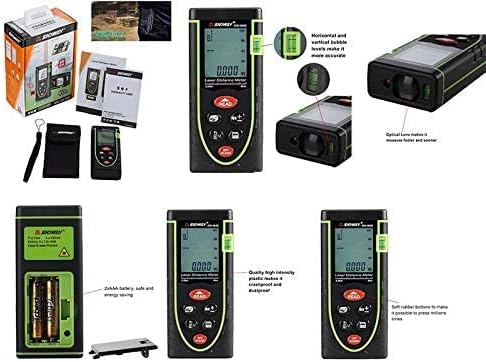
Figure 4.1: Battery compartment and other product details.
5. Operating Instructions
5.1 Power On/Off
- To Power On: Press the READ button. The laser will activate.
- To Power Off: Press and hold the OFF/CLEAR button for a few seconds. The device will also automatically power off after a period of inactivity.
5.2 Single Distance Measurement
- Power on the device by pressing READ.
- Aim the laser at the target point.
- Press READ again to take the measurement. The distance will be displayed on the screen.
5.3 Area Measurement
- Press the Mode button (the button with the box icon) until the area icon (square) appears on the display.
- Take the first length measurement by pressing READ.
- Take the second width measurement by pressing READ.
- The device will automatically calculate and display the area.
5.4 Volume Measurement
- Press the Mode button until the volume icon (cube) appears on the display.
- Take the length measurement by pressing READ.
- Take the width measurement by pressing READ.
- Take the height measurement by pressing READ.
- The device will automatically calculate and display the volume.
5.5 Pythagorean Measurement
This mode is used to calculate indirect distances (e.g., height) using the Pythagorean theorem.
- Press the Mode button until the Pythagorean icon (triangle) appears. There are typically two Pythagorean modes: two-point and three-point.
- Follow the on-screen prompts to measure the required sides of the triangle (e.g., hypotenuse, base).
- The device will calculate and display the unknown side.
5.6 Unit Switching and Reference Point
- Unit Switch: Briefly press the Reference Point / Unit Switch button to cycle through measurement units (meters, feet, inches).
- Reference Point: Press and hold the Reference Point / Unit Switch button to change the measurement reference point between the front edge and the rear edge of the device. An icon on the display will indicate the active reference point.

Figure 5.1: Device held in hand, showing button layout.
5.7 Addition and Subtraction
To add or subtract measurements:
- Take the first measurement.
- Press the '+' or '-' button.
- Take the second measurement.
- The result of the addition or subtraction will be displayed.
5.8 Data Storage
To save a measurement, press the Save button after a measurement is displayed. The device can store multiple readings, which can be recalled later.
5.9 Clearing Measurements
To clear the current measurement from the display, briefly press the OFF/CLEAR button.
6. Maintenance
- Cleaning: Use a soft, damp cloth to clean the device. Do not use abrasive cleaners or solvents.
- Lens Care: The optical lens is a sensitive component. Clean it gently with a soft cloth, similar to cleaning camera lenses.
- Storage: Store the device in a dry, cool place, away from direct sunlight and extreme temperatures. If storing for extended periods, remove the batteries to prevent leakage.
- Battery Replacement: Replace batteries when the low battery indicator appears on the display to ensure accurate operation.
7. Troubleshooting
| Problem | Possible Cause | Solution |
|---|---|---|
| Device does not power on | Low or dead batteries; Incorrect battery installation | Replace batteries; Check battery polarity |
| Inaccurate measurements | Unstable target surface; Obstruction in laser path; Dirty lens; Incorrect reference point | Ensure stable target; Clear laser path; Clean lens; Verify reference point setting |
| "Error" message on display | Measurement out of range; Strong light interference; Laser blocked | Ensure target is within 0.05m-40m range; Measure in shaded areas; Ensure laser is not blocked |
| Laser not visible | Bright ambient light; Laser not activated | Measure in lower light conditions; Press READ button to activate laser |
8. Specifications
| Feature | Specification |
|---|---|
| Model | SW-M40 |
| Measuring Range | 0.05m - 40m |
| Measurement Units | meters (m), feet (ft), inches (in) |
| Laser Class | Class 2 |
| Batteries | 2 x AAA (included) |
| Material | Plastic |
| Color | Green |
| Item Weight | 0.17 Kilograms |
| Package Dimensions | 17 x 8.8 x 5 cm |
9. Warranty and Support
9.1 Warranty Information
Please refer to your purchase documentation or the retailer's website for specific warranty terms and conditions applicable to your Sndway SW-M40 Digital Laser Rangefinder.
9.2 Customer Support
For technical assistance, troubleshooting not covered in this manual, or service inquiries, please contact the retailer or the manufacturer directly. Contact information can typically be found on the product packaging or the seller's online store page.


