Introduction
This manual provides instructions for the ALLIMITY Replacement Infrared Remote Control, designed for use with various SKYWORTH LCD/LED TV models. Please read this guide thoroughly before using the remote control to ensure proper operation and longevity.
Compatible SKYWORTH TV Models:
- 24E66A
- 24E58A
- 32E66A
- 42E66A
- 50E58
- 32E57
- 32E36
- 42E38
- 39E36
If your specific TV model is not listed, please verify compatibility before use. This remote control operates via infrared (IR) technology.
Package Contents
- 1 x ALLIMITY Replacement Remote Control (Model: IND-SKYWORTH4-W)
Note: Batteries are not included and must be purchased separately.
Setup
1. Installing Batteries
The remote control requires two AAA alkaline batteries (not included).
- Locate the battery compartment on the back of the remote control.
- Press down on the latch and slide the battery cover off.
- Insert two new AAA alkaline batteries, ensuring the positive (+) and negative (-) terminals match the diagrams inside the compartment.
- Slide the battery cover back into place until it clicks securely.
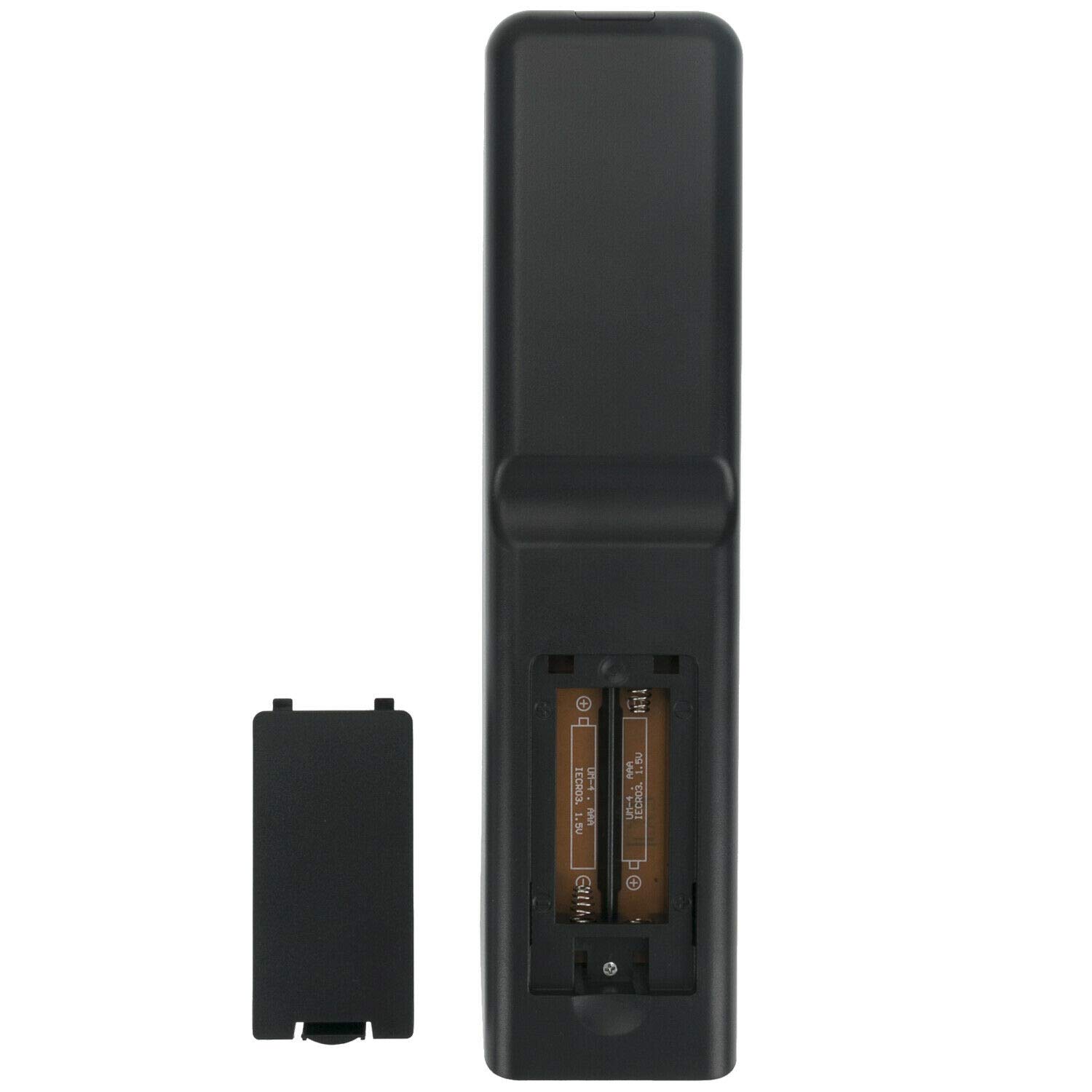
Image: Back of the remote control with the battery cover removed, illustrating the correct orientation for inserting AAA batteries.
2. First Use
No programming is required for this replacement remote control. Once batteries are installed, it is ready for use with compatible SKYWORTH LCD/LED TV models.
Operating Instructions
To operate your TV using the remote control:
- Ensure the TV is powered on or in standby mode.
- Point the remote control directly towards the infrared sensor on your SKYWORTH TV. Avoid any obstacles between the remote and the TV sensor.
- Press the desired function button.

Image: Overview of the ALLIMITY remote control buttons.
Key Functions:
| Button | Function |
|---|---|
| POWER | Turns the TV on or off (standby mode). |
| S.M. | Sound Mode selection. |
| ZOOM | Adjusts the screen zoom level. |
| 0-9 | Numeric buttons for direct channel selection. |
| RETURN | Returns to the previous menu or channel. |
| MENU | Opens the TV's main menu. |
| QUICK CH/LIST | Accesses quick channel list. |
| SOURCE | Selects input source (HDMI, AV, etc.). |
| Navigation Arrows (Up, Down, Left, Right) | Navigates through menus and options. |
| OK | Confirms selections. |
| REC.LIST | Accesses recorded content list. |
| EXIT | Exits current menu or function. |
| INFO | Displays information about the current program or input. |
| VOL +/- | Adjusts volume up or down. |
| PR +/- | Changes channels up or down. |
| MUTE | Mutes or unmutes the TV sound. |
| SLEEP | Sets the sleep timer. |
| FAV | Accesses favorite channels. |
| EPG | Electronic Program Guide. |
| HOLD | Holds the current screen. |
| TEXT | Activates/deactivates Teletext. |
| INDEX | Accesses Teletext index. |
| CANCEL | Cancels current action. |
| SUBPAGE | Navigates Teletext subpages. |
| REC | Starts recording (if supported by TV). |
| SIZE | Adjusts screen size/aspect ratio. |
| REVEAL | Reveals hidden Teletext information. |
| MIX | Mixes TV picture with Teletext. |
| Colored Buttons (Red, Green, Yellow, Blue) | Functionality varies by TV model and current menu/application. Refer to your TV's manual. |
| Playback Controls (Rewind, Play/Pause, Fast Forward, Previous, Stop, Next) | Controls media playback (if supported by TV/connected device). |
Maintenance
- Cleaning: Wipe the remote control with a soft, dry cloth. Do not use liquid or aerosol cleaners.
- Battery Replacement: Replace batteries when the remote control's response becomes sluggish or stops working. Always replace with new alkaline batteries.
- Storage: If the remote control will not be used for an extended period, remove the batteries to prevent leakage and damage.
- Avoid Damage: Do not drop the remote control, expose it to moisture, or place it in direct sunlight or near heat sources.
Troubleshooting
| Problem | Possible Cause | Solution |
|---|---|---|
| Remote control not working. | Dead or incorrectly inserted batteries. | Replace with new AAA alkaline batteries, ensuring correct polarity (+/-). |
| Remote control range is poor. | Weak batteries; Obstruction between remote and TV sensor. | Replace batteries. Ensure a clear line of sight to the TV's IR sensor. |
| Some buttons do not work. | Remote control not compatible with specific TV function; Button malfunction. | Verify your TV model is listed as compatible. Some advanced functions may require the original remote. If multiple buttons fail, consider replacing the remote. |
| TV does not respond to any remote commands. | TV's IR sensor is blocked or faulty; TV is off or unplugged. | Check TV power. Clear any obstructions from the TV's IR sensor. Test with another remote if available to rule out TV sensor issue. |
Specifications
- Brand: ALLIMITY
- Model: IND-SKYWORTH4-W
- Compatible Devices: SKYWORTH LCD/LED TVs (models: 24E66A, 24E58A, 32E66A, 42E66A, 50E58, 32E57, 32E36, 42E38, 39E36)
- Connectivity Technology: Infrared (IR)
- Power Source: Battery Powered
- Battery Type: 2 x AAA Alkaline Batteries (not included)
- Product Dimensions: 17 x 1.5 x 5 cm (approx.)
- Item Weight: 70 g (approx.)
- Material: ABS
- Country of Origin: China
Warranty and Support
This product is a replacement remote control. For specific warranty information, please refer to the seller's policy or contact ALLIMITY customer support directly. For technical assistance, refer to the troubleshooting section or contact your product vendor.
Note: This remote control is designed to function as a direct replacement for the original remote for the listed SKYWORTH TV models. Some advanced features specific to certain smart TV platforms or unique original remote buttons may not be fully supported.


