
1. Introduction
This manual provides essential information for the safe and efficient operation of your Sanyo XT-55A081U 55-inch 4K Ultra HD Smart Android TV. Please read it thoroughly before using the television and retain it for future reference. This television features a 4K Ultra HD IPS LED display, Android operating system, and integrated smart functionalities.
2. Safety Information
Observe the following safety precautions to prevent fire, electric shock, or injury:
- Do not expose the TV to rain or moisture.
- Ensure proper ventilation; do not block ventilation openings.
- Place the TV on a stable, level surface to prevent it from falling.
- Use only the power cord supplied with the TV.
- Unplug the TV during lightning storms or when unused for long periods.
- Do not open the TV casing; refer all servicing to qualified personnel.
3. Package Contents
Verify that all items are present in the package:
- 1 Sanyo XT-55A081U LED TV
- 1 Table Top Stand
- 1 Wall Mount Bracket
- 1 User Manual (this document)
- 1 Warranty Card
- 1 Remote Control
- 2 AAA Batteries
- 1 Power Cable / Power Supply Adapter
- 1 Voice Remote

Image Description: A front view of the Sanyo XT-55A081U 55-inch 4K Ultra HD Smart Android TV. The screen displays a vibrant image of a person's head with various media content icons floating around it, symbolizing the smart TV capabilities. The TV has a slim bezel and is supported by two V-shaped feet.
4. Setup
4.1 Stand Installation
To install the table-top stand:
- Carefully place the TV screen-down on a soft, clean surface to prevent scratches.
- Align the stand brackets with the screw holes on the bottom of the TV.
- Secure the stand using the provided screws. Ensure the stand is firmly attached.
4.2 Wall Mounting
A wall mount bracket is included with your TV. For safe and secure wall mounting, it is highly recommended to seek professional installation services. Refer to the wall mount bracket's specific instructions for details on installation.
4.3 Connecting Devices
Your Sanyo XT-55A081U TV offers multiple connectivity options:
- HDMI Ports (3): Connect set-top boxes, Blu-ray players, gaming consoles, or other HDMI-enabled devices.
- USB Ports (2): Connect USB storage devices for media playback or other USB peripherals.
- Wi-Fi: Connect to your home wireless network for internet access and smart TV features.

Image Description: A rear view of the Sanyo XT-55A081U TV, showing the back panel with various input and output ports. The design includes a textured central area and smooth edges, with visible mounting points and connection panels for HDMI, USB, and other cables.
5. Operating Instructions
5.1 Remote Control
The TV comes with a standard remote control and a voice remote. Insert the two AAA batteries into the remote control, observing polarity.
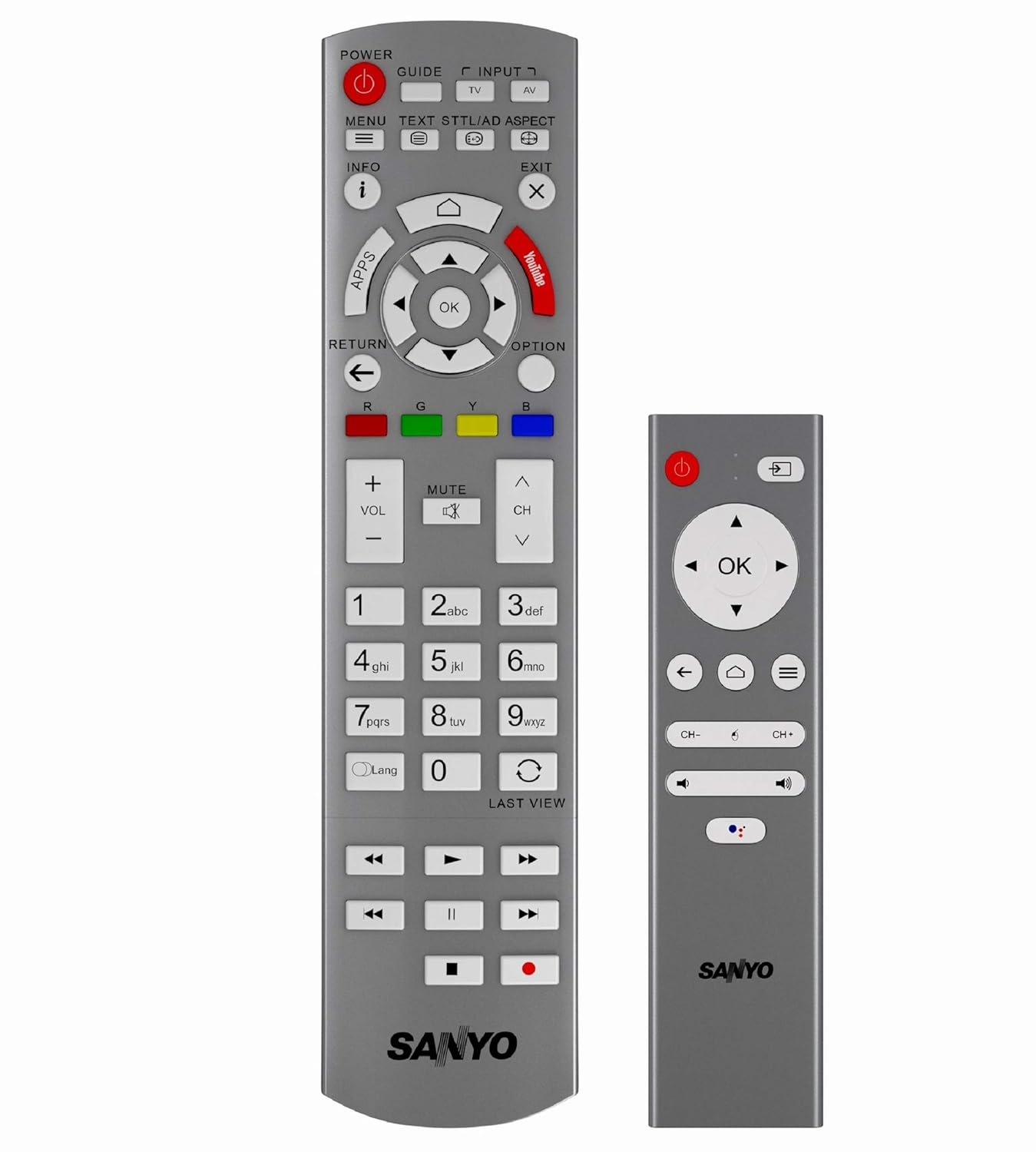
Image Description: Two remote controls for the Sanyo XT-55A081U TV. The larger remote features a full keypad, navigation buttons, and dedicated function keys for power, input, volume, channel, and smart features. The smaller voice remote is more compact, featuring essential navigation, power, and voice control buttons.
Key Remote Functions:
- Power: Turns the TV on or off.
- Input: Selects the input source (HDMI 1, HDMI 2, USB, etc.).
- Volume (+/-): Adjusts the volume level.
- Channel (CH+/-): Changes TV channels.
- Navigation (Arrow keys, OK): Navigates menus and confirms selections.
- Home: Accesses the Android TV home screen.
- Back/Return: Returns to the previous screen or menu.
- Voice Assistant: Activates Google Assistant for voice commands (on voice remote).
5.2 Initial Setup
Upon first power-on, the TV will guide you through the initial setup process:
- Language Selection: Choose your preferred language.
- Network Connection: Connect to your Wi-Fi network by selecting it from the list and entering the password.
- Google Account Sign-in: Sign in with your Google account to access the Google Play Store and other Android TV features.
- Terms of Service: Accept the terms and conditions.
- Channel Scan: If connecting to an antenna, perform a channel scan.
5.3 Smart TV Features
Your Sanyo XT-55A081U is a Google Certified Android TV running Android Oreo 8.0, offering:
- Google Assistant: Use voice commands via the voice remote to search for content, control smart home devices, and get information.
- Chromecast Built-in: Cast content from your compatible smartphone, tablet, or computer directly to the TV.
- Google Play App Store: Download and install a wide range of applications, games, music, and movies.
- Pre-installed Apps: Access popular services like YouTube, Google Play Music, and Google Play Movies & TV.
5.4 Input Selection
To switch between connected devices, press the 'Input' button on your remote control. A menu will appear, allowing you to select the desired source (e.g., HDMI 1, HDMI 2, USB).
6. Maintenance
To ensure the longevity and optimal performance of your TV:
- Cleaning the Screen: Gently wipe the screen with a soft, dry, lint-free cloth. For stubborn marks, use a screen-specific cleaning solution applied to the cloth, not directly to the screen.
- Cleaning the Casing: Use a soft, dry cloth to wipe the TV casing. Avoid abrasive cleaners or solvents.
- Ventilation: Ensure the ventilation openings on the back of the TV are not blocked.
- Power Cord: Regularly check the power cord for any damage.
7. Troubleshooting
If you encounter issues with your TV, refer to the following common problems and solutions:
| Problem | Possible Solution |
|---|---|
| No power | Check if the power cord is securely plugged into the TV and the wall outlet. Ensure the outlet has power. |
| No picture, but sound is present | Verify the correct input source is selected. Check cable connections to external devices. |
| No sound, but picture is present | Check the volume level and ensure the TV is not muted. Verify audio cable connections. |
| Remote control not working | Replace the batteries. Ensure there are no obstructions between the remote and the TV's IR sensor. |
| Cannot connect to Wi-Fi | Ensure your router is on and working. Re-enter the Wi-Fi password. Try restarting the TV and router. |
| Smart features not responding | Check your internet connection. Try restarting the TV. Ensure your Google account is signed in. |
8. Specifications
| Feature | Specification |
|---|---|
| Brand | Sanyo |
| Model | XT-55A081U |
| Screen Size | 55 Inches (138.8 cm) |
| Display Technology | IPS LED |
| Resolution | 4K Ultra HD (3840 x 2160 pixels) |
| Refresh Rate | 60 Hz |
| Operating System | Android Oreo 8.0 (Google Certified) |
| Processor | Quad-Core Cortex-A53, 64bit, 1.1GHz |
| Connectivity | 3 x HDMI, 2 x USB, Wi-Fi |
| Audio Output | 20 Watts, Dolby Digital, 2.1 Channel Surround |
| Special Features | Voice Search (Google Assistant), Chromecast Built-in, Google Play Store |
| Product Dimensions (LxWxH) | 124.2 x 26.7 x 78.2 cm |
| Item Weight | 20.3 kg |
9. Warranty and Support
This Sanyo XT-55A081U TV is a Certified Refurbished product and comes with a minimum six-month supplier-backed warranty. Please refer to the included Warranty Card for specific terms and conditions, including details on how to obtain support during the warranty period.
For technical assistance or service inquiries, please contact the authorized service center as indicated in your warranty documentation.