
Introduction
This manual provides essential instructions for the safe assembly, operation, and maintenance of your Nova Star 8 Rollator Walker. Please read this manual thoroughly before using the product to ensure proper function and user safety. The Nova Star 8 Rollator is designed to provide mobility assistance, featuring a lightweight, foldable frame and an adjustable Perfect Fit Size System for personalized comfort.
Safety Information
For external use only.
Always ensure the rollator is fully unfolded and stable before use. Regularly check all components for wear or damage. Do not exceed the maximum weight capacity of 300 lbs. Use caution on uneven surfaces or inclines. Engage brakes when sitting or standing. This product is intended as a mobility aid; it is not a substitute for medical advice or treatment. Statements regarding dietary supplements have not been evaluated by the FDA and are not intended to diagnose, treat, cure, or prevent any disease or health condition.
Setup and Adjustment
Follow these steps to prepare your Nova Star 8 Rollator for use:
- Unfolding the Rollator: Carefully unfold the walker until it locks into its open position. Ensure all locking mechanisms are securely engaged and the frame is stable.
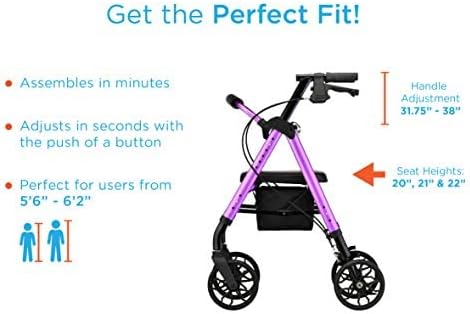
- Adjusting Handle Height: Use the Quick-Fit push buttons located on the handle posts to adjust the handle height. Ensure the handles are at a comfortable height, allowing your arms to be slightly bent (approximately 15-30 degrees) when standing upright. The handle height adjustment range is 31.75" - 38". Both handles should be set to the same height.
- Adjusting Leg Height (if applicable): Some models may allow for leg height adjustment. Ensure the legs are adjusted to provide a stable and level base for the rollator.
- Checking Stability: Before first use, gently push down on the handles and seat to confirm the rollator is stable and all parts are securely fastened.
Operating Instructions
Proper operation ensures safety and comfort:
- Walking with the Rollator: Grip the handles firmly. Walk close to the rollator, ensuring your front foot lands between the front and rear wheels. Maintain a stable posture.
- Using the Brakes: The Nova Star 8 is equipped with Feather Touch Locking Hand-Brakes. Squeeze the brake levers to slow down or stop. To engage the parking brake, push the brake levers down until they lock into place. Pull them up to release. Always engage parking brakes when sitting or standing.
- Using the Seat: To sit, ensure the rollator is on a level surface and the parking brakes are fully engaged. Sit gently on the padded seat. Do not use the seat to propel yourself.
- Utilizing Foot Pedals: Built-in foot pedals can assist with navigating curbs, small obstacles, or folding the rollator. Gently press down on the foot pedal to lift the front wheels slightly.
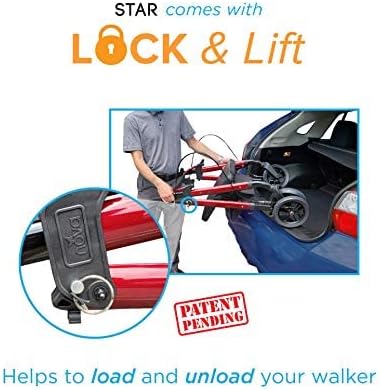
- Folding for Storage and Transport: To fold, lift the folding handle located on the seat. The rollator will collapse for easy storage and transport. A Lock & Lift mechanism helps secure the rollator in its folded position, making it easier to load and unload from vehicles.

Maintenance
Regular maintenance helps prolong the life of your rollator:
- Cleaning: Wipe down the frame and seat with a damp cloth and mild detergent. Avoid abrasive cleaners.
- Inspection: Periodically check all screws, bolts, and fasteners to ensure they are tight. Inspect the wheels for wear and ensure they rotate freely. Check brake cables for fraying and ensure brakes engage and disengage smoothly.
- Storage: Store the rollator in a dry place, away from extreme temperatures.
Troubleshooting
If you encounter issues, consider the following:
- Rollator feels unstable: Ensure all locking mechanisms are fully engaged after unfolding. Verify that handle and leg heights are evenly adjusted.
- Brakes not engaging/disengaging properly: Check brake cable tension. If cables appear loose or damaged, contact customer support. Ensure no debris is obstructing the brake mechanism.
- Wheels not rolling smoothly: Inspect wheels for debris (hair, lint) and remove if present. Ensure wheel axles are not bent or damaged.
- Difficulty folding: Ensure the folding handle is fully lifted and no items are obstructing the folding mechanism, especially in the under-seat pouch.
For persistent issues or repairs, contact Nova customer support.
Specifications
| Feature | Detail |
|---|---|
| Model Number | 4288RD |
| Overall Weight | 18 Pounds |
| Weight Capacity | 300 lbs |
| Overall Dimensions (Unfolded) | 28"D x 24.5"W x 38"H |
| Handle Height Adjustment | 31.75" - 38" |
| Seat Height | 20", 21", & 22" (adjustable) |
| Seat Dimensions | 14.5"W x 13.5"D |
| Pouch Dimensions | 14.5"W x 8"D x 6.5"H |
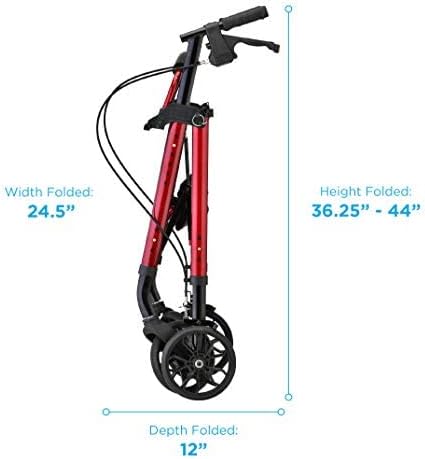
| Folded Dimensions | 24.5"W x 36.25"-44"H x 12"D |

Warranty and Support
For warranty information or customer support, please refer to the documentation included with your purchase or visit the official Nova Medical Products website. Contact information for support is typically available on the manufacturer's website or through your retailer.


