
1. Introduction
This manual provides detailed instructions for the installation, operation, and maintenance of your LE Solar Outdoor Motion Sensor Light, model WL4000. Please read this manual thoroughly before use to ensure proper function and longevity of the product.

Image 1.1: Overview of the LE Solar Outdoor Motion Sensor Light WL4000.
2. Product Features
- Wide Lighting Angle: Features 3 adjustable heads providing 270° wide lighting coverage.
- High Brightness: Delivers 1000 lumens of 6500K daylight illumination.
- Efficient Solar Charging: Converts sunlight into electricity, charging during the day for night operation.
- PIR Motion Sensor: Detects motion within 16-26 feet and a 120° angle, automatically turning the light on.
- Automatic Operation: Stays off during the day, charges in sunlight, and turns on for 20 seconds when motion is detected at night.
- Durable & Weatherproof: IP65 waterproof rating ensures resistance to water, heat, and frost for reliable outdoor performance.
- Easy Installation: Wireless design requires no household electrical circuit, simplifying mounting with included hardware.

Image 2.1: Product dimensions and adjustable light heads.

Image 2.2: The 270-degree wide lighting angle.

Image 2.3: Motion sensor detection range and angle.
3. Package Contents
- LE Solar Outdoor Motion Sensor Light (WL4000)
- Mounting Hardware (screws and wall anchors)
- User Manual
4. Setup and Installation
Follow these steps for proper installation of your solar light:
- Choose a Location: Select an outdoor location that receives direct sunlight for at least 8 hours a day to ensure optimal charging. The recommended installation height is 1.5-3.5 meters (5-12 feet).
- Install the Lamp Holder: Use the included screws and wall anchors to securely fix the lamp holder to the desired exterior wall.
- Activate the Light: Locate the power switch on the back of the light unit. Press the button to turn the light ON.
- Hang the Light: Carefully hang the solar light unit onto the installed lamp holder.
- Adjust Light Heads: Adjust the three light heads and the solar panel to your preferred angles for optimal lighting coverage and sun exposure.
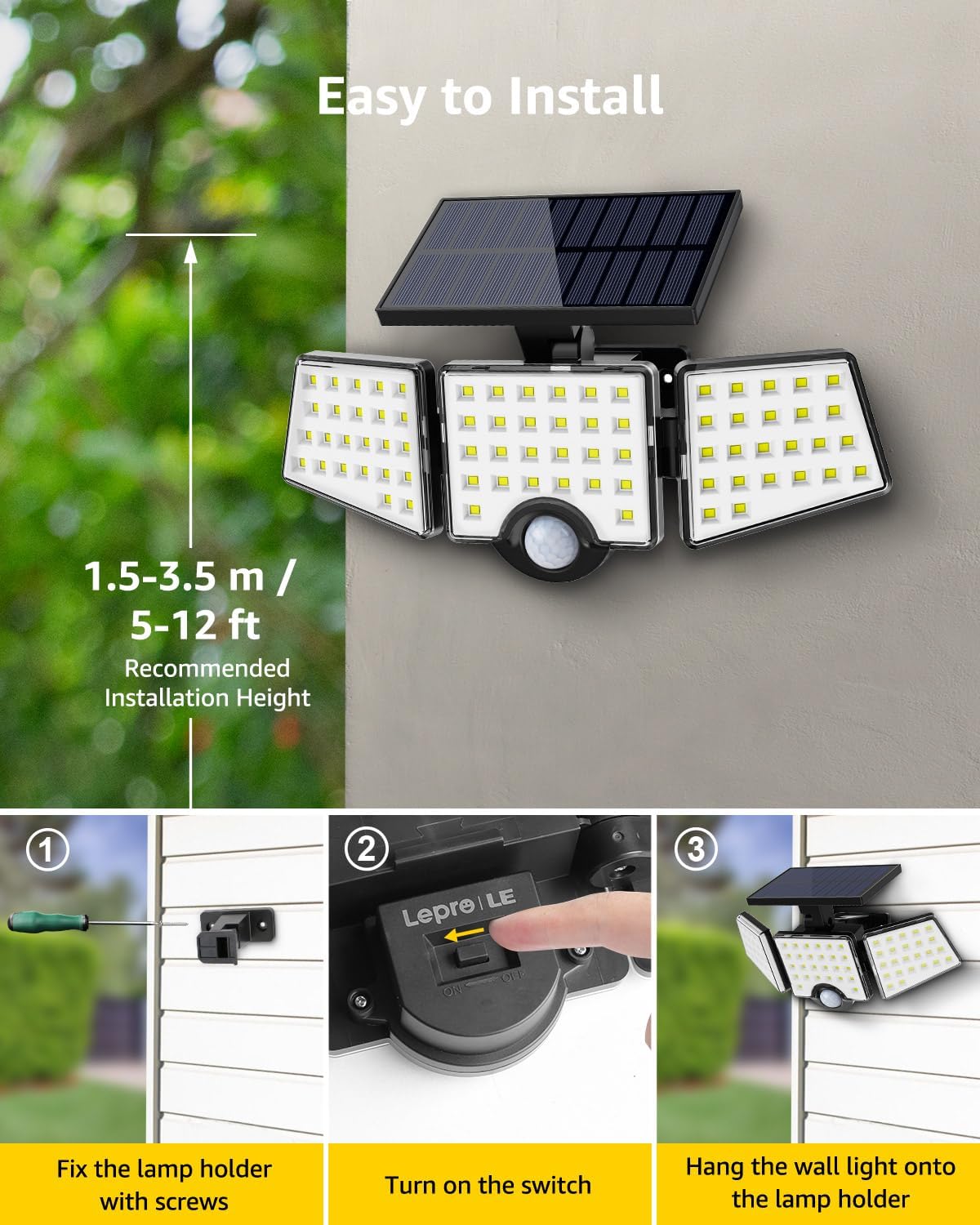
Image 4.1: Step-by-step installation process.

Image 4.2: Fixing the lamp holder with screws.

Image 4.3: Activating the light using the mode switch.

Image 4.4: Hanging the light onto the lamp holder.
5. Operating Instructions
The LE Solar Outdoor Motion Sensor Light operates automatically based on ambient light and motion detection.
- Daytime Operation: The light will remain off during the day and the solar panel will charge the internal battery using sunlight. Ensure the solar panel is clean and exposed to direct sunlight for optimal charging.
- Nighttime Operation: Once it gets dark, the motion sensor becomes active. When motion is detected within its 16-26 ft range and 120° angle, the light will automatically turn on at full brightness.
- Automatic Shut-off: The light will automatically turn off approximately 20 seconds after no further motion is detected.

Image 5.1: Solar charging and motion-activated lighting cycle.
6. Maintenance
To ensure optimal performance and extend the lifespan of your solar light, follow these maintenance guidelines:
- Clean the Solar Panel: Regularly wipe the solar panel with a soft, damp cloth to remove dust, dirt, and debris. A clean panel ensures efficient sunlight absorption and charging.
- Clear Obstructions: Ensure no trees, bushes, or other objects are blocking direct sunlight from reaching the solar panel, especially during peak sunlight hours.
- Inspect for Damage: Periodically check the light for any physical damage, loose connections, or signs of wear.
- Weather Resistance: The light is designed with IP65 waterproofing, making it resistant to rain, heat, and frost. However, extreme weather conditions may temporarily affect performance.

Image 6.1: IP65 waterproof, heat, and frost resistance features.
7. Troubleshooting
If your solar light is not functioning as expected, consider the following common issues and solutions:
- Light does not turn on at night:
- Ensure the power switch is in the ON position.
- Verify the solar panel is receiving sufficient direct sunlight (at least 8 hours) during the day. Relocate if necessary.
- Check if the solar panel is dirty or obstructed. Clean it thoroughly.
- Confirm it is dark enough for the light to activate. The light has a built-in photocell sensor.
- Light stays on for a short period or is dim:
- Insufficient charging due to cloudy weather, shade, or a dirty solar panel. Allow for more charging time or clean the panel.
- The battery may not be fully charged. Ensure optimal sun exposure.
- Motion sensor is not detecting:
- Ensure the sensor is not obstructed.
- Verify the light is installed within the recommended height range (1.5-3.5 meters).
- Test the sensor by walking within its detection range.
8. Specifications
| Specification | Detail |
|---|---|
| Brand | Lepro |
| Model Name | WL4000 |
| Part Number | 640003-DW |
| Light Source Type | LED |
| Brightness | 1000 Lumens |
| Color Temperature | 6500K Daylight White |
| Number of Light Heads | 3 |
| Lighting Angle | 270° |
| Motion Sensor Detection Distance | 16-26 ft (5-8 m) |
| Motion Sensor Detection Angle | 120° |
| Water Resistance Level | IP65 Waterproof |
| Power Source | Solar Powered |
| Battery | 1 Lithium Ion battery (included) |
| Material | ABS+GPPS |
| Product Dimensions | 11.1"L x 4.65"W x 5.87"H |
| Item Weight | 14.8 ounces |
9. Warranty and Support
For warranty information or technical support, please contact Lepro Customer Service. Details regarding your product's warranty period can be found with your purchase documentation or by contacting the seller directly. Please retain your proof of purchase for any warranty claims.


