Introduction
This manual provides essential information for the installation, operation, and maintenance of your Genius 6.5" 2-Way Component Speaker Set, model GS-M652-COM. This speaker kit is designed to enhance your vehicle's audio system by improving sound efficiency and fidelity. It includes a mid-range speaker and a tweeter, managed by a passive crossover network to ensure optimal sound reproduction.

Image: The complete Genius 6.5" 2-Way Component Speaker Set, including two 6.5-inch woofers, two tweeters, and two passive crossover networks.
Product Overview
The Genius GS-M652-COM component set consists of high-quality audio components engineered for superior sound performance in automotive environments. Key features include:
- 6.5-inch Mid-Range Speakers: Designed for clear mid-bass and vocal reproduction.
- ¾-inch Neodymium Dome Tweeters: For crisp and detailed high-frequency sound.
- Passive Crossover Networks: To correctly distribute audio frequencies to the respective speakers, protecting the tweeters and optimizing sound.
- Durable Construction: Featuring paper cones, rubber surrounds, and robust magnet structures.

Image: Detailed view of the 6.5-inch speaker, highlighting its components such as the paper cone, steel basket, ferrite magnet, and 1-inch voice coil. A neodymium dome tweeter is also shown.
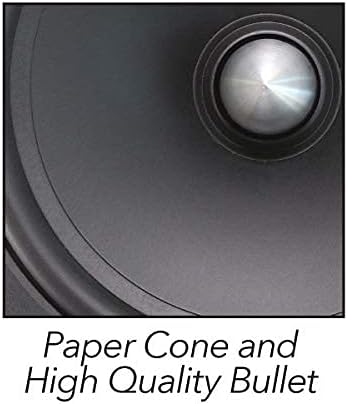
Image: Close-up of the speaker's paper cone and high-quality bullet, indicating material and design for sound reproduction.
Safety Information
Please read and understand all safety instructions before installing or operating this product. Failure to do so may result in injury or damage to the product or vehicle.
- Always disconnect the vehicle's battery before beginning any electrical installation.
- Ensure all wiring is properly insulated and secured to prevent short circuits and damage.
- Do not install speakers in locations that obstruct vehicle operation or safety features (e.g., airbags).
- Wear appropriate safety gear, including eye protection, during installation.
- Consult a professional installer if you are unsure about any part of the installation process.
Setup and Installation
Proper installation is crucial for optimal performance. This section outlines general steps for installing the component set. Specific vehicle requirements may vary.
Components Included:
- Two 6.5-inch Mid-Range Speakers
- Two ¾-inch Tweeters
- Two Passive Crossover Networks
- Mounting Hardware (e.g., screws, tweeter mounts)
Installation Steps:
- Planning: Determine the optimal mounting locations for the 6.5-inch speakers, tweeters, and crossover networks within your vehicle. Ensure adequate clearance and secure mounting surfaces.
- Speaker Installation:
- Mount the 6.5-inch mid-range speakers securely in their designated locations (e.g., door panels).
- Connect the speaker wires from your amplifier or head unit to the input terminals of the passive crossover network.
- Tweeter Installation:
- Choose the appropriate tweeter mounting base (e.g., flush mount, surface mount) for your desired location.
- Mount the tweeters securely. The tweeters are orientable for optimal sound direction.
- Connect the tweeter wires from the tweeter to the designated tweeter output terminals on the passive crossover network.

Image: The passive crossover network with input and output terminals, alongside two types of tweeter installation mounts (Mount Base A and Mount Base B).

Image: A close-up of the orientable tweeter, showing its design for adjustable sound direction.
- Crossover Network Connection:
- Connect the 6.5-inch speaker to the "WF" (woofer) output terminals on the crossover.
- Connect the tweeter to the "TW" (tweeter) output terminals on the crossover.
- Ensure correct polarity (+ to + and - to -) for all connections.
- Testing: Before reassembling vehicle panels, test the audio system to ensure all speakers are functioning correctly and sound is balanced.
Wiring Diagram: Refer to the diagram below for typical wiring connections. (Note: A specific diagram is not provided in the source data, but this placeholder indicates where one would be.)

Image: The product packaging for the Genius 6.5" 2-Way Component Speaker System, showing the included components and some key specifications.
Operating Instructions
Once installed, your Genius component set operates as part of your vehicle's audio system. Follow these guidelines for optimal performance:
- Initial Playback: Begin with a low volume setting and gradually increase it to assess sound quality and ensure all components are working.
- Volume Levels: Avoid prolonged listening at extremely high volumes, which can cause hearing damage and potentially damage the speakers.
- Audio Settings: Adjust your head unit's equalizer and balance/fader settings to fine-tune the sound to your preference. The passive crossovers are designed to optimize the frequency distribution between the woofer and tweeter.
- Break-in Period: Allow a short break-in period (e.g., 10-20 hours of normal use) for the speaker components to loosen up and achieve their full sound potential.
Maintenance
The Genius GS-M652-COM component set requires minimal maintenance to ensure long-lasting performance.
- Cleaning: Gently wipe the speaker grilles and surrounds with a soft, dry cloth to remove dust. Avoid using harsh chemicals or abrasive cleaners.
- Inspection: Periodically check speaker mounts and wiring connections to ensure they remain secure.
- Environmental Factors: While designed for automotive use, avoid exposing speakers to excessive moisture or extreme temperatures beyond normal vehicle operating conditions.
Troubleshooting
If you encounter issues with your speaker set, refer to the following common problems and solutions:
| Problem | Possible Cause | Solution |
|---|---|---|
| No sound from one or more speakers | Loose or incorrect wiring connection; faulty speaker or crossover; amplifier issue. | Check all wiring connections for security and correct polarity. Test speakers individually if possible. Verify amplifier is powered and functioning. |
| Distorted sound | Volume too high; amplifier clipping; incorrect audio settings; damaged speaker. | Reduce volume. Check amplifier gain settings. Adjust head unit equalizer. Inspect speaker cones for physical damage. |
| Weak or unbalanced sound | Incorrect balance/fader settings; phase issue; improper crossover connection. | Adjust balance/fader. Ensure all speakers are wired with correct polarity. Confirm crossover connections are correct. |
| No high frequencies (tweeters) | Tweeter not connected; faulty tweeter; crossover issue. | Check tweeter wiring to crossover. Ensure crossover is functioning. |
If problems persist after troubleshooting, contact Genius customer support or a qualified audio technician.
Specifications
Below are the technical specifications for the Genius GS-M652-COM 6.5" 2-Way Component Speaker Set:

Image: A 6.5-inch speaker with an overlay of its key specifications, including 300W Max Power, 150W Musical, 45W RMS, 4 Ohms impedance, 89dB sensitivity, and 70Hz-20KHz frequency response.
- Model: GS-M652-COM
- Speaker Type: 2-Way Component Set
- Speaker Size: 6.5 inches (Mid-Range Woofer)
- Tweeter Size: ¾ inch Neodymium Dome
- Maximum Power Handling: 300 Watts MAX
- RMS Power Handling: 45 Watts RMS (per speaker)
- Impedance: 4 Ohm
- Sensitivity: 89 dB
- Frequency Response: 70 Hz - 20 KHz
- Voice Coil: 1.0 inch Kapton (Mid-Range Woofer)
- Crossover: 12 dB Passive Crossover Network
- Cone Material: Paper Cone
- Surround Material: Rubber Surround
- Magnet Structure: Y35 Super Strontium Ferrite Magnet (Mid-Range Woofer)
- Product Dimensions: 36.83 x 18.54 x 8.89 cm (approximate package dimensions)
- Product Weight: 2.52 kg (approximate package weight)
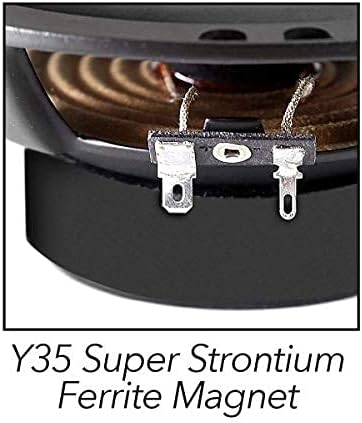
Image: A close-up view of the Y35 Super Strontium Ferrite Magnet, highlighting its material and construction.
Warranty Information
Genius products are manufactured to high-quality standards. For specific warranty terms and conditions, please refer to the warranty card included with your product or visit the official Genius Audio website. Keep your purchase receipt as proof of purchase for any warranty claims.
Support
For technical assistance, troubleshooting beyond this manual, or inquiries regarding your Genius GS-M652-COM component set, please contact Genius customer support through their official website or the contact information provided with your product documentation.
Online Resources: Visit the official Genius Audio website for additional product information, FAQs, and support resources.


