
1. Introduction
This manual provides essential instructions for the proper installation, operation, and maintenance of the DIGI IX14 Standard Temperature Accessory Kit (Model 76002080). This kit is designed to complement the DIGI IX14 device, providing necessary components for power and connectivity. Please read this manual thoroughly before using the product to ensure safe and efficient operation.
2. Package Contents
Verify that all items listed below are present in your package. If any items are missing or damaged, please contact your supplier.
- Power Supply
- LTE Antennas (quantity may vary)
- Ethernet Cable
- US/EU Power Plugs (interchangeable for power supply)
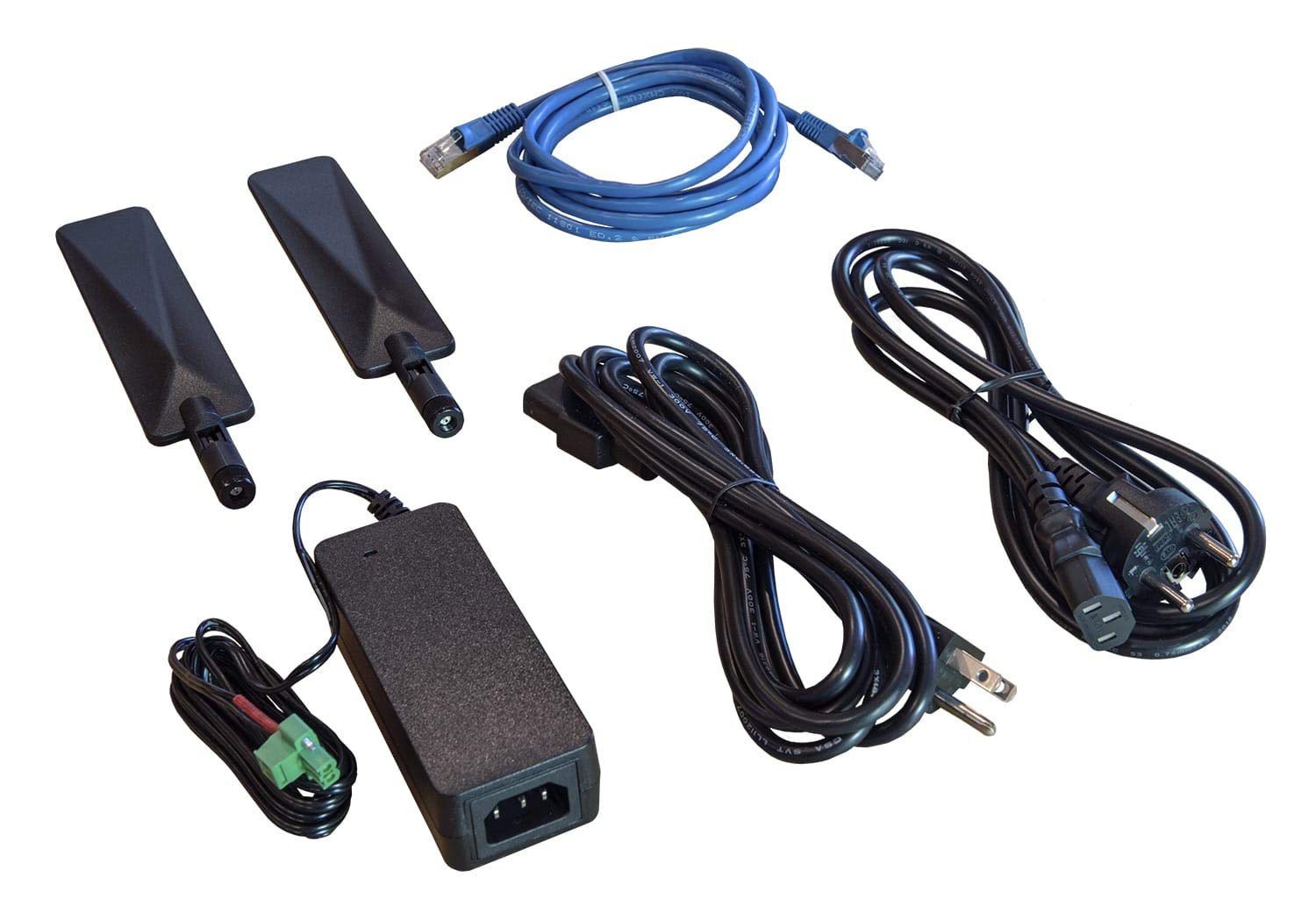
Figure 1: Components of the DIGI IX14 Standard Temperature Accessory Kit. This image displays the power supply unit, two LTE antennas, an Ethernet cable, and various power plug adapters for different regions.
3. Safety Information
Always observe the following safety precautions to prevent injury and damage to the product:
- Power Source: Use only the provided power supply and appropriate power plugs. Ensure the power source matches the voltage requirements specified for the device.
- Ventilation: Ensure adequate ventilation around the device and power supply to prevent overheating. Do not block ventilation openings.
- Environment: Do not expose the kit components to water, moisture, extreme temperatures, or direct sunlight. Operate within the specified standard temperature range.
- Cables: Route cables carefully to avoid tripping hazards or damage. Do not place heavy objects on cables.
- Servicing: Do not attempt to open or repair any component of the kit. Refer all servicing to qualified personnel.
4. Setup
Follow these steps to set up your DIGI IX14 Accessory Kit:
- Attach LTE Antennas: Carefully screw the LTE antennas onto the designated antenna ports on your DIGI IX14 device. Ensure they are finger-tight.
- Connect Ethernet Cable: Connect one end of the Ethernet cable to the Ethernet port on your DIGI IX14 device and the other end to your network device (e.g., router, switch, or computer).
- Assemble Power Supply: Select the appropriate US or EU power plug for your region and attach it to the power supply unit.
- Connect Power: Plug the power supply's barrel connector into the power input port on your DIGI IX14 device. Then, plug the power supply into a suitable electrical outlet.
- Power On: Once all connections are secure, the DIGI IX14 device should power on automatically or can be powered on via its designated power button, if applicable. Refer to the DIGI IX14 device's main manual for specific power-on procedures.
5. Operating Instructions
This accessory kit provides the necessary power and connectivity components for the DIGI IX14 device. The operation of the DIGI IX14 device itself is detailed in its primary user manual. This kit's components are generally plug-and-play:
- The Power Supply delivers stable power to the DIGI IX14. Ensure it remains connected to a live power outlet during operation.
- The LTE Antennas facilitate cellular communication for the DIGI IX14. Ensure they are positioned for optimal signal reception. Avoid placing the device in enclosed metal cabinets without external antennas.
- The Ethernet Cable provides a wired network connection. Verify that the cable is securely connected to both the DIGI IX14 and your network infrastructure.
6. Maintenance
The DIGI IX14 Accessory Kit requires minimal maintenance. Follow these guidelines to ensure longevity:
- Cleaning: Use a soft, dry cloth to clean the exterior surfaces of the components. Do not use liquid cleaners or aerosols.
- Cable Inspection: Periodically inspect all cables for signs of wear, fraying, or damage. Replace damaged cables immediately.
- Environmental Control: Ensure the operating environment remains within the specified temperature and humidity ranges to prevent component degradation.
7. Troubleshooting
If you encounter issues with your DIGI IX14 Accessory Kit, refer to the following common troubleshooting steps:
- No Power:
- Ensure the power supply is securely plugged into both the DIGI IX14 device and a working electrical outlet.
- Verify that the correct regional power plug is firmly attached to the power supply.
- Test the electrical outlet with another device to confirm it is functional.
- Poor LTE Signal:
- Ensure LTE antennas are securely attached to the device.
- Reposition the antennas or the DIGI IX14 device to improve signal reception. Avoid obstructions.
- Check the DIGI IX14 device's status indicators or web interface for antenna connection status.
- No Ethernet Connection:
- Verify that the Ethernet cable is securely connected at both ends (DIGI IX14 and network device).
- Try a different Ethernet cable to rule out a faulty cable.
- Check the link/activity LEDs on both the DIGI IX14 and the connected network device.
For further troubleshooting or issues not covered here, consult the DIGI IX14 device's main user manual or contact technical support.
8. Specifications
Key specifications for the DIGI IX14 Standard Temperature Accessory Kit (Model 76002080):
| Feature | Detail |
|---|---|
| Manufacturer | Digi |
| Model Number | 76002080 (IX14 Accessory Kit) |
| Power Source | Corded Electric |
| Included Components | Power Supply, LTE Antennas, Ethernet Cable, US/EU Power Plugs |
| ASIN | B0836215MC |
| UPC | 723707437466 |
| Date First Available | December 26, 2019 |
9. Warranty and Support
For specific warranty information regarding the DIGI IX14 Standard Temperature Accessory Kit, please refer to the documentation provided with your original DIGI IX14 device or visit the official Digi International website. Technical support can also be accessed through the manufacturer's official channels.
For assistance, please contact:
- Manufacturer: Digi International
- Website: www.digi.com (Example link, actual link may vary)


