1. Introduction
This manual provides comprehensive instructions for the safe and effective operation, maintenance, and troubleshooting of the RANZHIX KWD808-I Electric Acupuncture Stimulator. Please read this manual thoroughly before using the device and retain it for future reference.
2. Important Safety Information
WARNING: This device is intended for professional use or under the guidance of a qualified practitioner. Do not use this device without proper training or consultation.
- Consult a healthcare professional before use, especially if you have pre-existing medical conditions, are pregnant, or have a pacemaker.
- Do not apply electrodes over open wounds, irritated skin, or areas with decreased sensation.
- Keep the device and accessories out of reach of children.
- Use only the power adapter and accessories provided by the manufacturer.
- Statements regarding dietary supplements have not been evaluated by the FDA and are not intended to diagnose, treat, cure, or prevent any disease or health condition.
3. Package Contents
Carefully unpack the box and ensure all items listed below are present and undamaged. If any items are missing or damaged, contact your supplier immediately.
- KWD808-I Main Unit
- Power Adapter (110~240V compatible)
- Output Electrode Wires (6 sets, various colors)
- Self-adhesive Electrode Pads
- Detection Probe
- User Manual

Figure 3.1: Overview of the KWD808-I Stimulator and its complete accessories, including the main unit, power adapter, electrode wires, pads, and detection probe.

Figure 3.2: Close-up view of the six sets of colored electrode wires, each designed for connecting to the output channels of the device.
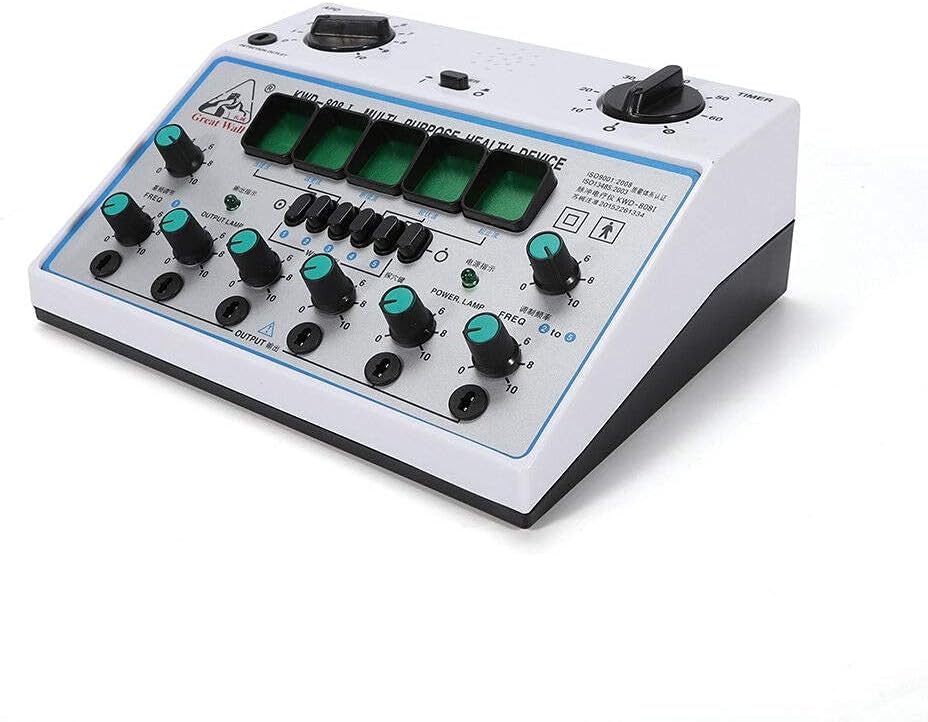
Figure 3.3: The self-adhesive electrode pads and a roll of medical tape, used for securing electrodes during treatment.
4. Device Overview and Controls
The KWD808-I features a user-friendly interface with clearly labeled controls for precise adjustments.

Figure 4.1: Detailed view of the KWD808-I control panel, highlighting the frequency and intensity adjustment knobs, mode selection buttons, and output indicators.
Key Components:
- Power Switch: Turns the device on/off.
- Timer Knob: Adjusts treatment duration (0-60 minutes).
- Detection Outlet (APD): For connecting the detection probe.
- Frequency Adjustment Knobs (FREQ): Controls the output frequency for each channel.
- Intensity Adjustment Knobs (OUTPUT): Controls the output intensity for each channel.
- Waveform Selection Buttons: Allows selection of different pulse waveforms (e.g., continuous, intermittent, dense-disperse).
- Output Lamps: Indicate active output for each channel.
5. Setup Instructions
- Placement: Place the KWD808-I unit on a stable, flat surface away from moisture and direct sunlight.
- Power Connection: Connect the power adapter to the DC input port on the device and then plug it into a standard 110~240V AC power outlet.
- Electrode Connection:
- Attach the electrode wires to the self-adhesive electrode pads.
- Plug the electrode wires into the desired output channels (OUTPUT 1-6) on the front panel.
- Ensure all connections are secure.
- Detection Probe (Optional): If using the detection probe, connect it to the 'DETECTION OUTLET' port.
6. Operating Instructions
- Power On: Turn the power switch to the 'ON' position. The power lamp should illuminate.
- Set Timer: Rotate the 'TIMER' knob to set the desired treatment duration (e.g., 30 minutes).
- Select Waveform: Press the appropriate waveform selection button (1-6) to choose the desired pulse pattern.
- Apply Electrodes: Place the self-adhesive electrode pads on the intended areas of the body. Ensure good skin contact.
- Adjust Frequency: Slowly turn the 'FREQ' knob for each active channel to set the desired frequency.
- Adjust Intensity: Gradually increase the 'OUTPUT' intensity knob for each active channel until a comfortable sensation is felt. Avoid setting the intensity too high, which may cause discomfort. The output lamps will flash to indicate active output.
- Monitoring: Monitor the user's comfort level throughout the session. Adjust intensity as needed.
- Session End: The device will automatically stop when the timer reaches zero. Turn off the power switch and carefully remove the electrodes.
7. Maintenance
- Cleaning: Wipe the main unit with a soft, dry cloth. Do not use abrasive cleaners or immerse the device in water.
- Electrode Pads: Clean electrode pads with a damp cloth and allow them to air dry. Replace pads when their adhesive properties diminish.
- Storage: Store the device and accessories in a cool, dry place, away from direct sunlight and extreme temperatures.
- Inspection: Regularly inspect all cables and connections for signs of wear or damage. Replace damaged components immediately.
8. Troubleshooting
If you encounter issues with your KWD808-I device, refer to the following common problems and solutions:
| Problem | Possible Cause | Solution |
|---|---|---|
| Device does not power on. | Power adapter not connected or faulty; power outlet issue. | Ensure power adapter is securely connected and plugged into a working outlet. Test the outlet with another device. |
| No output sensation. | Intensity too low; poor electrode contact; faulty electrode wire/pad. | Increase intensity gradually. Ensure electrodes are firmly attached to clean skin. Check electrode wires and pads for damage and replace if necessary. |
| Irregular or inconsistent output. | Loose connections; damaged wire. | Check all cable connections. Inspect electrode wires for breaks or damage. |
| Device makes unusual noises. | Internal malfunction. | Discontinue use immediately and contact customer support. |
If the problem persists after attempting these solutions, please contact RANZHIX customer support for further assistance.
9. Specifications
| Feature | Detail |
|---|---|
| Model | KWD808-I |
| Manufacturer | RANZHIX |
| Input Voltage | 110~240V |
| Output Channels | 6 |
| Frequency | Adjustable (50Hz mentioned in product title, typical range for such devices) |
| Timer | Adjustable (0-60 minutes) |
| ASIN | B0833X5MRL |
| Date First Available | December 25, 2019 |
10. Warranty and Support
For warranty information, technical support, or service inquiries, please contact RANZHIX directly through their official channels. Keep your purchase receipt as proof of purchase.


