
1. Introduction
This manual provides comprehensive instructions for the ALLIMITY AXD7661 replacement remote control. This remote is designed to function as a direct replacement for the original Pioneer AXD7661 remote, ensuring compatibility with specified Pioneer AV Receiver models. It operates using infrared (IR) technology and requires no programming for initial use.
Compatible Pioneer AV Receiver Models:
- VSX-822
- VSX-1022
- VSX-822-K
- VSX-1022-K
2. Product Overview
The ALLIMITY AXD7661 remote control is constructed from durable plastic and features an ergonomic design for comfortable handling. It provides full functionality for controlling your compatible Pioneer AV Receiver.
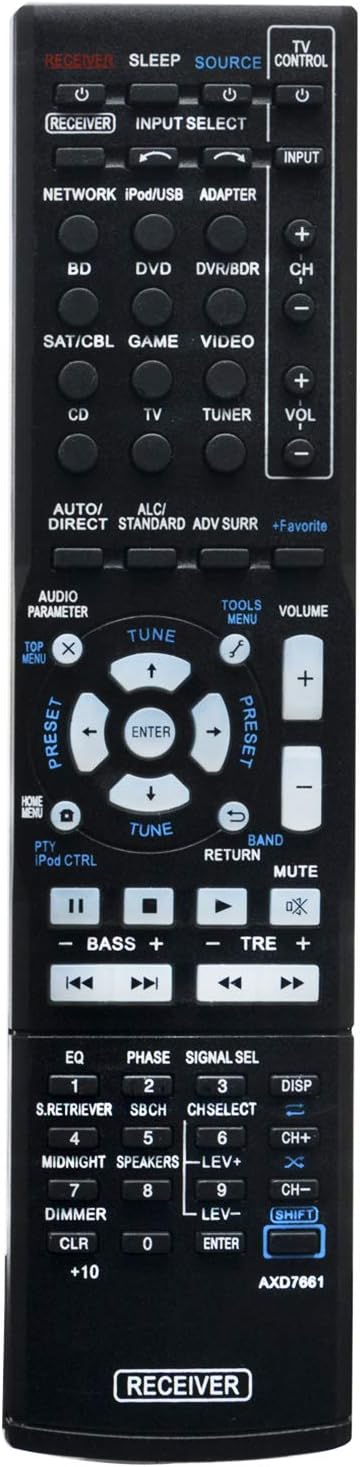
Figure 2.1: Front View of the Remote Control
This image displays the front of the ALLIMITY AXD7661 remote control, showing the layout of all buttons, including power, input selection, volume, channel, navigation, and various function keys for Pioneer AV Receivers.

Figure 2.2: Angled View of the Remote Control
This image provides an angled perspective of the remote control, highlighting its ergonomic shape and the arrangement of buttons from a side-front view.
3. Setup
3.1 Battery Installation
The remote control requires two (2) AAA batteries (not included) for operation. Follow these steps to install the batteries:
- Locate the battery compartment cover on the back of the remote control.
- Press down on the tab and slide the cover downwards to open the compartment.
- Insert two AAA batteries, ensuring the positive (+) and negative (-) terminals align correctly with the markings inside the compartment.
- Slide the battery compartment cover back into place until it clicks securely.

Figure 3.1: Battery Compartment
This image shows the back of the remote control with the battery compartment open, illustrating the correct orientation for inserting two AAA batteries.
3.2 Initial Use
This is an infrared (IR) replacement remote control. No programming is required. Once batteries are installed, the remote is ready for use with compatible Pioneer AV Receivers.
4. Operating Instructions
To operate your Pioneer AV Receiver using the ALLIMITY AXD7661 remote control, ensure a clear line of sight between the remote's IR emitter and the receiver's IR sensor. Avoid any obstacles that may block the signal.
4.1 Basic Functions
- Power: Press the POWER button to turn the receiver on or off.
- Input Select: Use the dedicated input buttons (e.g., BD, DVD, SAT/CBL, GAME, VIDEO, CD, TV, TUNER, NETWORK, iPod/USB, ADAPTER) to switch between connected audio/video sources.
- Volume Control: Press VOL + to increase volume and VOL - to decrease volume.
- Mute: Press the MUTE button to temporarily silence the audio. Press again to restore sound.
- Navigation: Use the arrow buttons (UP, DOWN, LEFT, RIGHT) and ENTER button for menu navigation and selection.
- Return: The RETURN button typically navigates back in menus.
4.2 Advanced Functions
The remote includes buttons for various advanced functions specific to Pioneer AV Receivers, such as AUDIO PARAMETER, TOOLS MENU, AUTO/DIRECT, STANDARD, ADV SURR, +Favorite, BASS, TRE, EQ, PHASE, SIGNAL SEL, DISP, MIDNIGHT, SPEAKERS, DIMMER, and numeric keys. Refer to your Pioneer AV Receiver's original manual for detailed usage of these specific functions.
5. Maintenance
5.1 Battery Replacement
Replace batteries when the remote control's response becomes sluggish or stops working. Always replace both batteries simultaneously with new AAA batteries. Do not mix old and new batteries, or different types of batteries.
5.2 Cleaning
To clean the remote control, wipe it with a soft, dry cloth. Do not use liquid cleaners, abrasive pads, or chemical solvents, as these can damage the remote's surface or internal components.
5.3 Storage
If the remote control will not be used for an extended period, remove the batteries to prevent leakage and potential damage to the device.
6. Troubleshooting
6.1 Remote Control Not Responding
- Check Batteries: Ensure batteries are correctly inserted with the proper polarity (+/-) and are not depleted. Replace with fresh AAA batteries if necessary.
- Line of Sight: Verify there are no obstructions between the remote control and the AV Receiver's IR sensor.
- Distance: Ensure you are within the effective operating range of the remote control.
- Receiver Power: Confirm that your Pioneer AV Receiver is powered on.
6.2 Specific Functions Not Working
- While this remote is a replacement for the original AXD7661, some specific advanced functions may behave differently or require specific receiver settings. Consult your Pioneer AV Receiver's original manual for detailed function explanations.
7. Specifications
| Feature | Detail |
|---|---|
| Model Number | AXD7661 |
| Product Material | Plastic |
| Connectivity Technology | Infrared (IR) |
| Compatible Devices | Pioneer AV Receivers (VSX-822, VSX-1022, VSX-822-K, VSX-1022-K) |
| Batteries Required | 2 x AAA (not included) |
| Product Dimensions | 7 x 2 x 0.7 inches |
| Item Weight | 2.46 ounces |
8. Warranty and Support
This product is a replacement remote control. Specific warranty details are not provided in the product information. For support regarding compatibility or if you cannot find your specific model listed, please contact the seller directly via email for assistance in finding the correct remote control.