
OLIGHT OL-I5TBK#USVC
OLIGHT I5T EOS Flashlight User Manual
Model: OL-I5TBK#USVC | Brand: OLIGHT
Introduction
The OLIGHT I5T EOS is a slim, everyday carry (EDC) flashlight designed for convenience and powerful illumination. It features a dual-output system, providing both low and high brightness modes, and is powered by a single, readily available AA battery. Its compact size, durable aluminum construction, and user-friendly tail switch make it an ideal tool for various applications, from daily tasks to outdoor adventures.

Image: The OLIGHT I5T EOS flashlight, showcasing its sleek black body and blue pocket clip.
Safety Information
- Eye Safety: Do not shine the light directly into eyes. The powerful beam can cause temporary vision impairment or permanent eye damage.
- Heat: The flashlight may become warm during prolonged use, especially on high mode. This is normal. Avoid direct contact with hot surfaces for extended periods.
- Battery Safety: Use only recommended AA alkaline batteries. Do not mix old and new batteries, or different types of batteries. Remove batteries if the flashlight will not be used for an extended period to prevent leakage.
- Children: Keep out of reach of children. This is not a toy.
- Disassembly: Do not attempt to disassemble the flashlight. This may damage the device and void the warranty.
Package Contents
- OLIGHT I5T EOS Flashlight x 1
- AA Alkaline Battery x 1 (pre-installed)
- Pocket Clip x 1 (pre-installed)
- User Manual x 1

Image: The OLIGHT I5T EOS flashlight shown with its retail packaging and included user manual.
Product Overview
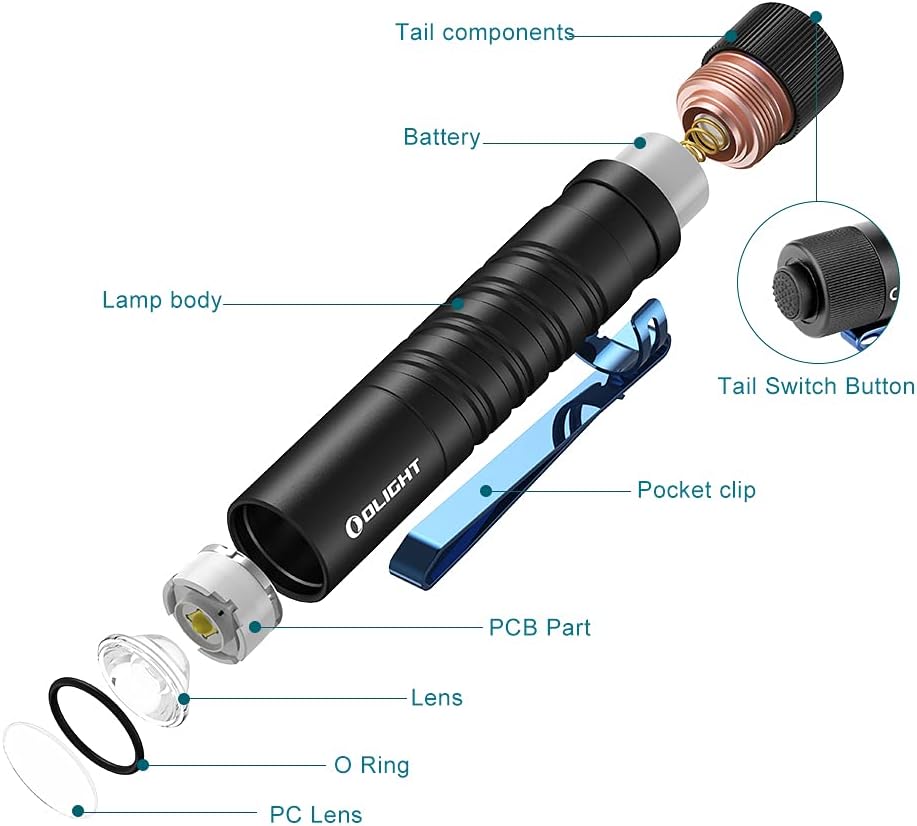
Image: An exploded diagram illustrating the internal and external components of the OLIGHT I5T EOS flashlight, including the tail components, battery, lamp body, pocket clip, PCB part, lens, O-ring, and PC lens.
The OLIGHT I5T EOS consists of several key components:
- Tail Components: Houses the tail switch button and spring.
- Battery: Single AA alkaline battery (included).
- Lamp Body: The main aluminum casing with double helix knurling for grip.
- Pocket Clip: A dual-direction clip for versatile carrying options.
- PCB Part: Printed Circuit Board, controlling the flashlight's functions.
- Lens: PMMA optic lens for a soft and balanced beam.
- O-Ring: Provides water resistance.
- PC Lens: Protective outer lens.
Setup
Battery Installation
- Unscrew the tail cap of the flashlight by turning it counter-clockwise.
- Insert the included AA alkaline battery with the positive (+) end facing towards the head of the flashlight (towards the LED).
- Screw the tail cap back on clockwise until it is securely tightened. Ensure the O-ring is properly seated to maintain water resistance.
The flashlight comes with one AA battery pre-installed. Please remove the insulating film from the battery before first use if present.
Operating Instructions
Tail Switch Operation
The OLIGHT I5T EOS features a convenient tail switch for all operations.
- Momentary ON (Low Mode): Lightly press the tail switch. Release to turn off.
- Constant ON (Low Mode): Fully press the tail switch once. Press again to turn off.
- High Mode: From constant ON (Low Mode), quickly press the tail switch fully again to switch to High mode. Alternatively, from OFF, quickly press the tail switch fully twice to directly activate High mode.
- Mode Cycling: When the light is ON, quickly press the tail switch fully to cycle between Low and High modes.
The dual-direction pocket clip allows for versatile carrying options, including clipping to a pocket, backpack strap, or hat brim for hands-free use.
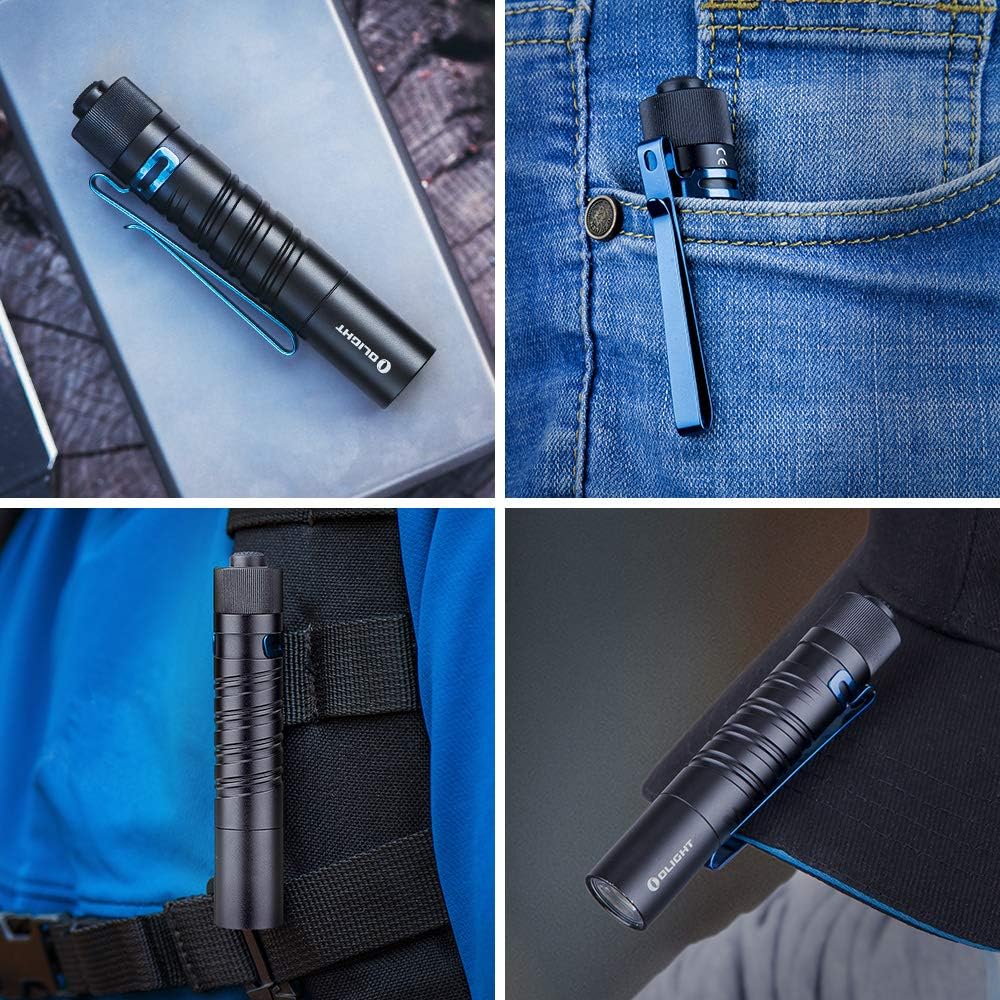
Image: The OLIGHT I5T EOS flashlight demonstrated in various everyday carry and hands-free scenarios, including clipped to a pocket, a backpack, and a hat brim.

Image: A hand holding the OLIGHT I5T EOS flashlight, highlighting the double helix body knurling designed for a unique style and solid grip.
Maintenance
- Cleaning: Clean the flashlight body with a soft, damp cloth. Do not use abrasive cleaners or solvents.
- Threads and O-rings: Periodically lubricate the threads and O-rings with silicone grease to maintain water resistance and smooth operation.
- Battery Replacement: Replace the AA battery when the light output dims significantly or the flashlight stops functioning. Ensure proper polarity during installation.
- Storage: Store the flashlight in a cool, dry place. Remove the battery if storing for extended periods to prevent battery leakage and potential damage to the flashlight.
Troubleshooting
| Problem | Possible Cause | Solution |
|---|---|---|
| Flashlight does not turn on. | Battery is dead or inserted incorrectly. | Replace battery or check polarity. |
| Light output is dim. | Low battery power. | Replace battery. |
| Light flickers or turns off intermittently. | Loose tail cap or dirty contacts. | Tighten tail cap. Clean battery contacts and threads with a clean cloth. |
| Tail switch is stiff or unresponsive. | Dirt or debris in the switch mechanism. | Gently clean around the switch. Avoid excessive force. |
Specifications

Image: A graphic summarizing key specifications of the OLIGHT I5T EOS, including max output, runtime, throw distance, battery type, drop test rating, and waterproof rating.
| Feature | Detail |
|---|---|
| Model | I5T EOS |
| Light Source | LED |
| Max Brightness | 300 Lumens |
| Max Beam Distance | 60 meters (196 feet) |
| Power Source | 1 x AA Alkaline Battery (included) |
| Max Runtime | 20 hours (Low Mode) |
| Material | Aluminum Alloy |
| Dimensions | 0.7" (D) x 0.7" (W) x 3.74" (H) |
| Weight | 2.12 Ounces (including battery) |
| Water Resistance | IPX8 (Submersible up to 2 meters) |
| Impact Resistance | 1.5 meters |
| Special Features | Lightweight, Adjustable Light Modes, Anti-Slip, Compact, Easy Operation, Dual-Direction Pocket Clip |
Warranty and Support
The OLIGHT I5T EOS Flashlight comes with a 5-year limited warranty from OLIGHT. This warranty covers defects in material and workmanship under normal use.
For warranty claims, technical support, or additional information, please refer to the official OLIGHT website or contact their customer service directly. You can also find a detailed User Manual in PDF format for this product at https://manuals.plus/m/b6e15c38aef50e4d7b96c70d253088add0bc8ff77bf1d07700771bdfd96397ed.
Related documentsOL-I5TBK#USVC


Ask a question about this manual
Ask about setup, troubleshooting, compatibility, parts, safety, or missing instructions. Manuals+ will review the question and use this page’s manual context to help answer it.