
Justfog Compact 14 Kit
Justfog Compact 14 Kit Instruction Manual
Brand: Justfog
Model: Compact 14 Kit
1. Introduction
This manual provides detailed instructions for the safe and effective use of your Justfog Compact 14 Kit. Please read this manual thoroughly before operating the device to ensure proper function and longevity.
Package Contents
The Justfog Compact 14 Kit package typically includes the following items:

Image: Justfog Compact 14 Kit package contents. Includes the Compact 14 device, a clearomizer, a USB charging cable, a replacement coil, and the user manual.
- Justfog Compact 14 Battery Device
- Justfog Q14 Clearomizer (1.8ml)
- OCC Bottom Coil (pre-installed, typically 1.6Ω)
- Micro USB Charging Cable
- User Manual
2. Product Components
Familiarize yourself with the different parts of your Justfog Compact 14 Kit:

Image: Labeled diagram of the Justfog Compact 14 Kit, highlighting key components such as the LED indicator, power button, USB port, 1500mAh battery, eGo 510 connector, adjustable airhole, chrome-coated surface, Pyrex glass tank, and coil resistance (1.2Ω / 1.6Ω).
- LED Indicator: Displays battery status and error signals.
- Power Button: Used for device activation, power on/off, and vaping.
- USB Spin Port: For charging the device.
- 1,500mAh Battery: Integrated rechargeable battery.
- eGo 510 Connect: Standard threading for clearomizer attachment.
- Adjustable Airhole: Allows adjustment of airflow for preferred draw.
- Chrome Coated Surface: Durable and aesthetically pleasing finish.
- Pyrex Glass: Transparent tank material for e-liquid visibility.
- Coil (1.2Ω / 1.6Ω): Heating element responsible for vaporizing e-liquid.
3. Initial Setup
3.1 Charging the Device
Before first use, fully charge the device. Use the provided Micro USB cable.

Image: The Justfog Compact 14 Kit being charged via its Micro USB port, with the LED indicators illuminated to show charging status.
- Connect the Micro USB cable to the USB port on the side of the Compact 14 device.
- Connect the other end of the USB cable to a suitable USB power adapter (e.g., wall adapter, computer USB port).
- The LED indicators will illuminate to show charging progress. Once fully charged, the LEDs will indicate completion (refer to Battery Functions section for details).
3.2 Installing/Replacing the Coil
The coil is a consumable part and needs to be replaced regularly (typically every 1-3 weeks depending on usage).
- Unscrew the clearomizer from the battery.
- Invert the clearomizer and unscrew the base.
- Carefully unscrew the old coil from the base.
- Screw a new coil firmly into the clearomizer base.
- Important: Before reassembling, apply a few drops of e-liquid to the cotton wicking holes of the new coil to prime it. This prevents dry hits and extends coil life.
- Screw the base back onto the clearomizer.
3.3 Filling the Clearomizer with E-liquid
Ensure the coil is properly installed before filling.
- Unscrew the clearomizer from the battery.
- Invert the clearomizer and unscrew the base.
- Carefully tilt the clearomizer and fill the tank with e-liquid along the inner wall, avoiding the central airflow tube. Do not overfill.
- Screw the base back onto the clearomizer firmly.
- Allow the clearomizer to stand upright for 5-10 minutes after filling a new coil to ensure the cotton is fully saturated.
- Screw the filled clearomizer back onto the battery device.
4. Operating Instructions
4.1 Power On/Off
To turn the device on or off, quickly press the power button 4 times consecutively within 2 seconds.
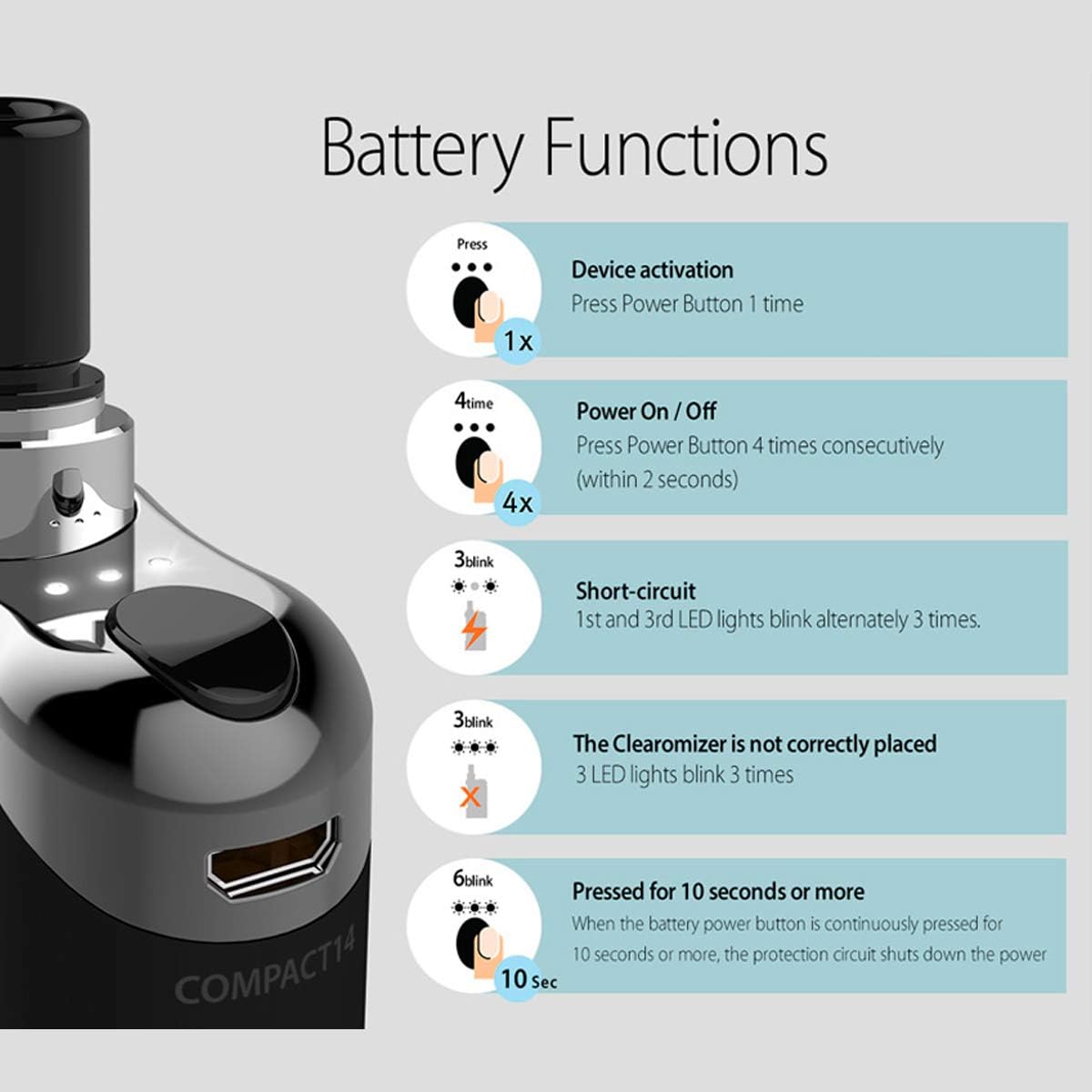
Image: Detailed diagram illustrating the battery functions of the Justfog Compact 14 Kit. It shows how to activate the device (1 press), power on/off (4 consecutive presses), and LED blink patterns for short-circuit (3 blinks), clearomizer not correctly placed (3 blinks), and continuous press for 10 seconds or more (6 blinks).
4.2 Vaping
Once the device is powered on, press and hold the power button while inhaling from the mouthpiece. Release the button when you finish inhaling.
4.3 Battery Level Indication
The LED indicators on the device show the remaining battery charge:

Image: Visual representation of the Justfog Compact 14 Kit's LED battery level indicators. Three LEDs indicate 100-70% charge, two LEDs indicate 70-30%, one LED indicates 30%, and the light blinking 4 times signifies a nearly discharged battery.
- 3 LEDs: 100% - 70% Remaining Battery
- 2 LEDs: 70% - 30% Remaining Battery
- 1 LED: 30% Remaining Battery
- Light blinks 4 times: Battery is nearly discharged and requires charging.
4.4 Safety Protections and Error Indicators
The device is equipped with several safety features indicated by LED blinks:
- Short-circuit: 1st and 3rd LED lights blink alternately 3 times. This indicates a short circuit in the clearomizer or coil. Remove and inspect the clearomizer/coil.
- Clearomizer not correctly placed: 3 LED lights blink 3 times. Ensure the clearomizer is screwed on properly and making good contact.
- Pressed for 10 seconds or more: When the battery power button is continuously pressed for 10 seconds or more, the protection circuit shuts down the power to prevent overheating. Release the button and try again.
5. Maintenance
5.1 Cleaning
Regular cleaning helps maintain performance and hygiene:
- Clearomizer: When changing coils or e-liquid flavors, it is recommended to disassemble the clearomizer and rinse all parts (except the coil) with warm water. Allow them to dry completely before reassembly.
- Battery Connection: Periodically clean the 510 connection on the battery and clearomizer with a cotton swab slightly dampened with rubbing alcohol. Ensure no liquid enters the device.
- Device Exterior: Wipe the device exterior with a soft, dry cloth.
5.2 Coil Replacement
Coils are consumable and should be replaced when you notice a burnt taste, reduced vapor production, or a change in flavor. Refer to section 3.2 for detailed coil replacement instructions.
6. Troubleshooting
If you encounter issues with your Justfog Compact 14 Kit, refer to the table below for common problems and solutions:
| Problem | Possible Cause | Solution |
|---|---|---|
| No vapor/Device not firing |
|
|
| Burnt taste |
|
|
| Leaking from clearomizer |
|
|
| Weak vapor production |
|
|
7. Product Specifications
| Feature | Specification |
|---|---|
| Brand | Justfog |
| Model Name | Compact 14 Kit |
| Battery Capacity | 1500mAh (Integrated) |
| Clearomizer Capacity | 1.8ml |
| Coil Resistance | 1.2Ω / 1.6Ω (OCC Bottom Coil) |
| Charging Port | Micro USB |
| Dimensions (approx.) | 11.2 x 8.4 x 3.4 cm (Package Size) |
| Weight (approx.) | 140 g (Package Weight) |
8. Safety Information and Warnings
Please read and adhere to the following safety guidelines to prevent injury, damage to the device, or property damage:
- Keep the device out of reach of children and pets.
- Do not expose the device to extreme temperatures (hot or cold), direct sunlight, or high humidity.
- Do not immerse the device in water or any other liquid.
- Use only the provided USB cable for charging. Do not use damaged cables or chargers.
- Do not attempt to disassemble or modify the device, as this will void the warranty and may cause malfunction or injury.
- If the device emits smoke, a strange odor, or becomes excessively hot, immediately stop using it and disconnect it from any power source.
- Dispose of the device and battery responsibly according to local regulations. Do not dispose of in household waste.
- This product is intended for adult smokers or vapers. It is not recommended for non-smokers, pregnant or breastfeeding women, or individuals with heart disease, high blood pressure, diabetes, or asthma. Consult your doctor before use if you have any medical conditions.
- E-liquids may contain nicotine, which is an addictive chemical.
9. Warranty and Support
For warranty information, please refer to the warranty card or documentation included in your product packaging. Warranty terms and conditions may vary by region and retailer.
For technical support or further assistance, please contact the retailer where you purchased the product or visit the official Justfog website for contact information.
Official Justfog Website: www.justfog.com
Related documentsCompact 14 Kit

Ask a question about this manual
Ask about setup, troubleshooting, compatibility, parts, safety, or missing instructions. Manuals+ will review the question and use this page’s manual context to help answer it.