
1. Introduction
This manual provides detailed instructions for the safe and effective use of the ANENG V01B Digital Multimeter. The ANENG V01B is a battery-powered, true-RMS, auto-ranging digital multimeter featuring a 4000-count LCD display with backlight and flashlight functionality. It is designed for measuring various electrical parameters in automotive, electrical, and general testing applications.

Figure 1: Front view of the ANENG V01B Digital Multimeter, showing the display, function dial, and input jacks.
Key Features:
- 4000 Counts LCD Display
- True RMS Measurement
- Auto-Ranging Functionality
- Backlight and Flashlight
- Battery-Powered Operation
2. Safety Information
WARNING: To avoid possible electric shock, fire, or personal injury, please read all safety information before using the product. Improper use can lead to severe injury or death.
- Always ensure the multimeter is in the correct function and range before making measurements.
- Do not exceed the maximum input values for any range.
- Inspect test leads for damage before each use. Do not use if insulation is damaged or bare metal is exposed.
- Do not use the multimeter if it appears damaged or if it is not operating properly.
- Be cautious when working with voltages above 30V AC RMS, 42V peak, or 60V DC. These voltages pose a shock hazard.
- Always disconnect power to the circuit and discharge all high-voltage capacitors before measuring resistance, continuity, diodes, or capacitance.
- The device is rated for 600V CAT I. Do not use for measurements in CAT II, CAT III, or CAT IV environments.
- Replace batteries when the low battery indicator appears to ensure accurate readings.
- Do not operate the meter in explosive gas, vapor, or dusty environments.
3. Product Overview
3.1. Components
The ANENG V01B multimeter consists of the following main components:
- LCD Display: Shows measurement readings, units, and function indicators.
- Function Rotary Dial: Selects the desired measurement function.
- Input Jacks: Terminals for connecting test leads.
- Function Buttons: For additional features like HOLD, Backlight, and Range selection.
- Battery Compartment: Located on the back for battery installation.
- Retractable Stand: On the back for convenient viewing.
- Flashlight: Integrated for illuminating work areas.
3.2. Dimensions

Figure 2: Product dimensions of the ANENG V01B Multimeter. Approximate measurements are 119.5mm (length) x 61.7mm (width) x 31.9mm (thickness).

Figure 3: Display dimensions and test lead length. The display measures approximately 44.5mm x 27mm. Test lead bus length is approximately 790mm (31.1 inches).
4. Setup
4.1. Battery Installation
- Ensure the multimeter is turned OFF.
- Locate the battery compartment cover on the back of the device.
- Use a screwdriver to remove the screw securing the battery cover.
- Remove the battery cover.
- Insert two AAA batteries, observing the correct polarity (+ and -) as indicated inside the compartment.
- Replace the battery cover and secure it with the screw.
Figure 4: Battery slot and product back shell. The back shell includes a retractable bracket and a high-brightness flashlight.
4.2. Connecting Test Leads
- Insert the black test lead into the "COM" (Common) input jack.
- Insert the red test lead into the appropriate input jack for your measurement:
- For Voltage (V), Resistance (Ω), Capacitance (F), Diode, Continuity, Frequency (Hz), and NCV measurements, insert the red lead into the "VΩHz" jack.
- For Current (mA) measurements, insert the red lead into the "mA" jack.
- For High Current (10A) measurements, insert the red lead into the "10A MAX FUSED" jack.

Figure 5: Test line interface showing the input jacks for connecting test leads.
5. Operating Instructions
5.1. Power On/Off
Turn the rotary dial from the "OFF" position to any desired measurement function to power on the multimeter. To power off, turn the rotary dial back to the "OFF" position.
The multimeter features an Auto Power Off function to conserve battery life. It will automatically power off after a period of inactivity. Press any button or turn the rotary dial to wake it up.

Figure 6: Function turntable for selecting measurement modes.
5.2. Function Selection
Rotate the central dial to select the desired measurement function. The available functions include:
- V~ (AC Voltage) / V- (DC Voltage): Measures alternating or direct current voltage. Use the "SEL" button to switch between AC and DC.
- mV~ (AC Millivolt) / mV- (DC Millivolt): Measures low alternating or direct current voltage. Use the "SEL" button to switch between AC and DC.
- Ω (Resistance): Measures electrical resistance.
- Hz (Frequency) / % (Duty Cycle): Measures frequency or duty cycle.
- NCV (Non-Contact Voltage): Detects AC voltage without direct contact.
- A~ (AC Current) / A- (DC Current): Measures alternating or direct current (10A range). Use the "SEL" button to switch between AC and DC.
- mA~ (AC Milliamps) / mA- (DC Milliamps): Measures low alternating or direct current. Use the "SEL" button to switch between AC and DC.
- Diode / Continuity / Capacitance: Measures diode forward voltage drop, checks circuit continuity, or measures capacitance. Use the "SEL" button to cycle through these functions.
5.3. Button Functions
- SEL: Selects between different measurement modes within a single rotary dial position (e.g., AC/DC voltage, Diode/Continuity/Capacitance).
- HOLD / *:
- Press briefly to activate Data Hold, freezing the current reading on the display. Press again to release.
- Press and hold to turn the display backlight ON or OFF.
- Press and hold to turn the flashlight ON or OFF (located on the back of the device).
5.4. Millivolt Value Jump (Correct Phenomenon)
When measuring in the millivolt (mV) range, it is normal to observe a non-zero reading even when the test leads are not connected to a circuit. This phenomenon can occur due to:
- Excessive changes in ambient temperature and humidity.
- Strong electric field or magnetic field interference.
To confirm the meter is functioning correctly, short-circuit the red and black test pens. The display should return to zero (0.00 mV). If it does not, ensure the corresponding input hole is inserted into the red and black pen line correctly.
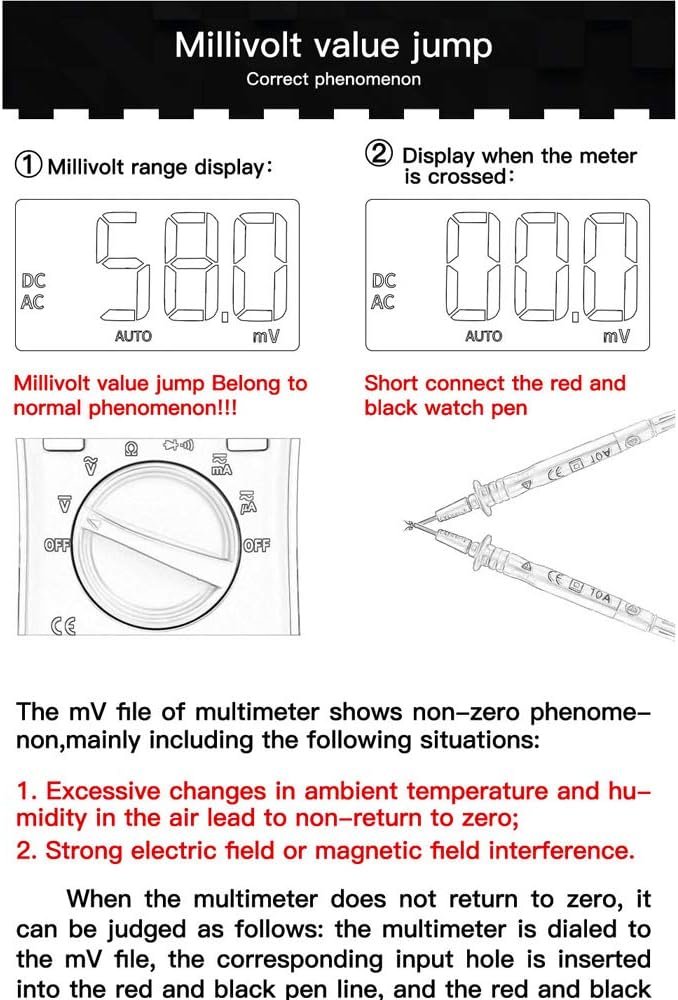
Figure 7: Explanation of millivolt range display behavior and how to short-circuit test leads to verify zero.
6. Maintenance
6.1. Cleaning
Wipe the case with a damp cloth and mild detergent. Do not use abrasives or solvents. Keep the input terminals free of dirt and moisture.
6.2. Battery Replacement
When the battery symbol [battery icon] appears on the LCD, the batteries must be replaced. Refer to Section 4.1 for detailed battery installation instructions.
6.3. Fuse Replacement
If the current measurement function fails, the fuse may need replacement. The ANENG V01B uses two fuses:
- 10A MAX FUSED: For the 10A current range.
- 600V CAT I FUSED 400mA: For the mA current range.
WARNING: To prevent damage to the multimeter or personal injury, always replace blown fuses with fuses of the specified type and rating.
- Ensure the multimeter is turned OFF and test leads are disconnected.
- Remove the battery compartment cover and batteries as described in Section 4.1.
- Carefully remove the back casing screws (if any, beyond battery cover) to access the internal circuit board.
- Locate the blown fuse(s) and gently remove them.
- Install new fuses of the correct type and rating.
- Reassemble the multimeter, ensuring all screws are tightened.
7. Troubleshooting
| Problem | Possible Cause | Solution |
|---|---|---|
| No display or dim display | Dead or low batteries; Multimeter OFF | Replace batteries; Turn rotary dial to a function. |
| Incorrect readings | Wrong function selected; Test leads improperly connected; Blown fuse (for current); Environmental interference (for mV) | Select correct function; Ensure leads are in correct jacks; Check/replace fuses; Refer to Millivolt Value Jump section. |
| No current measurement | Blown fuse for current range | Replace the appropriate fuse (10A or 400mA). |
| "OL" or "OVER" displayed | Measurement exceeds selected range; Open circuit | Select a higher range (if not auto-ranging); Check for open circuit in the component/circuit. |
8. Specifications
| Parameter | Detail |
|---|---|
| Display | 4000 Counts LCD |
| Measurement Type | True RMS Digital Multimeter |
| Ranging | Auto-Ranging |
| Power Source | Battery Powered (AAA batteries) |
| Safety Rating | 600V CAT I |
| Dimensions (L x W x T) | Approx. 119.5mm x 61.7mm x 31.9mm |
| Test Lead Length | Approx. 790mm (31.1 inches) |
| Features | Backlight, Flashlight, Data Hold, Auto Power Off, NCV |
| Model Number | V01B |
9. Warranty and Support
For warranty information or technical support, please refer to the documentation provided with your purchase or contact the seller directly. Keep your purchase receipt as proof of purchase.