
1. Product Overview
The MUNBYN Black Cash Register Drawer is a robust and functional cash management solution designed for various commercial environments. It features a durable steel construction and an organized internal layout for efficient handling of currency and other payment methods.

Image 1.1: The MUNBYN Black Cash Register Drawer with the tray open, displaying organized compartments for bills and coins.
Key Features:
- Dimensions: 16.53" x 15.74" x 3.93" (420mm x 400mm x 100mm).
- Construction: Heavy-duty stainless alloy steel.
- Tray Configuration: 5 bill trays and 5 coin trays. Two coin trays are removable for larger miscellaneous items.
- Deposit Slot: A front-panel slot for checks or large bills without opening the main drawer.
- Security: 4-position key lock mechanism (locked closed, locked open, online, manual open).
- Interface: RJ11/RJ12 interface for connection to POS systems.

Image 1.2: An internal view of the cash drawer, highlighting the five bill slots with stainless steel clips and five coin trays, including two larger, removable ones.
2. Package Contents
Please verify that all items are present in the package before proceeding with installation.

Image 2.1: Illustration showing the cash drawer, connection cable, and keys included in the package.
- Cash Drawer (x1)
- RJ11/RJ12 Connection Cable (x1)
- Keys (x2)
3. Setup Instructions
3.1 Connecting to a POS System
- Ensure your Point of Sale (POS) system or receipt printer is powered off.
- Locate the RJ11/RJ12 port on the back of the cash drawer.
- Connect one end of the provided RJ11/RJ12 cable to the cash drawer's port.
- Connect the other end of the cable to the designated cash drawer port on your POS system or receipt printer. This port is typically labeled "CD" or "Drawer".
- Power on your POS system or receipt printer. The cash drawer is now ready to receive commands to open automatically upon transaction completion.
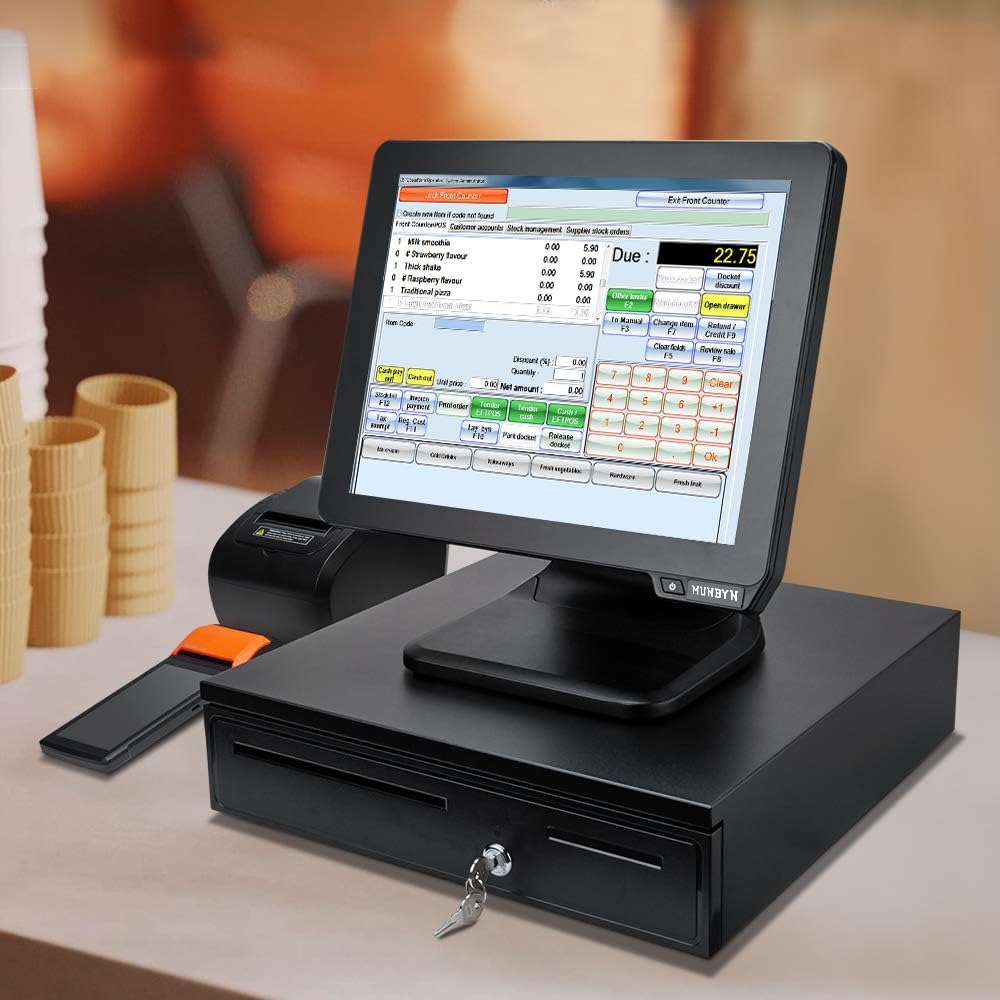
Image 3.1: The cash drawer integrated with a POS terminal and receipt printer, demonstrating a typical setup.
3.2 Manual Operation
The cash drawer can also be opened manually using the provided keys.
- Insert one of the provided keys into the lock cylinder on the front of the cash drawer.
- Turn the key to the "open" position (usually a quarter turn clockwise or counter-clockwise, depending on the lock).
- The drawer will spring open.
- To lock the drawer, push it closed and turn the key back to the "locked" position. Remove the key for security.

Image 3.2: Visual representation of the two opening methods: automatic opening after a POS transaction and manual opening using the key.
4. Operating Instructions
4.1 Using the Currency Trays
- The cash drawer features 5 fixed bill compartments with stainless steel clips to secure currency.
- There are 5 coin compartments. Two of these are larger and can be removed to accommodate other items or larger coin denominations.
- Organize bills and coins according to their denominations for quick and accurate transactions.
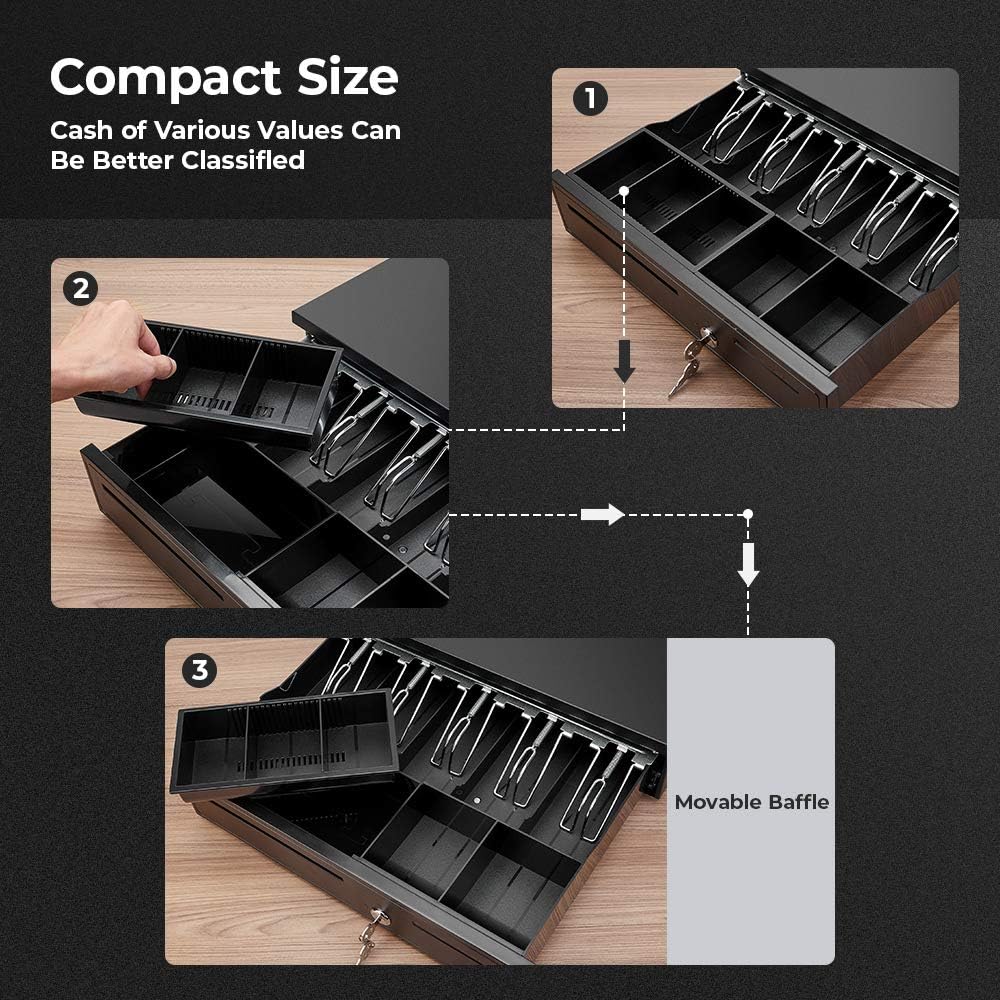
Image 4.1: A visual guide demonstrating how the removable coin tray can be lifted out to create more space within the drawer.
4.2 Using the Deposit Slot
A front-facing slot allows for the secure deposit of checks, large bills, or other documents without needing to open the main cash drawer. This enhances security and speeds up transactions.
5. Maintenance
Regular maintenance ensures the longevity and smooth operation of your cash drawer.
- Cleaning: Wipe the exterior with a soft, damp cloth. Avoid abrasive cleaners or solvents. For the interior, remove the coin tray and wipe down compartments.
- Lubrication: Periodically check the drawer slides for smooth movement. If resistance is felt, a small amount of silicone-based lubricant can be applied to the slides.
- Key Care: Keep the keys in a secure location. Avoid forcing the key if it feels stuck.
- Environmental Conditions: Operate the cash drawer in a dry environment, away from excessive dust or moisture.
6. Troubleshooting
6.1 Drawer Does Not Open Automatically
- Check Cable Connection: Ensure the RJ11/RJ12 cable is securely connected to both the cash drawer and the POS system/receipt printer.
- POS System Settings: Verify that your POS software or printer driver settings are configured to send the open command to the cash drawer. Consult your POS system's manual for specific instructions.
- Power: Confirm that the POS system or printer is powered on and functioning correctly.
6.2 Drawer Does Not Open Manually
- Correct Key: Ensure you are using the correct key provided with the cash drawer.
- Key Position: Make sure the key is fully inserted and turned to the correct "open" position.
- Obstructions: Check for any obstructions preventing the drawer from sliding open.
6.3 Drawer Sticks or is Difficult to Open/Close
- Obstructions: Remove any items that might be blocking the drawer's path or interfering with the slides.
- Level Surface: Ensure the cash drawer is placed on a flat, level surface. Uneven surfaces can cause misalignment.
- Lubrication: Apply a small amount of silicone-based lubricant to the drawer slides if they appear dry or stiff.
7. Specifications
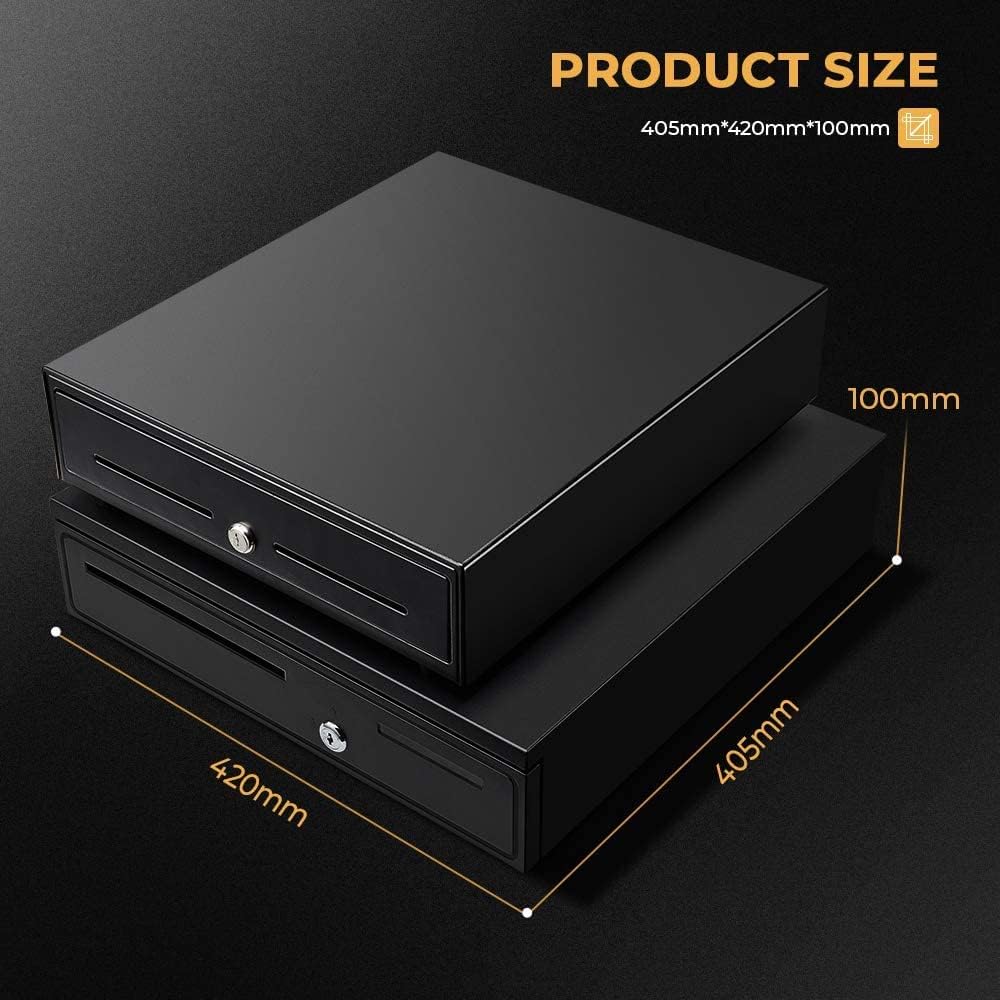
Image 7.1: Detailed dimensions of the cash drawer: 405mm (depth), 420mm (width), and 100mm (height).
| Feature | Specification |
|---|---|
| Brand | MUNBYN |
| Model Number | MU-IPCD02-BK-US |
| Color | Black |
| Material | Alloy Steel |
| Product Dimensions (L x W x H) | 16.53 x 15.74 x 3.93 inches (420mm x 400mm x 100mm) |
| Item Weight | 11.44 pounds (5.2 Kilograms) |
| Lock Type | Key (4-position) |
| Currency Trays | 5 Bill, 5 Coin (2 removable) |
| Interface | RJ11/RJ12 |
| UPC | 729920671328 |
8. Warranty and Support
MUNBYN is committed to providing quality products and customer satisfaction. This product comes with a manufacturer's warranty. For specific warranty details, please refer to the documentation included with your purchase or contact MUNBYN customer support.
For technical assistance, troubleshooting, or any inquiries regarding your MUNBYN cash drawer, please contact our support team. We offer lifetime support for our products.
Contact Information:
- Website: www.munbyn.com (Note: This is a placeholder URL, please refer to official product documentation for actual support contact details.)
- Email: Refer to product packaging or official website.
- Phone: Refer to product packaging or official website.