
1. Introduction
Thank you for purchasing the Hytech HY-S30 Bluetooth Speaker. This manual provides essential information for the safe and efficient use of your device. Please read it carefully before operating the speaker and retain it for future reference.
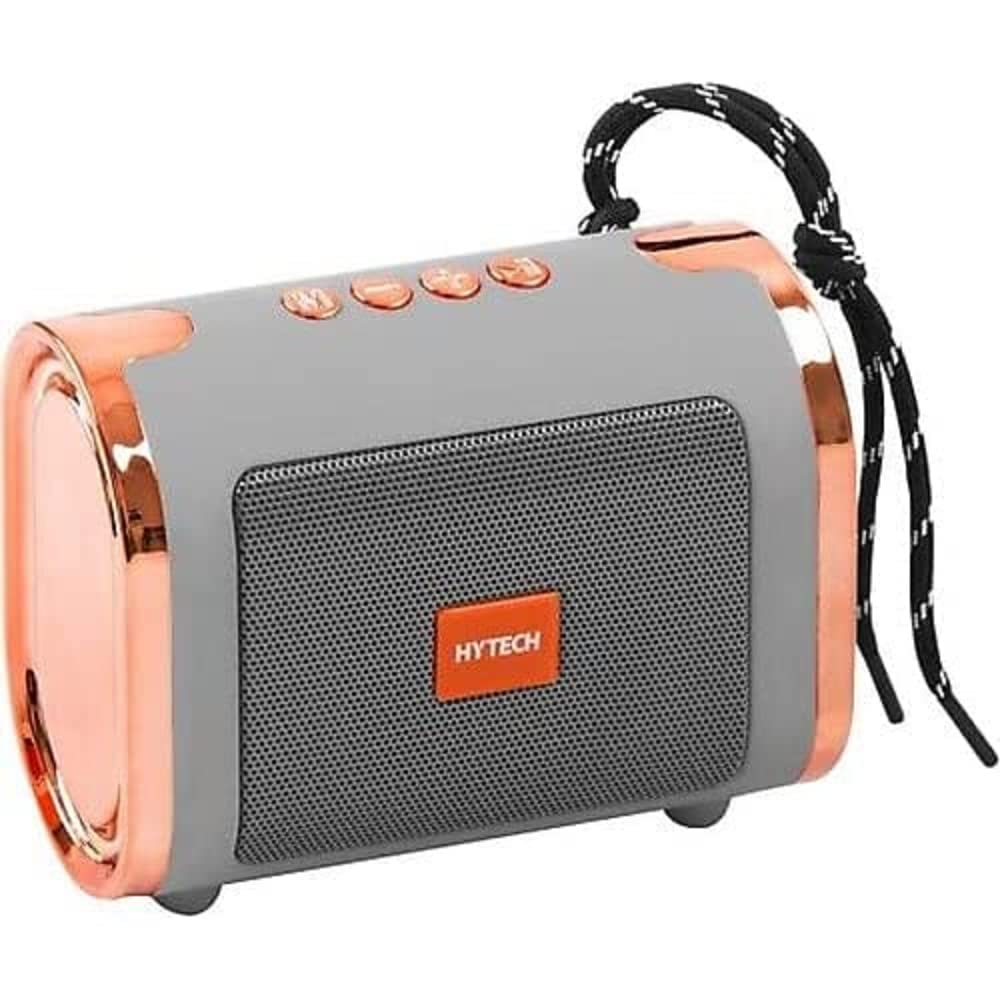
Image 1.1: Hytech HY-S30 Bluetooth Speaker. This image displays the silver-colored speaker unit, highlighting its compact design and the front speaker grille.
2. Safety Information
- Do not expose the speaker to water, moisture, or extreme temperatures.
- Avoid dropping or subjecting the speaker to strong impacts.
- Do not attempt to disassemble or repair the speaker yourself. Contact qualified service personnel.
- Keep the speaker away from heat sources and direct sunlight.
- Use only the specified charging voltage (DC 5V) and a compatible USB charger.
3. Package Contents
Please check the package for the following items:
- Hytech HY-S30 Bluetooth Speaker (Silver)
- USB Charging Cable
- User Manual
4. Product Overview
The Hytech HY-S30 is a portable Bluetooth speaker designed for versatile audio playback. It features:
- Bluetooth Connectivity: Wirelessly connect to smartphones, tablets, and laptops.
- USB Type-A Port: For playing audio from USB flash drives.
- TF (Micro SD) Card Slot: For playing audio from memory cards.
- Battery Powered: Enjoy music on the go with its built-in rechargeable battery.
- Touch Control: Intuitive touch-sensitive controls for easy operation.
5. Setup
5.1. Charging the Speaker
- Connect the small end of the USB charging cable to the charging port on the speaker.
- Connect the large end of the USB charging cable to a DC 5V USB power adapter (not included) or a computer's USB port.
- The charging indicator light will illuminate, typically red, during charging.
- Once fully charged, the indicator light will change color or turn off. Disconnect the speaker from the power source.
5.2. Powering On/Off
- To Power On: Press and hold the power button (location may vary, refer to product diagram if available) for a few seconds until you hear an audible prompt or see an indicator light.
- To Power Off: Press and hold the power button again for a few seconds until the speaker powers down.
5.3. Bluetooth Pairing
- Ensure the speaker is powered on and in Bluetooth pairing mode. The Bluetooth indicator light will typically flash rapidly.
- On your smartphone, tablet, or laptop, enable Bluetooth and search for available devices.
- Select "HY-S30" from the list of found devices.
- Once paired, the speaker will emit a confirmation sound, and the Bluetooth indicator light will stop flashing and remain solid.
- If prompted for a password, enter "0000".
6. Operating Instructions
6.1. Bluetooth Playback
After successful pairing, you can play audio from your connected device. Use your device's controls to select music and adjust playback.
- Play/Pause: Tap the Play/Pause touch control on the speaker.
- Next Track: Tap the Next Track touch control.
- Previous Track: Tap the Previous Track touch control.
6.2. USB Playback
- Insert a USB flash drive containing audio files into the USB Type-A port on the speaker.
- The speaker should automatically switch to USB mode and begin playing audio. If not, press the Mode button (if available) to switch to USB mode.
- Use the Play/Pause, Next Track, and Previous Track touch controls to manage playback.
6.3. TF Card Playback
- Insert a TF (Micro SD) card containing audio files into the TF card slot on the speaker.
- The speaker should automatically switch to TF card mode and begin playing audio. If not, press the Mode button (if available) to switch to TF card mode.
- Use the Play/Pause, Next Track, and Previous Track touch controls to manage playback.
6.4. Volume Control
Volume can be adjusted either from your connected device or using the speaker's touch controls (e.g., long press Next/Previous for volume, or dedicated volume controls if present).
7. Maintenance
- Cleaning: Use a soft, dry cloth to clean the speaker's surface. Do not use abrasive cleaners or solvents.
- Storage: When not in use for extended periods, store the speaker in a cool, dry place away from direct sunlight.
- Battery Care: To prolong battery life, avoid fully discharging the battery frequently. Charge the speaker regularly, even if not in use.
8. Troubleshooting
| Problem | Possible Cause | Solution |
|---|---|---|
| Speaker does not power on. | Low battery. | Charge the speaker fully. |
| No sound. | Volume too low; incorrect mode; device not connected. | Increase volume; ensure correct mode (Bluetooth, USB, TF); re-pair Bluetooth device. |
| Bluetooth pairing fails. | Speaker not in pairing mode; device too far; interference. | Ensure speaker is in pairing mode; move device closer; restart both speaker and device. |
| USB/TF card not playing. | Incorrect file format; card/drive not inserted correctly; speaker not in correct mode. | Ensure audio files are compatible (e.g., MP3); reinsert card/drive; press Mode button to switch. |
9. Specifications
| Feature | Detail |
|---|---|
| Model | HY-S30 |
| Connectivity Technology | Bluetooth, USB |
| Supported Media | USB Type-A, TF (Micro SD) Card |
| Power Source | Battery Powered (DC 5V) |
| Control Method | Touch |
| Compatible Devices | Smartphones, Laptops, Tablets |
| Speaker Type | Soundbar (Portable) |
| Speaker Amplifier Type | Active |
| Product Weight | 0.26 Kilograms (260 g) |
| Color | Silver |
| Manufacturer | Hytech |
10. Warranty and Support
For warranty information and customer support, please refer to the warranty card included with your product or contact your local retailer. Keep your proof of purchase for any warranty claims.