1. Introduction
Thank you for choosing the Ciglow Digital Voice Recorder. This portable 8G handheld device is designed for high-quality audio recording, suitable for lectures, meetings, interviews, and personal notes. It features a professional recorder chip with high-definition noise reduction and supports one-click recording. This manual provides essential information for setting up, operating, maintaining, and troubleshooting your device.
Key features include:
- 8GB internal memory for ample storage.
- Support for WAV recording format.
- Playback of lossless music formats such as MP3, WMA, and WAV.
- Built-in and external microphone support.
- Telephone recording function.
- 250mAh battery providing up to 30 hours of continuous recording.
2. Package Contents
Please check the package to ensure all items are present:
- 1 x Digital Voice Recorder (Recording Pen)
- 1 x Headphone
- 1 x External Microphone
- 1 x Charging Cable (USB)
- 1 x Junction Box
- 1 x Telephone Line
- 1 x Audio Line

Image: The Ciglow Digital Voice Recorder shown with all its accessories, including headphones, external microphone, charging cable, junction box, telephone line, and audio line.
3. Device Layout and Controls
Familiarize yourself with the buttons and ports on your recorder.

Image: Front view of the digital voice recorder, highlighting the REC (red circle), STOP (square), and PLAY/PAUSE (triangle) buttons, along with the display screen showing 'Record' and selection icons.
- REC Button: Initiates recording.
- STOP Button: Stops recording or playback.
- PLAY/PAUSE Button: Starts or pauses playback.
- Display Screen: Shows recording status, menu options, and playback information.
- Built-in Microphone: For standard recordings.
- Headphone Jack: For listening to recordings.
- USB Port: For charging and data transfer.
- External Microphone Port: For connecting the included external microphone.
4. Setup
4.1 Charging the Device
Before first use, fully charge the recorder. Connect the included USB charging cable to the device's USB port and to a computer's USB port or a compatible USB wall adapter. The battery indicator on the screen will show charging status. A full charge provides approximately 30 hours of continuous recording.
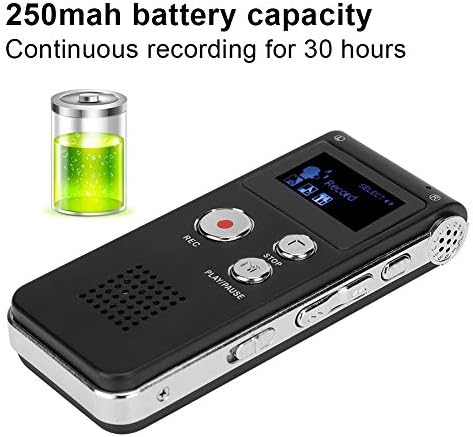
Image: The digital voice recorder display showing battery capacity (250mAh) and indicating up to 30 hours of continuous recording time.
4.2 Connecting Accessories
- Headphones: Plug the headphones into the 3.5mm headphone jack for private listening.
- External Microphone: For enhanced audio input, connect the external microphone to the dedicated microphone input port.
- Telephone Recording: Use the provided junction box and telephone line to connect the recorder for telephone call recording. Refer to the specific diagram in the full manual for detailed connection steps.
5. Operating Instructions
5.1 Power On/Off
To power on the device, slide the power switch to the 'ON' position. To power off, slide it to 'OFF'.
5.2 Recording Audio
The recorder supports one-click recording.
- Ensure the device is powered on.
- Press the REC button (red circle) to start recording. The screen will display a recording indicator.
- To pause recording, press the PLAY/PAUSE button. Press it again to resume.
- To stop and save the recording, press the STOP button (square). The recording will be saved automatically.

Image: A hand pressing the side button of the digital voice recorder, illustrating its use for one-click recording with high-definition noise reduction in a busy environment.
5.3 Playing Back Recordings
- Navigate through your saved files using the navigation buttons (if available, otherwise connect to PC).
- Select the desired recording.
- Press the PLAY/PAUSE button to start playback.
- Press PLAY/PAUSE again to pause, or STOP to end playback.
5.4 Connecting to a Computer
Connect the recorder to your computer using the USB cable. The device will appear as a removable disk, allowing you to transfer, delete, or manage your recorded files (WAV format) and music files (MP3/WMA/WAV).
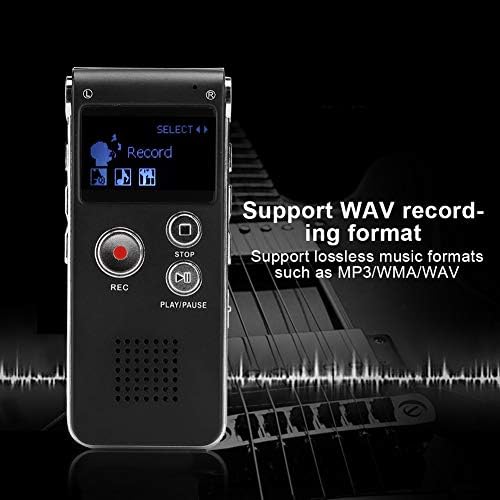
Image: The digital voice recorder's screen showing 'Record' mode, emphasizing its compatibility with WAV recording format and lossless music formats like MP3, WMA, and WAV.
6. Maintenance
- Cleaning: Use a soft, dry cloth to clean the device. Avoid using liquid cleaners or solvents.
- Storage: Store the recorder in a cool, dry place away from direct sunlight, extreme temperatures, and humidity.
- Battery Care: To prolong battery life, avoid fully discharging the battery frequently. Charge the device regularly, even if not in use for extended periods.
- Data Management: Regularly back up important recordings to a computer to prevent data loss.
7. Troubleshooting
If you encounter issues with your Ciglow Digital Voice Recorder, refer to the following common solutions:
- Device does not power on: Ensure the battery is charged. Connect the device to a power source and try again. Check the power switch is in the 'ON' position.
- Cannot record: Check if the memory is full. Transfer files to a computer to free up space. Ensure the microphone is not obstructed.
- Poor recording quality: Ensure you are recording in a quiet environment. If using an external microphone, ensure it is securely connected. Check recording settings (if adjustable).
- No sound during playback: Ensure headphones are properly connected and volume is adjusted. Check if the audio file is corrupted.
- Device not recognized by computer: Try a different USB port or cable. Ensure the device is powered on when connected.
8. Specifications
| Feature | Specification |
|---|---|
| Memory Capacity | 8GB |
| Recording Format | WAV |
| Music Format Support | MP3, WMA, WAV |
| Sampling Rate | 48KHZ |
| Number Of Digits | 192KBPS |
| Battery Capacity | 250mAh |
| Battery Life (Recording) | Up to 30 hours |
| Host Size (Approx.) | 8.5 x 3.3 x 1.3 cm (3.3 x 1.3 x 0.5 inches) |
| Item Weight | 4.9 ounces (0.14 Kilograms) |
| Hardware Interface | USB |
| Microphone Form Factor | Built-In |
| Headphones Jack | 3.5 millimeters |
| Compatible Devices | MP3 Player |
| Manufacturer | Ciglow |
| ASIN | B082Y5G5C2 |
| UPC | 738588226696 |
| Date First Available | December 23, 2019 |
9. Warranty and Support
For warranty information and customer support, please refer to the documentation provided at the time of purchase or contact your retailer. Specific warranty terms and conditions may vary.