
Fanimation FPD8530DZ-48DWA
Fanimation Wrap Custom Ceiling Fan User Manual
Model: FPD8530DZ-48DWA | Brand: Fanimation
1. Introduction
This manual provides detailed instructions for the safe installation, operation, and maintenance of your Fanimation Wrap Custom Ceiling Fan. Please read this manual thoroughly before beginning installation and retain it for future reference. The Fanimation Wrap Custom is a versatile ceiling fan designed for both indoor and outdoor (damp rated) use, offering various motor and blade finish combinations. This model includes fanSync Bluetooth for control.
2. Safety Information
WARNING: To reduce the risk of fire, electric shock, or personal injury, always follow these basic precautions:
- Read all instructions before installing the fan.
- Ensure the installation site is suitable for the fan's weight and size.
- All wiring must be in accordance with national and local electrical codes. If you are unfamiliar with wiring, consult a qualified electrician.
- Disconnect power at the main circuit breaker before installation or servicing.
- Do not operate the fan with a damaged power cord or plug.
- Avoid placing objects in the path of the fan blades.
- Do not attempt to repair or replace any part of the fan unless specifically instructed in this manual.
3. What's in the Box
Upon opening the package, verify that all components are present and undamaged. The Fanimation Wrap Custom Ceiling Fan package includes:
- Remote Control
- Fan Motor Assembly
- Blades (Dark Walnut)
- Mounting Hardware
- Instruction Manual
Note: Light kit, if desired, is sold separately.
4. Setup and Installation
Before beginning installation, ensure the power is turned off at the circuit breaker. It is recommended to have two people for installation.
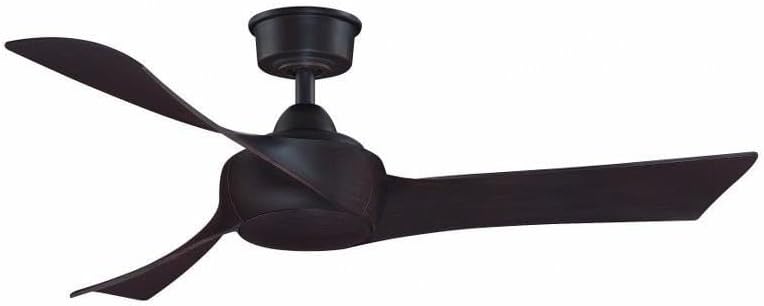
Image: The Fanimation Wrap Custom Ceiling Fan, featuring a dark bronze finish on the motor housing and a sleek, curved dark walnut blade design. The fan is shown fully assembled, ready for installation.
4.1 Mounting the Fan
- Secure the mounting bracket to the ceiling outlet box. The outlet box must be securely fastened to the building structure and capable of supporting the fan's weight (14.99 lbs).
- Attach the downrod to the motor assembly, ensuring all screws are tightened.
- Carefully lift the fan assembly and hang it from the mounting bracket.
4.2 Electrical Wiring
- Connect the fan's electrical wires to the household wiring according to the wiring diagram provided in the separate wiring guide (if applicable) or standard electrical practices (Black to Black, White to White, Green/Bare to Ground).
- Ensure all wire connections are secure using wire nuts.
- Tuck the wires neatly into the outlet box.
4.3 Attaching the Blades
- Attach each blade to the blade arms using the provided screws.
- Secure the blade assemblies to the motor housing. Ensure all screws are firmly tightened to prevent wobbling.
5. Operating Instructions
The Fanimation Wrap Custom Ceiling Fan can be controlled via the included remote control or an optional wall control (sold separately). It features 3 power levels for fan speed.
5.1 Remote Control Operation
The remote control allows for convenient operation of your ceiling fan from anywhere in the room. Ensure batteries are installed correctly.
- Fan ON/OFF: Press the power button to turn the fan on or off.
- Speed Control: Use the speed buttons to cycle through the 3 available fan speeds (Low, Medium, High).
- Reverse Function: (If applicable) Press the reverse button to change the direction of the fan blades for summer (downward airflow) or winter (upward airflow) operation.
- Light Control: (If optional light kit is installed) Use the light button to turn the light on/off or dim.
5.2 Wall Control Operation (Optional)
If you have installed the optional wall control, refer to its specific instruction manual for detailed operation. Generally, wall controls offer similar functions to the remote control, including fan speed and light control.
6. Maintenance
Regular cleaning and maintenance will ensure the longevity and optimal performance of your ceiling fan.
- Cleaning: To clean the fan, wipe with a soft, damp cloth. Do not use abrasive cleaners or solvents, as these may damage the finish.
- Blade Cleaning: Dust the blades regularly to prevent dust buildup, which can cause wobbling.
- Tightening Screws: Periodically check all screws on the fan and mounting hardware to ensure they are tight. Loose screws can cause noise or wobbling.
- No Lubrication Required: The fan motor is permanently lubricated and does not require oiling.
7. Troubleshooting
If you experience issues with your Fanimation Wrap Custom Ceiling Fan, consult the table below for common problems and solutions.
| Problem | Possible Cause | Solution |
|---|---|---|
| Fan does not start | No power to the fan Loose wire connections Remote control battery low | Check circuit breaker/fuse Verify all wire connections are secure Replace remote control batteries |
| Fan wobbles | Loose blade screws Unbalanced blades Loose mounting bracket | Tighten all blade screws Ensure blades are installed evenly; use balancing kit if necessary Verify mounting bracket is securely fastened to ceiling |
| Noisy operation | Loose screws Motor hum Blades hitting an obstruction | Check and tighten all screws Some motor hum is normal; ensure fan is properly grounded Ensure nothing is in the path of the blades |
8. Specifications
Detailed technical specifications for the Fanimation Wrap Custom Ceiling Fan (Model: FPD8530DZ-48DWA):
| Feature | Specification |
|---|---|
| Brand | Fanimation |
| Model Name | FPD8530DZ-48DWA |
| Color | Dark Bronze |
| Electric Fan Design | Ceiling Fan |
| Power Source | Corded Electric |
| Style | Custom |
| Product Dimensions | 48"D x 48"W x 12.46"H |
| Special Feature | Wall Control, Remote Control |
| Finish Type | Bronze |
| Voltage | 120 Volts |
| Item Weight | 14.99 Pounds |
| Included Components | Remote |
| Indoor/Outdoor Usage | Indoor (Damp Rated) |
| Control Method | Remote |
| Blade Material | Plastic |
| Efficiency | Energy Star certified |
| Number of Power Levels | 3 |
| UPC | 840506091979 |
9. Warranty and Support
Fanimation products are manufactured to the highest quality standards. For specific warranty information regarding your Fanimation Wrap Custom Ceiling Fan, please refer to the warranty card included with your purchase or visit the official Fanimation website. For technical support, replacement parts, or service inquiries, please contact Fanimation Customer Service directly. Keep your purchase receipt as proof of purchase for warranty claims.
Related documentsFPD8530DZ-48DWA


Ask a question about this manual
Ask about setup, troubleshooting, compatibility, parts, safety, or missing instructions. Manuals+ will review the question and use this page’s manual context to help answer it.