
1. Introduction
This manual provides essential instructions for the proper installation, operation, and maintenance of your Sartorius Entris II Basic Essential Toploading Balance. This precision instrument is designed for accurate weighing in various laboratory and industrial applications. Please read this manual thoroughly before using the balance to ensure safe and correct operation.
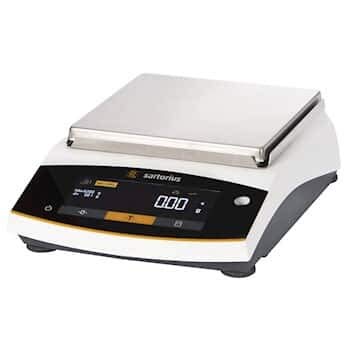
Image 1.1: The Sartorius Entris II Basic Essential Toploading Balance. This image displays the compact design of the balance, featuring its weighing pan and the integrated display panel.
2. Safety Information
Always observe the following safety precautions to prevent injury and damage to the equipment:
- Electrical Safety: Connect the balance only to a grounded power outlet with the specified voltage (100 to 240 VAC, 50/60 Hz). Do not use damaged power cords.
- Placement: Place the balance on a stable, level surface away from vibrations, drafts, direct sunlight, and extreme temperature fluctuations.
- Chemical Resistance: The balance is constructed with chemical-resistant polybutylene terephthalate, stainless steel, and glass. However, avoid prolonged exposure to harsh chemicals and clean spills immediately.
- Overload Protection: Do not exceed the maximum weighing capacity of 3200 g.
- Cleaning: Disconnect the power before cleaning. Use a soft, damp cloth and mild detergent. Do not use abrasive cleaners or immerse the balance in water.
3. Setup
3.1 Unpacking
Carefully remove the balance and all accessories from the packaging. Retain the original packaging for future transport or storage.
3.2 Placement
Select a location that is free from drafts, vibrations, and rapid temperature changes. Ensure the surface is firm and level. The balance dimensions are approximately 7 inches (pan length) by 7 inches (pan width).
3.3 Power Connection
Connect the provided power adapter to the balance and then to a suitable electrical outlet (100 to 240 VAC, 50/60 Hz).
3.4 Leveling
Adjust the leveling feet located at the base of the balance until the air bubble in the spirit level (usually located near the display) is centered. This ensures accurate weighing results.
3.5 Initial Calibration (isoCAL)
The Entris II features isoCAL internal calibration. Upon initial setup or after relocation, it is recommended to perform an internal calibration. Refer to the on-screen prompts or the balance's menu for initiating this process. This ensures optimal accuracy.
4. Operating Instructions
4.1 Turning On/Off
- To Turn On: Press the [ON/OFF] button. The balance will perform a self-test.
- To Turn Off: Press and hold the [ON/OFF] button until the display turns off.
4.2 Basic Weighing
- Zeroing: With an empty pan, press the [ZERO] button to set the display to zero.
- Taring: Place an empty container on the weighing pan. Press the [TARE] button. The display will show zero, allowing you to weigh the net content.
- Weighing: Place the item to be weighed on the pan. Wait for the stabilization indicator to appear (typically 0.9 seconds), then read the value.
4.3 Advanced Applications
The Entris II Basic Essential balance includes 12 built-in applications accessible via the hybrid screen and LED touch technology. These applications include:
- Dosing
- Counting
- Percentage Weighing
- Mixing
- Totalizing
- Animal Weighing
- Free Factor
- Density Determination
- Statistics
- Peakhold
- Checkweighing
- Mass Unit Conversion
- Underfloor Weighing
Consult the on-screen menu or the detailed application guide (if provided separately) for specific instructions on using each function.
4.4 Data Transfer
The balance features a USB Type-C interface for connecting to a PC and an RS232 output. It is "PC-direct," meaning no additional software is required for basic data transfer. You can download weighing data directly to applications like Microsoft Word or Excel.
5. Maintenance
5.1 Cleaning
Regular cleaning is crucial for maintaining accuracy and prolonging the life of your balance. Disconnect the power cord before cleaning.
- Use a soft, lint-free cloth dampened with a mild cleaning agent (e.g., isopropyl alcohol or a mild soap solution).
- Wipe down the weighing pan, housing, and display.
- Avoid allowing liquids to enter the balance housing.
- Do not use abrasive materials, strong solvents, or harsh chemicals.
5.2 Calibration Checks
While the isoCAL function provides internal calibration, periodic checks with external calibration weights are recommended, especially for applications requiring high precision or to comply with quality standards. Refer to your laboratory's standard operating procedures for calibration frequency.
6. Troubleshooting
This section addresses common issues you might encounter. For problems not listed here, contact customer support.
| Problem | Possible Cause | Solution |
|---|---|---|
| Unstable readings | Drafts, vibrations, unstable surface, temperature fluctuations. | Relocate balance, ensure stable surface, close doors/windows, allow balance to acclimatize. |
| Balance does not turn on | No power, faulty power cord/adapter. | Check power connection, try a different outlet, inspect power cord for damage. |
| Inaccurate readings | Not leveled, needs calibration, pan not clean. | Level the balance, perform internal or external calibration, clean the weighing pan. |
| Data transfer issues | Incorrect cable, software settings. | Ensure correct USB-C cable, check PC settings for device recognition. |
7. Specifications
| Feature | Specification |
|---|---|
| Model | Entris II Basic Essential Toploading Balance |
| Capacity | 3200 g |
| Readability | 10 mg |
| Linearity | 20 mg |
| Repeatability | 10 mg |
| Stabilization Time | 0.9 seconds |
| Pan Dimensions (L x W) | 7 in x 7 in |
| Power Requirements | 100 to 240 VAC, 50/60 Hz |
| Output Interfaces | RS232, USB-C |
| Weighing Units | gram, kilogram, carat, pound, ounce, troy ounce, Hong Kong tael, Singapore tael, Taiwan tael, grain, pennyweights, milligram, parts per pound, China tael, mommes, Austrian carat, tola, baht, mesghal, Newton |
| Construction Materials | Polybutylene terephthalate, Stainless Steel, Glass |
| Item Weight | 12 pounds |
8. Warranty and Support
8.1 Warranty Information
Sartorius products are manufactured to high-quality standards. For specific warranty terms and conditions, please refer to the warranty card included with your product or visit the official Sartorius website. Keep your proof of purchase for warranty claims.
8.2 Customer Support
Should you require technical assistance, service, or have questions regarding your Sartorius Entris II Basic Essential Toploading Balance, please contact Sartorius customer support or your authorized dealer. Contact information can typically be found on the manufacturer's website or in the product packaging.


