
1. Introduction
The Sartorius Entris II Basic Essential Toploading Balance is designed for general-purpose weighing applications in laboratory and industrial environments. This balance offers a high maximum capacity and is constructed from durable, chemical-resistant materials including polybutylene terephthalate, stainless steel, and glass. It integrates advanced features for various weighing tasks and provides modern connectivity options.
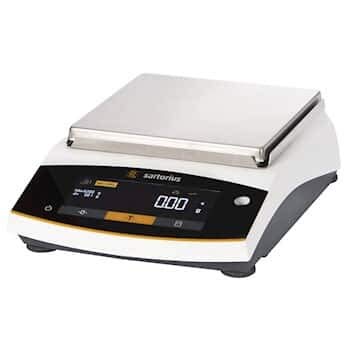
Figure 1: Sartorius Entris II Basic Essential Toploading Balance. This image shows the compact design and user interface of the balance.
2. Setup
2.1 Unpacking
Carefully remove the balance and all accessories from the packaging. Retain the original packaging for future transport or storage.
2.2 Placement
Place the balance on a stable, level surface free from vibrations, drafts, and direct sunlight. Ensure the operating environment is within the specified temperature and humidity ranges to maintain accuracy.
2.3 Leveling
Adjust the balance's feet until the air bubble in the level indicator is centered. This ensures accurate weighing results.
2.4 Power Connection
Connect the provided power adapter to the balance and then to a suitable electrical outlet (100 to 240 VAC, 50/60 Hz). Power on the balance using the designated power button.
3. Operating Instructions
3.1 User Interface
The balance features an intuitive hybrid screen with LED touch technology, designed for ease of use and improved functionality.
3.2 Weighing Modes and Applications
The Entris II balance includes 12 built-in applications and supports various weighing modes:
- Dosing: For precise dispensing of materials.
- Counting: Determines the number of pieces based on a reference weight.
- Percentage Weighing: Displays the weight as a percentage of a reference weight.
- Mixing: For preparing mixtures according to a formula.
- Totalizing: Sums up individual weighing results.
- Animal Weighing: Stabilizes readings for unstable loads.
- Free Factor: Allows custom calculation factors.
- Density Determination: Calculates the density of solids or liquids.
- Statistics: Provides statistical analysis of weighing series.
- Peakhold: Captures the maximum weight value.
- Checkweighing: Compares weight against target limits.
- Mass Unit Conversion: Converts between various weighing units.
- Underfloor Weighing: For weighing larger or magnetic samples using a hook on the underside.
3.3 Calibration
The balance features isoCAL internal calibration, which automatically adjusts the balance for accurate weighing results, saving time and ensuring precision. External calibration is also supported, allowing users to calibrate the balance with certified external weights.
3.4 Data Transfer
Equipped with a USB Type-C interface and RS232 output, the Entris II allows direct connection to a PC. It is "PC-direct," meaning no additional software is required to transfer data directly to applications like Microsoft Word or Excel.
4. Maintenance
4.1 Cleaning
The balance's parts, including the pan and housing, are made from chemical-resistant materials (polybutylene terephthalate, stainless steel, and glass). This allows for easy cleaning of spills. Use a soft cloth dampened with a mild cleaning agent. Avoid abrasive cleaners or solvents that could damage the surfaces.
4.2 General Care
To ensure the longevity and accuracy of your balance, avoid dropping it or subjecting it to excessive force. Keep the weighing pan free from debris and ensure the balance is stored in a clean, dry environment when not in use.
5. Troubleshooting
5.1 Unstable Readings
- Check if the balance is level. Adjust the feet if necessary.
- Ensure the balance is placed on a stable surface, away from vibrations or drafts.
- Verify that the ambient temperature is stable and there are no air currents affecting the weighing pan.
5.2 Calibration Errors
- Perform an internal isoCAL calibration if available.
- If performing external calibration, ensure the correct calibration weights are used and they are clean and free from damage.
- Refer to the on-screen messages for specific error codes or instructions.
5.3 Display Not Working
- Check the power connection and ensure the power adapter is securely plugged into both the balance and the outlet.
- Verify that the power outlet is functional.
- If the issue persists, contact customer support.
6. Specifications
| Specification | Value |
|---|---|
| Model | Entris II Basic Essential Toploading Balance 2200 g x 100 mg |
| Capacity | 2200 g |
| Readability | 100 mg |
| Linearity | 300 mg |
| Repeatability | 100 mg |
| Stabilization Time | 0.9 seconds |
| Pan Dimensions (L x W) | 7 in x 7 in |
| Calibration Type | External, isoCAL Internal |
| Power Requirements | 100 to 240 VAC, 50/60 Hz |
| Output Interfaces | RS232, USB-C |
| Weighing Units | gram, kilogram, carat, pound, ounce, troy ounce, Hong Kong tael, Singapore tael, Taiwan tael, grain, pennyweights, milligram, parts per pound, China tael, mommes, Austrian carat, tola, baht, mesghal, Newton |
| Supported Languages | English, German, French, Italian, Spanish, Portuguese, Russian, Polish |
| Materials | Polybutylene terephthalate, Stainless Steel, Glass |
| Item Weight | 12 pounds |
7. Warranty and Support
For information regarding product warranty, technical support, or service, please refer to the documentation provided with your purchase or visit the official Sartorius website. Contact details for customer service are typically available on the manufacturer's website.


