
Orion Motor Tech OMT-BTC-S002
Orion Motor Tech 2PC 12V Battery Charger and Maintainer
Model: OMT-BTC-S002
Introduction
This manual provides essential information for the safe and efficient operation, maintenance, and troubleshooting of your Orion Motor Tech 2PC 12V Battery Charger and Maintainer. This device is designed to charge and maintain various types of 12V lead-acid batteries, including flooded, sealed maintenance-free, AGM, and gel batteries, ensuring optimal performance and longevity for your vehicle's battery.
Setup
Before connecting the charger, ensure the area is well-ventilated and free from flammable materials. Always wear appropriate personal protective equipment, such as safety glasses and gloves.
- Inspect the Charger: Before each use, check the charger, cables, and clamps for any signs of damage. Do not use if damaged.
- Connect to Battery:
- Connect the red positive (+) clamp to the positive (+) terminal of the battery.
- Connect the black negative (-) clamp to the negative (-) terminal of the battery.
- Ensure a secure connection to prevent sparks.
- Connect to Power Outlet: Once the clamps are securely connected to the battery terminals, plug the charger's power cord into a standard 120V AC electrical outlet.
- Initial Check: The charging indicator light will illuminate, indicating the charging status.

Image: The Orion Motor Tech 12V Battery Charger, showing its compact design, standard power plug, and robust battery clamps.

Image: A close-up view of the heavy-duty battery clamps, featuring red and black insulation for positive and negative terminals, designed for secure gripping and superior conductivity.
Operating Instructions
The Orion Motor Tech battery charger employs a smart 2-stage charging process to optimize battery health and efficiency.
Charging Process:
- Stage 1: Bulk Charge
This initial stage provides a constant high current to the battery, maximizing charging efficiency and quickly bringing the battery to a significant charge level. - Stage 2: Float Mode
Once the battery is nearly full, the charger transitions to Float Mode. In this stage, a safe trickle current is applied to maintain a complete charge without the risk of overcharging, making it ideal for long-term maintenance.
Charging Indicator:
The charging indicator light on the unit provides visual feedback on the charging status:
- Red Light: Indicates the battery is currently charging.
- Green Light: Indicates the battery is fully charged or in float mode.
Important Note:
- Do not plug in this charger without connecting to a battery first.
- Disconnect the charger immediately if charging is not working as expected.
- If the indicator stays red for 12 hours, check the battery for potential issues.
- For 7-12Ah batteries, stop charging after 8-10 hours to prevent overcharging.
- For car batteries, charging time should not exceed 12 hours for optimal battery health.
Wide Compatibility:
This charger is suitable for a broad range of 12V lead-acid batteries, including flooded, sealed maintenance-free (AGM, Gel) types. It is ideal for charging and maintaining batteries in:
- Boats
- Motorcycles
- ATVs
- Riding Mowers
- Cars
- Trucks
- SUVs
- RVs

Image: The Orion Motor Tech battery charger connected to a large blue lead-acid battery, demonstrating its multipurpose charging capability.

Image: An illustration highlighting the wide application of the charger, suitable for charging and maintaining batteries in a variety of vehicles such as boats, motorcycles, ATVs, lawn tractors, cars, trucks, SUVs, and RVs.

Image: A graphical representation of the smart 2-stage charging process, showing the transition from "Bulk Charge" (high constant current for efficiency) to "Float Mode" (trickle current for maintaining full charge without overcharging).
Maintenance
Proper maintenance of your battery charger will ensure its longevity and reliable performance.
- Cleaning: Disconnect the charger from both the power outlet and the battery before cleaning. Use a dry, soft cloth to wipe down the unit. Do not use liquid cleaners or solvents.
- Storage: Store the charger in a cool, dry place away from direct sunlight and moisture when not in use. Ensure cables are neatly coiled and not kinked.
- Cable and Clamp Inspection: Regularly inspect the power cord and battery clamps for any cuts, fraying, or corrosion. Replace the unit if significant damage is found.
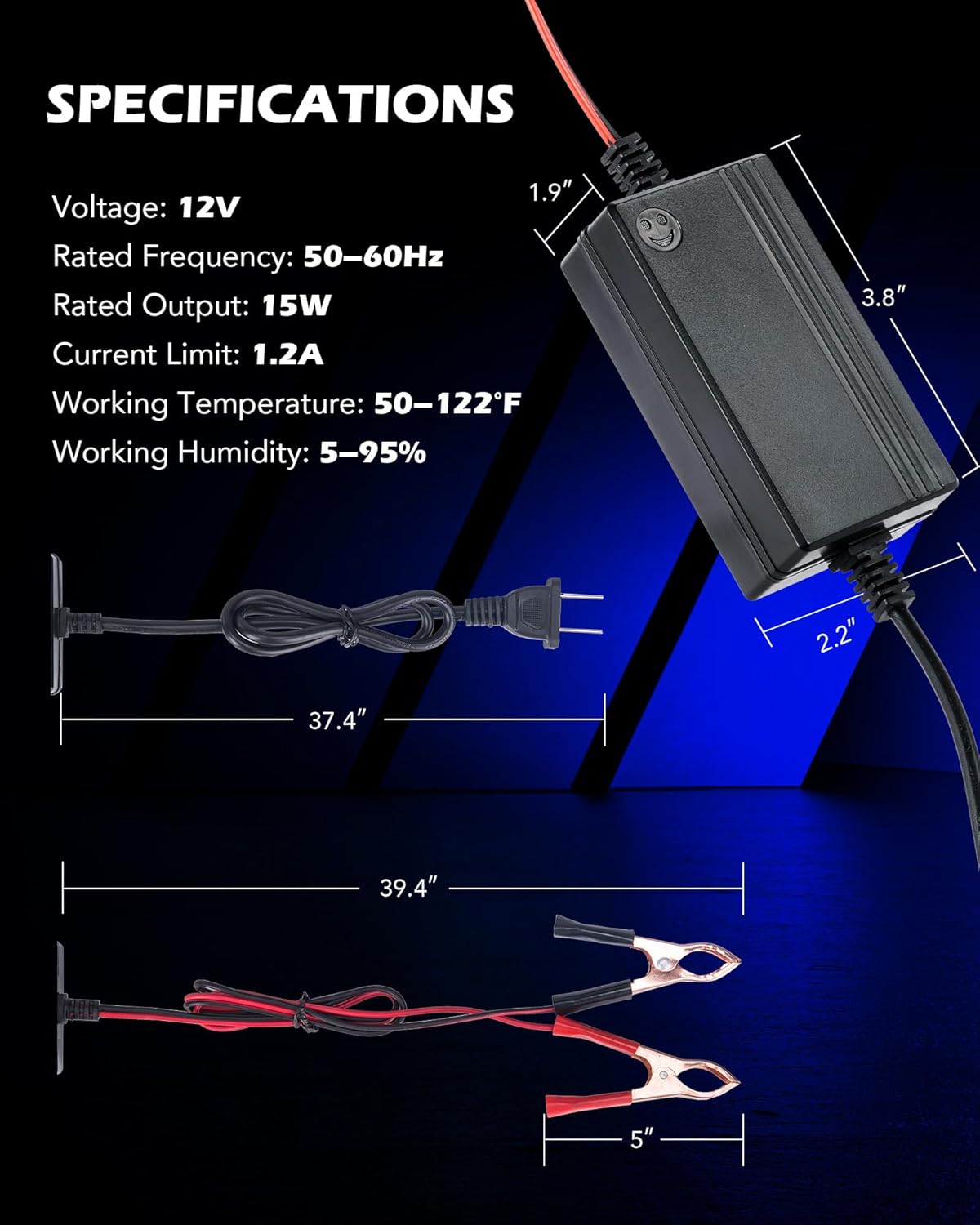
Image: Detail showing the pure copper core of the charger's cables, which ensures stable and efficient charging, alongside the sturdy battery clamps designed for secure holding and superior conductivity.
Troubleshooting
If you encounter issues with your charger, refer to the following common problems and solutions:
| Problem | Possible Cause | Solution |
|---|---|---|
| Charger not turning on / No indicator light | Not connected to power, faulty outlet, or damaged charger. | Ensure charger is properly plugged into a working outlet. Check connections to the battery. If still no power, the unit may be faulty. |
| Indicator light stays red for extended period (e.g., 12 hours) | Battery deeply discharged, faulty battery, or incorrect battery type. | Check the battery's voltage. If extremely low, it may take longer to initiate charging or the battery might be beyond recovery. Verify battery type is 12V lead-acid. |
| Charger gets excessively hot | Overload, poor ventilation, or internal fault. | Ensure adequate ventilation around the charger. Disconnect immediately if overheating. This unit has overheating protection, but continuous overheating indicates an issue. |
| Battery not charging or not holding charge | Poor connection, faulty battery, or charger malfunction. | Verify secure connections to battery terminals. Test the battery with a multimeter to confirm its condition. If the battery is healthy, the charger may be faulty. |
Safety Protections:
The Orion Motor Tech charger is equipped with multiple safety features to protect both the user and the battery:
- Short-Circuit Protection: Prevents damage from accidental short circuits.
- Overcurrent Protection: Safeguards against excessive current flow.
- Overheating Protection: Automatically shuts down if the unit gets too hot.
- Overvoltage Protection: Protects the battery from being charged at too high a voltage.
- Low-Voltage Dropout Protection: Ensures stable operation even with voltage fluctuations.

Image: An illustration detailing the comprehensive safety features of the charger, including protection against short-circuits, overcurrent, overheating, and overvoltage, ensuring safe operation.
Specifications
| Feature | Value |
|---|---|
| Model Number | OMT-BTC-S002 |
| Output Voltage | 12 Volts |
| Rated Frequency | 50-60Hz |
| Rated Output | 15W |
| Current Limit | 1.2A |
| Working Temperature | 50-122°F (10-50°C) |
| Working Humidity | 5-95% |
| Product Dimensions (Charger Unit) | 1.9" (Depth) x 2.2" (Width) x 3.8" (Height) |
| Item Weight | 0.71 Pounds (approx. 11.3 ounces) |
Image: A visual guide to the charger's physical specifications, including the dimensions of the main unit and the lengths of the power and battery cables.
Warranty and Support
Information regarding product warranty and customer support is not provided within this manual. For warranty details or technical assistance, please refer to the product packaging, the manufacturer's official website, or contact Orion Motor Tech customer service directly.
Ask a question about this manual
Ask about setup, troubleshooting, compatibility, parts, safety, or missing instructions. Manuals+ will review the question and use this page’s manual context to help answer it.