
Segway Ninebot N1KB18
Segway Ninebot 18-inch Kids Bike (Model N1KB18) Instruction Manual
1. Introduction
This manual provides essential information for the safe assembly, operation, and maintenance of your Segway Ninebot 18-inch Kids Bike. Please read this manual thoroughly before first use and retain it for future reference. This bike is designed for children aged 5-10 years with a height between 3'9'' and 4'9'' (39-57 inches).
Safety Warnings
- Always ensure the rider wears a helmet and appropriate safety gear (knee pads, elbow pads) when operating the bicycle.
- Adult supervision is required at all times, especially for young riders.
- Regularly inspect the bicycle for any loose parts, damage, or wear before each ride.
- Do not ride in unsafe conditions, such as heavy traffic, slippery surfaces, or poor visibility.
- Ensure all brakes are functioning correctly before riding.
2. Product Features
The Segway Ninebot 18-inch Kids Bike is engineered with safety and comfort in mind, featuring a durable aerospace-grade aluminum frame and advanced components.
Key Features Overview
- Aerospace-Grade Aluminum Frame: Provides a lightweight yet sturdy structure for enhanced durability and portability.
- Enclosed Chain: A fully enclosed chain system protects the rider from potential scratches and keeps the chain clean, ensuring a smoother and quieter ride.
- Shock-Absorbing Front Suspension: Maximizes riding stability and comfort by absorbing impacts from uneven terrain.
- Dual Braking System: Features a front disc brake for reliable stopping power and a rear coaster brake for intuitive control.
- Inflatable Mountain Tires: Wear-resistant, non-slip tires with shock absorption properties, suitable for various terrains.
- Adjustable Ergonomic Saddle: Designed for comfort and can be adjusted to accommodate the child's growth.
- Integrated Kickstand: Conveniently located at the rear for stable parking.
Visual Guide to Features
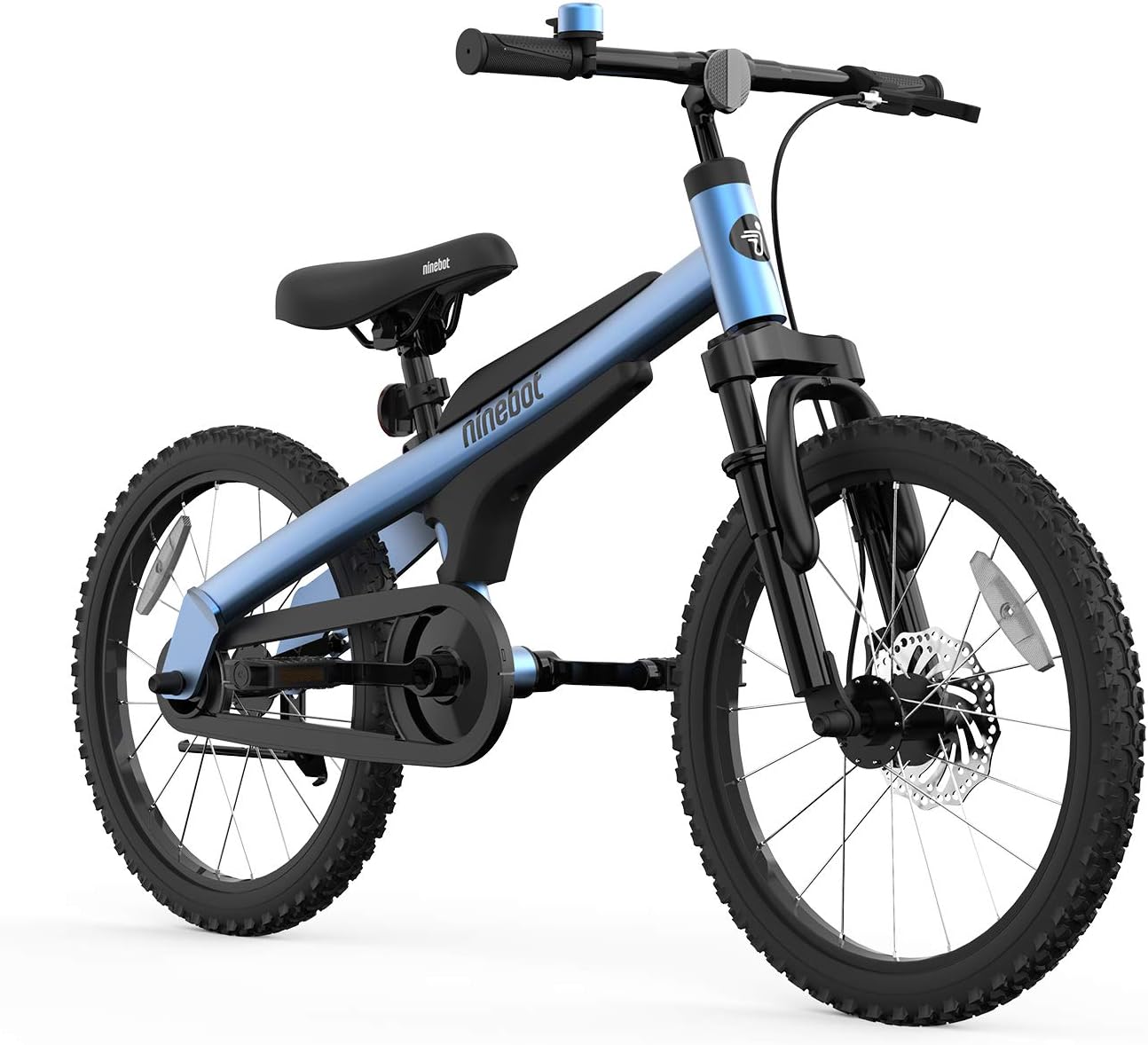
Figure 2.1: The Segway Ninebot 18-inch Kids Bike in blue, showcasing its sleek design and robust construction.

Figure 2.2: Recommended height range for the 18-inch bike, suitable for children 3'9'' to 4'9'' tall.

Figure 2.3: Detailed view of the TRR Sports Handle Bar, Adjustable Saddle Seat, Full Coverage with Soft Silicone on the frame, and the Fully-enclosed Chain for safety.

Figure 2.4: Features such as front wheel suspension, disc brake, shock absorbing tires, and the steady kickstand.
Official Product Video
Video 2.1: Official product video showcasing the Segway Ninebot Kids Bike in various sizes and colors, highlighting its features and children enjoying their ride.
3. Setup and Assembly
Your Segway Ninebot Kids Bike comes partly assembled. Please follow these general steps for final assembly. Refer to the detailed instructions provided in the physical user manual for specific diagrams and torque specifications.
Included Components

Figure 3.1: Package contents include the partly-assembled bike, user manual, tools, kickstand, pedals, stem cap, and nut covers.
- Partly-assembled Bike
- User Manual
- Tools (for assembly)
- Kickstand (x1)
- Pedals (x2)
- Stem Cap (x1)
- Nut Cover (x6)
Assembly Steps (General)
- Unpacking: Carefully remove all components from the packaging. Check for any missing or damaged parts. Contact customer support if any issues are found.
- Handlebar Installation: Attach the handlebar to the stem, ensuring it is centered and tightened securely.
- Pedal Attachment: Identify the left (L) and right (R) pedals. Thread the pedals into the crank arms and tighten them firmly. Note that the left pedal has a reverse thread.
- Seat Post Adjustment: Insert the seat post into the frame and adjust the height to the rider's comfort, ensuring the minimum insertion mark is not visible. Secure the quick-release lever.
- Kickstand Installation: Attach the kickstand to the designated mounting point at the rear of the bike and tighten securely.
- Final Checks: Ensure all bolts and fasteners are tightened, brakes are functional, and tires are inflated to the recommended pressure.
4. Operating Instructions
Riding Posture
- Adjust the seat height so the rider can comfortably touch the ground with their toes while seated.
- Maintain a relaxed grip on the handlebars with elbows slightly bent.
- Keep eyes focused forward on the path ahead.
Braking
- The bike features a front disc brake operated by a hand lever and a rear coaster brake activated by pedaling backward.
- To stop, apply both brakes gently and evenly. Avoid sudden, hard braking, especially with the front brake, as this can cause loss of control.
- Practice braking in a safe, open area before riding in more challenging environments.
Steering and Balance
- Steer by gently turning the handlebars and leaning into the turn.
- Encourage the rider to look where they want to go, as the body naturally follows the gaze.
5. Maintenance
Regular maintenance ensures the longevity and safe operation of your Segway Ninebot Kids Bike.
Routine Checks
- Tires: Check tire pressure before each ride. The recommended pressure is usually indicated on the tire sidewall. Ensure tires are free from punctures or excessive wear.
- Brakes: Test both front and rear brakes for proper function. Ensure brake levers are easily accessible and responsive. Adjust if necessary.
- Chain: Although enclosed, periodically check the chain for tension and lubrication. A well-lubricated chain ensures smooth pedaling.
- Fasteners: Inspect all nuts, bolts, and quick-release levers for tightness. Tighten any loose components.
- Frame and Fork: Check the frame and fork for any signs of damage, cracks, or bends.
Cleaning and Storage
- Clean the bike with a damp cloth and mild soap. Avoid using high-pressure washers directly on bearings or electrical components.
- Store the bike in a dry, cool place away from direct sunlight and extreme temperatures to prevent material degradation.
6. Troubleshooting
This section addresses common issues you might encounter with your Segway Ninebot Kids Bike.
| Problem | Possible Cause | Solution |
|---|---|---|
| Brakes feel weak or unresponsive | Brake pads worn, cables loose, or disc brake misaligned. | Inspect brake pads for wear and replace if necessary. Adjust brake cable tension. For disc brakes, check alignment and adjust as per the physical manual. |
| Tires are flat or losing air quickly | Puncture, valve issue, or improper inflation. | Check for punctures and repair or replace the inner tube. Ensure the valve stem is tight. Inflate tires to the recommended pressure. |
| Chain is noisy or stiff | Lack of lubrication, dirt/debris, or incorrect tension. | Clean the chain and apply bicycle chain lubricant. Check chain tension and adjust if too loose or too tight. |
| Pedals are difficult to turn | Loose or damaged pedals, or issues with the bottom bracket. | Ensure pedals are securely tightened. If the issue persists, professional inspection of the bottom bracket may be required. |
7. Specifications
Below are the technical specifications for the Segway Ninebot 18-inch Kids Bike (Model N1KB18).

Figure 7.1: Key dimensions and net weight of the Segway Ninebot 18-inch Kids Bike.
| Feature | Specification |
|---|---|
| Model Number | N1KB18 |
| Bike Type | Kids Bike |
| Wheel Size | 18 Inches |
| Frame Material | Aerospace Grade Aluminum |
| Suspension Type | Front Dual Suspension |
| Brake Style | Front: Disc Brake, Rear: Coaster Brake |
| Number of Speeds | 1 |
| Item Weight | 13.5 Kilograms (Approx. 29.7 lbs) |
| Maximum Weight Recommendation | 176 Pounds |
| Recommended Age Range | 5-10 Years |
| Minimum User Height | 39 Inches |
| Included Components | Kickstand, Stem cap, Pedals, Nut covers |
8. Warranty and Support
Warranty Information
The Segway Ninebot 18-inch Kids Bike comes with a 1-year limited warranty. This warranty covers manufacturing defects under normal use. Please refer to the warranty card included with your product for full terms and conditions.
Customer Support
For any questions, missing parts, defective components, or warranty claims, please contact your authorized dealer or Segway-Ninebot customer service directly. Keep your proof of purchase for warranty validation.
Ask a question about this manual
Ask about setup, troubleshooting, compatibility, parts, safety, or missing instructions. Manuals+ will review the question and use this page’s manual context to help answer it.