
1. Introduction
Thank you for choosing the JUNUO C05 Money Counter. This device is designed for efficient and accurate counting of banknotes, incorporating advanced counterfeit detection technologies. This manual provides essential information for the safe and effective operation, maintenance, and troubleshooting of your money counter.

Figure 1: JUNUO C05 Money Counter
2. Safety Information
- Ensure the power supply voltage matches the specifications indicated on the machine.
- Do not operate the machine with wet hands or in damp environments.
- Keep the machine away from direct sunlight, high temperatures, and strong magnetic fields.
- Unplug the power cord before cleaning or performing any maintenance.
- Do not attempt to disassemble or repair the machine yourself. Contact qualified service personnel for assistance.
- Keep children away from the machine during operation.
3. Package Contents
Verify that all items are present in the package:
- JUNUO C05 Money Counter
- Power Cord
- Cleaning Brush
- User Manual (this document)

Figure 2: Money Counter with included accessories (power cord and cleaning brush)
4. Product Overview and Components
Familiarize yourself with the main parts of the JUNUO C05 Money Counter:

Figure 3: Rear view of the JUNUO C05 Money Counter with labeled components
- Hopper: Where bills are placed for counting.
- Stacker: Where counted bills are collected.
- Control Panel: Buttons for various functions and settings.
- Display Screen: Shows count, error codes, and mode indicators.
- Power Switch: Turns the machine on or off.
- Power Socket: Connects the power cord.
- Adjustment Knob: Used to adjust the bill feeding gap.
- RJ232 Port: For external display connection (optional).
- Retractable Handle: For easy portability.
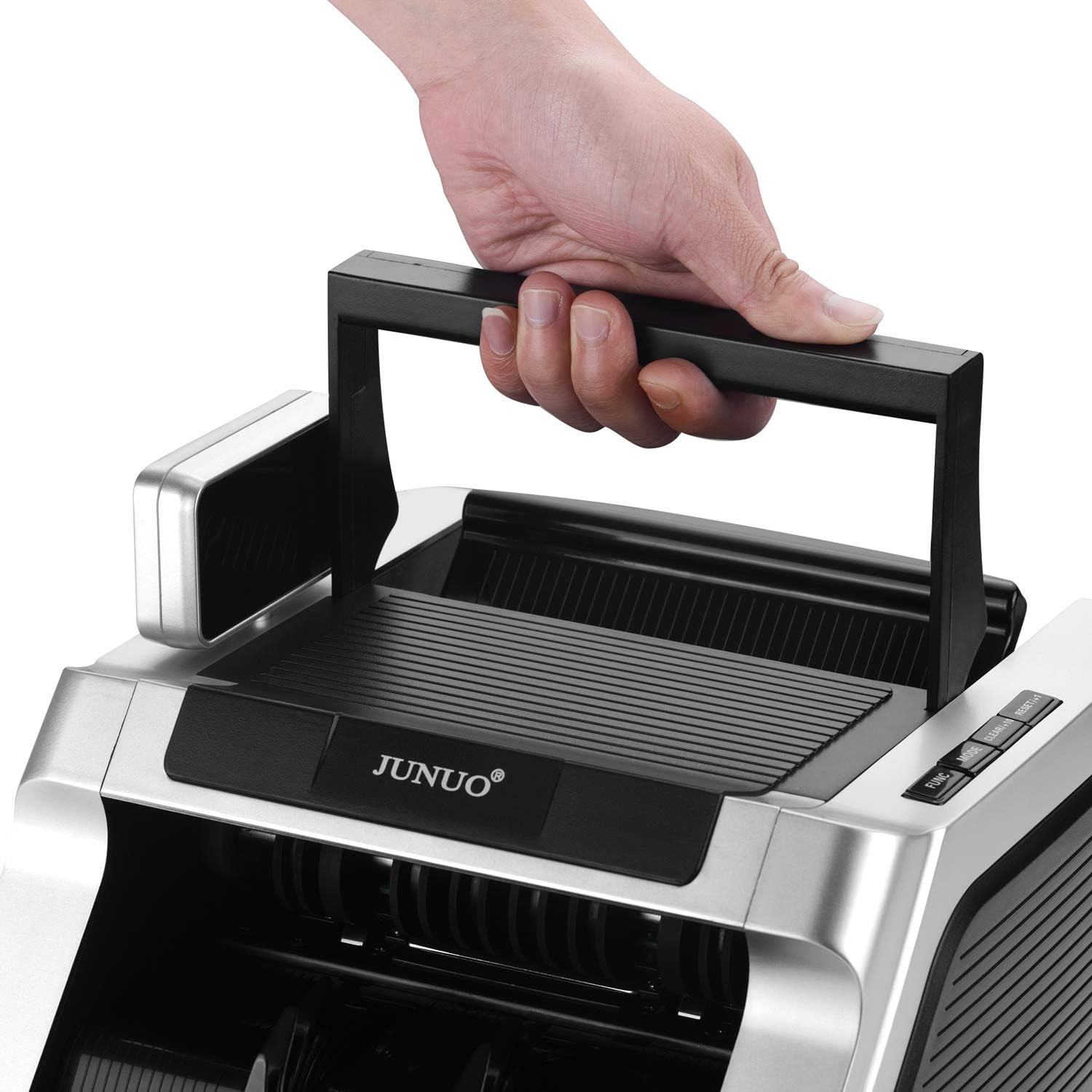
Figure 4: Retractable handle for convenient transport
5. Setup
- Unpacking: Carefully remove the money counter and all accessories from the packaging.
- Placement: Place the machine on a stable, flat, and dry surface, ensuring adequate ventilation.
- Power Connection: Connect the power cord to the power socket on the back of the machine, then plug the other end into a suitable electrical outlet.
- Initial Power On: Flip the power switch to the 'ON' position. The machine will perform a self-diagnostic test. Ensure the display lights up and no error codes are shown.
6. Operating Instructions
6.1 Basic Counting
- Ensure the machine is powered on and in standby mode.
- Place a stack of bills neatly into the hopper. Ensure bills are aligned and not folded or wrinkled.
- The machine will automatically start counting. The count will be displayed on the screen.
- Once counting is complete, remove the counted bills from the stacker.
Important Note: This machine counts the number of bills only. It does not display a total monetary value.
6.2 Counterfeit Detection
The JUNUO C05 features three detection methods that can be used simultaneously or separately:
- UV (Ultraviolet) Detection: Checks for UV security features present in genuine banknotes.
- MG (Magnetic) Detection: Verifies magnetic ink patterns on banknotes.
- IR (Infrared) Detection: Detects infrared security features, including half-note and chain-note detection.
If a suspicious bill is detected, the machine will stop, and an error code will appear on the display. Remove the suspect bill and press the 'RESET' button to resume counting.

Figure 5: Display indicating active UV and MG detection
6.3 Operating Modes
Use the control panel buttons to select different operating modes:
- ADD Mode: Press the 'ADD' button. The machine will accumulate the count of multiple batches. The total count will be displayed.
- BATCH Mode: Press the 'BATCH' button. Use the numeric keys (if available) or repeated presses to set a desired batch quantity (e.g., 100 bills). The machine will stop counting once the set quantity is reached. Remove the batch and press 'START' to continue counting the next batch.
- RESET/CLEAR: Press 'RESET' or 'CLEAR' to clear the current count or error message and return to standby mode.
7. Maintenance
Regular maintenance ensures optimal performance and longevity of your money counter.
7.1 Cleaning
- Power Off: Always turn off and unplug the machine before cleaning.
- Dust Removal: Use the provided cleaning brush or a soft, dry cloth to remove dust and debris from the hopper, stacker, and internal sensors. Pay special attention to the bill path.
- Sensor Cleaning: Gently wipe the UV, MG, and IR sensors with a soft, lint-free cloth. Avoid using abrasive materials or harsh chemicals.
7.2 Storage
When not in use, store the machine in a clean, dry, and dust-free environment. Cover it to prevent dust accumulation.
8. Troubleshooting
Refer to the table below for common issues and their solutions:
| Problem | Possible Cause | Solution |
|---|---|---|
| Machine does not power on. | Power cord not connected; power switch off; no power from outlet. | Check power cord connection; ensure power switch is ON; test outlet with another device. |
| Bills jam frequently. | Bills are wrinkled, folded, or poorly stacked; bill feeding gap incorrect; dust on sensors. | Straighten bills and stack neatly; adjust the bill feeding gap using the knob; clean sensors. |
| Inaccurate counting. | Dust on sensors; bills not properly aligned. | Clean sensors thoroughly; ensure bills are neatly stacked and aligned in the hopper. |
| Counterfeit detection errors (false positives). | Dust on sensors; heavily worn or damaged bills. | Clean sensors; try counting the bill again or manually inspect it. |
9. Specifications
| Feature | Detail |
|---|---|
| Brand | JUNUO |
| Model Number | C05 |
| Counting Speed | Up to 1000 bills per minute |
| Hopper Capacity | 100 bills |
| Detection Methods | UV (Ultraviolet), MG (Magnetic), IR (Infrared) |
| Power Consumption | Less than 60W (working), less than 3W (idle) |
| Noise Level | Less than 60 dB |
| Item Weight | Approximately 11.38 pounds |
| Package Dimensions | Approximately 14 x 11.25 x 9.25 inches |
10. Warranty and Support
The JUNUO C05 Money Counter comes with a 1-year warranty from the date of purchase. This warranty covers manufacturing defects and ensures reliable operation under normal use conditions.
For technical support, warranty claims, or service inquiries, please refer to the contact information provided with your purchase documentation or visit the official JUNUO website.