
1. Introduction
This manual provides essential information for the safe and efficient installation, operation, and maintenance of your Schneider Electric PowerLogic PM5350 Power Meter. Please read this manual thoroughly before using the device and retain it for future reference. The PM5350 is designed for accurate measurement and monitoring of electrical parameters in various applications.
2. Important Safety Information
Always observe the following safety precautions to prevent injury and damage to the device:
- Installation and servicing must be performed by qualified personnel only.
- Disconnect all power to the equipment before installing, servicing, or removing the device.
- Use appropriate personal protective equipment (PPE) when working with electrical systems.
- Ensure all wiring complies with local and national electrical codes.
- Do not operate the device if it appears damaged.
3. Product Overview
The Schneider Electric PowerLogic PM5350 is a compact and versatile power meter designed for precise energy measurement. It features a clear digital display and intuitive controls for easy navigation and data retrieval.
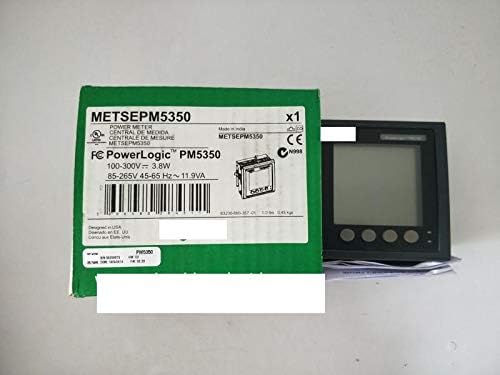
The image displays the Schneider Electric PowerLogic PM5350 Power Meter, a compact digital device designed for energy measurement. It is shown alongside its green product packaging, which details specifications such as '100-300V~ 3.8W' and '85-265V 45-65 Hz~ 11.9VA'. The meter features a digital display and four control buttons on its front panel.
Key Features:
- Accurate measurement of electrical parameters (voltage, current, power, energy).
- Digital display for clear data visualization.
- User-friendly interface with navigation buttons.
- Compact design for easy integration.
4. Installation and Setup
4.1 Unpacking
Carefully remove the PM5350 Power Meter from its packaging. Inspect the device for any signs of damage. Retain the packaging for future transport or storage.
4.2 Mounting
The PM5350 is designed for panel mounting. Ensure adequate space for ventilation and access to wiring terminals. Refer to the mounting template (if provided separately) for precise panel cutout dimensions.
4.3 Wiring
All wiring must be performed by a qualified electrician. Ensure power is disconnected before making any connections. Connect the voltage and current inputs according to the wiring diagrams provided in the full technical documentation. Pay close attention to phase rotation and current transformer (CT) polarity.
5. Operating Instructions
5.1 Powering On
Once correctly wired and power is restored, the PM5350 will power on automatically. The display will typically show a startup sequence followed by the default measurement screen.
5.2 Navigating the Display
Use the navigation buttons located on the front panel to scroll through different measurement screens. Typically, there are buttons for 'Up', 'Down', 'Enter', and 'Escape' or similar functions. Refer to the on-screen prompts for specific menu navigation.
5.3 Reading Measurements
The display will show various electrical parameters such as voltage (V), current (A), active power (W), reactive power (VAR), apparent power (VA), power factor (PF), and energy (kWh). The specific parameters displayed and their units will be indicated on the screen.
6. Maintenance
The PM5350 Power Meter requires minimal maintenance.
- Cleaning: Use a soft, dry cloth to clean the display and casing. Do not use abrasive cleaners or solvents.
- Inspection: Periodically inspect wiring connections for tightness and signs of wear or damage.
- Calibration: The device is factory calibrated. Recalibration should only be performed by authorized service personnel if accuracy issues are suspected.
7. Troubleshooting
Refer to the table below for common issues and their potential solutions:
| Problem | Possible Cause | Solution |
|---|---|---|
| No display/No power | No power supply; Incorrect wiring | Check power connections; Verify wiring according to diagrams. |
| Incorrect readings | Incorrect CT ratio setting; Wiring error; Faulty CT | Verify CT ratio in settings; Recheck wiring; Test or replace CT. |
| Buttons unresponsive | Temporary software glitch; Physical damage | Cycle power to the device; Contact support if issue persists. |
8. Technical Specifications
- Voltage Input Range: 100-300V~
- Power Consumption: 3.8W
- Auxiliary Power Supply: 85-265V AC/DC
- Frequency Range: 45-65 Hz
- Apparent Power Consumption: 11.9VA
- Model Number: PM5350
9. Warranty and Support
Schneider Electric products are manufactured to high standards and are covered by a limited warranty. For specific warranty terms and conditions, please refer to the documentation included with your purchase or visit the official Schneider Electric website. For technical support, service, or spare parts, please contact your local Schneider Electric representative or authorized distributor. You may also find additional resources online using the product identifier: 3606480284311.


