
Lumie NBCGA-1000
Lumie Bodyclock Glow 150 Instruction Manual
Model: NBCGA-1000
Introduction
Welcome to your Lumie Bodyclock Glow 150. This device is designed to help regulate your sleep-wake cycle naturally through light and sound, providing a gentle and effective way to wake up and wind down.

Image: Front view of the Lumie Bodyclock Glow 150, showcasing its spherical design and central digital display. The display shows the time 07:00 and various icons for settings.
Setup Guide
- Unpacking: Carefully remove the Bodyclock Glow 150 from its packaging. Ensure all components, including the power cable, are present.
- Placement: Place the unit on a stable, flat surface, such as a bedside table, within reach of a power outlet. For optimal effect, position it where the light can reach your eyes naturally.
- Power Connection: Connect the provided power cable to the DC input port on the back of the Bodyclock Glow 150. Plug the other end into a standard electrical outlet.
- Initial Power On: The display will illuminate upon connection. The time will likely need to be set.
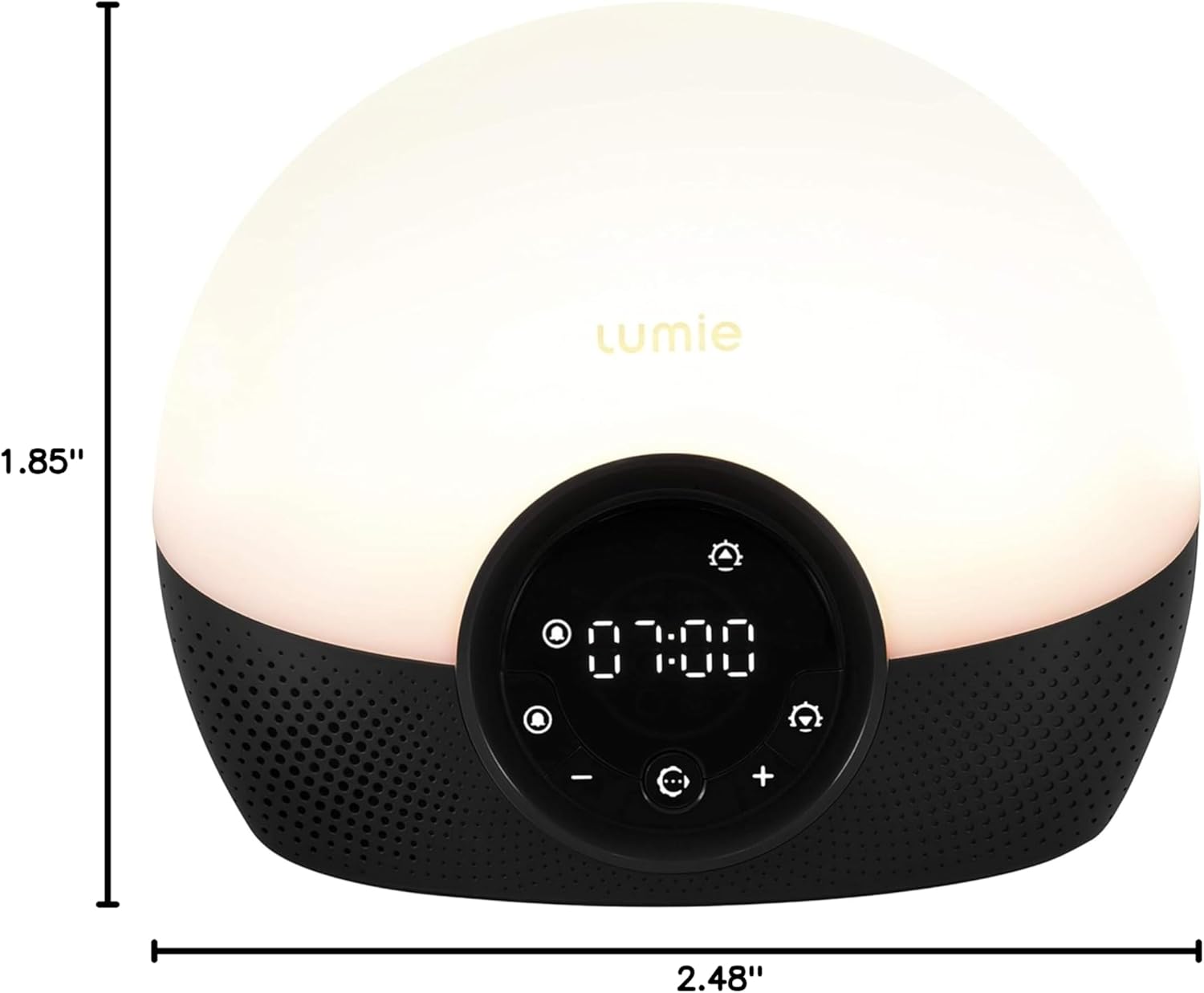
Image: The Lumie Bodyclock Glow 150 shown with its physical dimensions: Height 6.3 inches, Width 7.5 inches, Depth 4.7 inches, and Weight 1.25 lbs.
Operating Instructions
Setting the Time
- Press and hold the Settings button (gear icon) until the time display flashes.
- Use the + and - buttons to adjust the hour. Press Settings again to confirm.
- Use the + and - buttons to adjust the minute. Press Settings again to save.
Setting the Alarm (Sunrise Simulation)
- Press and hold the Alarm button (bell icon) until the alarm time flashes.
- Adjust the alarm hour and minute using the + and - buttons, confirming each with the Alarm button.
- Select the sunrise duration (20, 30, or 45 minutes) and final light intensity.
- Choose your preferred wake-up sound from the 10 available options (e.g., birdsong, white noise).
- Press the Alarm button one last time to activate the alarm. A small alarm icon will appear on the display.

Image: A woman is shown in bed, gently waking up as the Lumie Bodyclock Glow 150 emits a bright light. The image highlights the option to wake up with light only or with one of 10 wake sounds, and mentions the tap-control snooze feature.
Sunset Simulation (Wind-Down)
- Press the Sunset button (moon icon) to activate the sunset simulation.
- The light will gradually dim over a chosen duration (20, 30, or 45 minutes), mimicking a natural sunset.
- You can select a sleep sound to accompany the dimming light.

Image: A woman is shown sleeping peacefully in bed, with the Lumie Bodyclock Glow 150 on her bedside table. The clock's display is dark, illustrating its light-sensitive auto-dimming feature that tracks the room's light level and turns off in darkness.
Night Light Function
The Bodyclock Glow 150 can function as a night light. The auto-dimming display adjusts to the light level in your room and can turn off completely when the room is dark, providing a calming environment.
Tap-Control Snooze
To snooze the alarm, simply tap the top of the unit. This will provide an additional 9 minutes of sleep before the alarm sounds again.
Adjusting Brightness and Volume
Use the + and - buttons to adjust the brightness of the light or the volume of the sounds during operation or setup.
Official Product Video: Lumie Bodyclock Glow 150 Overview
Video: This official Lumie video provides a comprehensive overview of the Bodyclock Glow 150, demonstrating its sunrise and sunset simulation features, sound options, and overall functionality to enhance sleep and wakefulness.
Maintenance
- Cleaning: To clean the unit, unplug it from the power outlet. Use a soft, dry cloth to wipe the surface. Do not use abrasive cleaners or solvents.
- Storage: If storing the device for an extended period, ensure it is clean and dry. Store it in a cool, dry place away from direct sunlight.
- Bulb Replacement: The Lumie Bodyclock Glow 150 uses long-lasting LED bulbs that are not user-replaceable. If you experience issues with the light, please refer to the troubleshooting section or contact customer support.
Troubleshooting
| Problem | Possible Cause | Solution |
|---|---|---|
| Device does not power on. | Power cable not properly connected or no power from outlet. | Check power cable connection. Try a different power outlet. |
| Alarm does not sound or light up. | Alarm not activated or set incorrectly. | Ensure the alarm icon is visible on the display. Re-set the alarm time and sound. |
| Display is too bright/dim or off. | Auto-dimming feature or manual brightness setting. | Tap the unit to temporarily illuminate the display. Adjust display brightness in settings if available, or ensure room lighting is appropriate for auto-dimming. |
| Sounds are too loud/quiet. | Volume setting. | Use the + and - buttons to adjust the volume. |
Specifications
- Brand: Lumie
- Model: NBCGA-1000
- Color: Black
- Display Type: Digital
- Style: Modern, Compact
- Special Features: Sunrise and sunset simulation, 10 sleep/wake sounds, tap-control snooze, fade-to-off or fade-to nightlight option
- Product Dimensions: 7.5" W x 6.3" H (1.85" D x 2.48" H x 2.95" W, 1.25 lbs)
- Power Source: Corded Electric
- Room Type: Bedroom
- Material: Plastic
- Type of Bulb: LED
- Wattage: 15 watts
- Color Temperature: 2700 Kelvin
- Included Components: Power Cable
Warranty Information
The Lumie Bodyclock Glow 150 comes with a Limited Warranty. For specific details regarding the warranty period and coverage, please refer to the documentation included with your product or visit the official Lumie website.
Customer Support
For further assistance, technical support, or inquiries about your Lumie Bodyclock Glow 150, please visit the official Lumie website or contact their customer service department. Contact information can typically be found on the product packaging or the Lumie website.
Online Support: Visit the Lumie Store on Amazon
Related documentsNBCGA-1000


Ask a question about this manual
Ask about setup, troubleshooting, compatibility, parts, safety, or missing instructions. Manuals+ will review the question and use this page’s manual context to help answer it.