
YOCUNKER eggreh-001
YOCUNKER 3-in-1 Qi Fast Wireless Charging Station User Manual
Model: eggreh-001
1. Introduction
The YOCUNKER 3-in-1 Qi Fast Wireless Charging Station is designed to provide a convenient and efficient charging solution for multiple compatible devices simultaneously. This station supports wireless charging for Apple iPhones, Apple Watches, and AirPods (with wireless charging case). It features a stable design and incorporates safety mechanisms to protect your devices during charging.

Image 1: YOCUNKER 3-in-1 Wireless Charging Station with an iPhone, Apple Watch, and AirPods charging.
2. Package Contents
Please verify that all items are present in the package:
- YOCUNKER 3-in-1 Wireless Charging Station
- USB-C Charging Cable (Power adapter not included)
- User Manual
3. Specifications
| Product Dimensions | 5.35 x 3.11 x 4.65 inches |
| Item Weight | 6 ounces |
| Model Number | eggreh-001 |
| Input Voltage | 9 Volts |
| Amperage | 2 Amps |
| Connector Type | Proprietary (USB-C cable included) |
| Special Features | Magnetic, Short Circuit Protection, Over-voltage Protection, Overcurrent Protection, Over-temperature Control, Foreign Object Detection |
4. Setup Instructions
- Connect Power Adapter: Connect the provided USB-C charging cable to the charging station. For optimal fast charging of all three devices simultaneously, a QC3.0 (Quick Charge 3.0) power adapter (not included) is highly recommended. A standard 5V/1A adapter may result in slower charging or inability to charge all devices at once.
- Plug into Power Outlet: Plug the power adapter into a wall outlet.
- Placement: Place the charging station on a flat, stable surface.

Image 2: Illustration emphasizing the recommendation of a QC 3.0 adapter for optimal performance.
5. Operating Instructions
This charging station allows for simultaneous wireless charging of your compatible iPhone, Apple Watch, and AirPods.
- Charging iPhone: Place your iPhone vertically or horizontally on the main charging pad. Ensure the phone's charging coil aligns with the charging area on the stand. The green indicator light will illuminate for 20 seconds to confirm charging has begun.
- Charging Apple Watch: Place your Apple Watch on the dedicated watch charging module. The watch will magnetically attach and begin charging.
- Charging AirPods: Place your AirPods (with wireless charging case) on the flat base charging pad. Ensure the case is centered on the pad.
The charging station supports both vertical and horizontal phone placement, allowing for convenient viewing of content or video calls while charging.
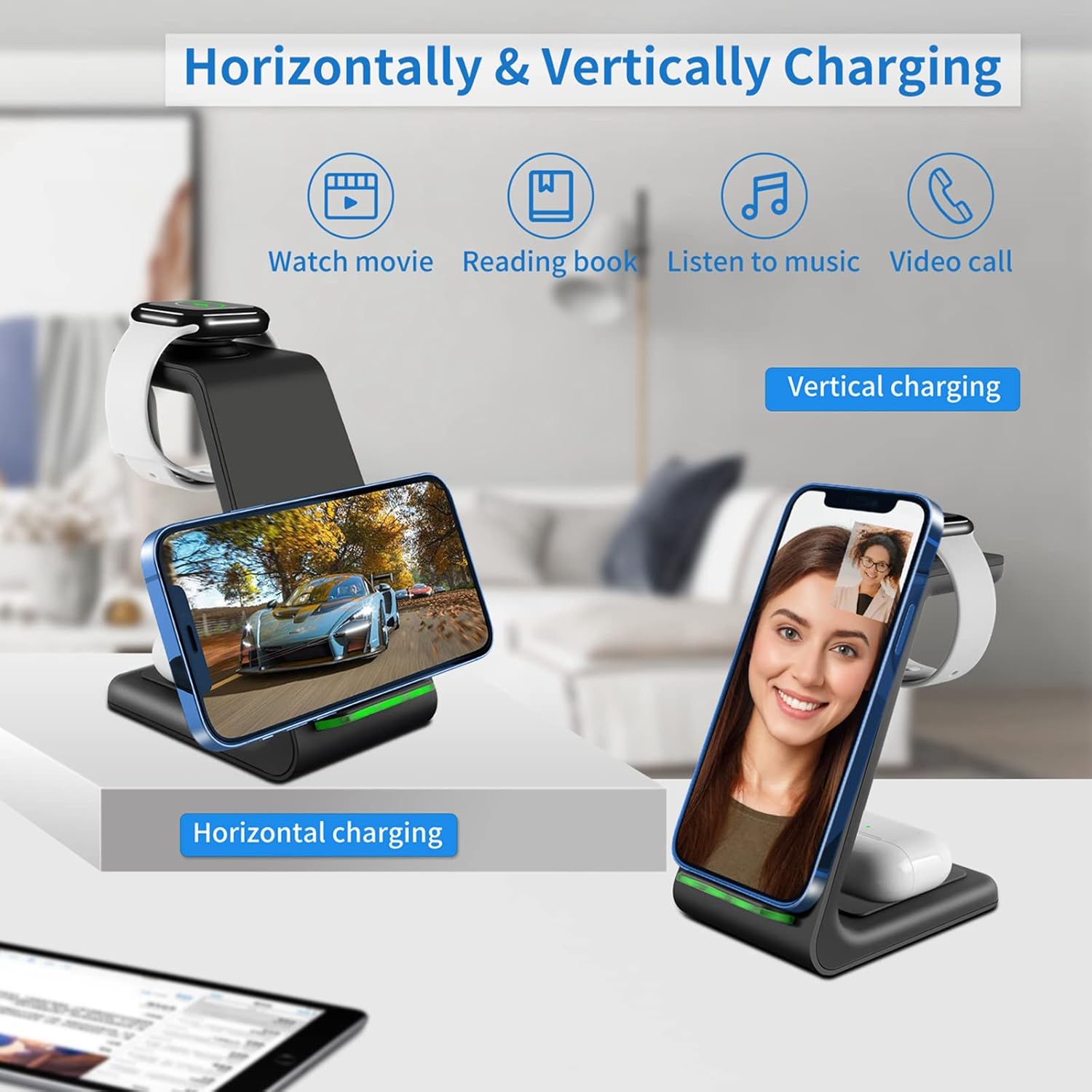
Image 3: The charging station supports both vertical and horizontal phone charging orientations.

Image 4: Close-up views of the distinct charging areas for iPhone, Apple Watch, and AirPods.
6. Device Compatibility
This charging station is compatible with a wide range of Qi-enabled devices:
- Apple iPhones (7.5W Fast Charging): iPhone 14/13/13 Pro/13 Pro Max/12/12 Pro/12 Pro Max (Note: Not compatible with iPhone 13/12 mini due to size), 11/11 Pro/11 Pro Max, XS/XS MAX/XR/X/8/8 Plus.
- Apple Watch: Series 8/7/SE/6/5/4/3/2 (38mm/42mm).
- Apple AirPods: AirPods 2/3/Pro (requires wireless charging case).
- Samsung Galaxy (10W Fast Charging): S22/S21/S20/S10/S10 Plus/S10e, S9/S9+/S8/S8+, S7/S7 Edge, S6 Edge Plus, Note 20/Note 10/Note 9/Note 8/Note 7/Note 5.
- Other Qi-enabled Phones: LG G7 V30 V35 V40, Google Pixel 3/3XL, Nexus 4/5/6, Sony Xperia Z3v/XZ2/XZ2 Premium/XZ3, and other Qi-certified smartphones.
Note: This charger does not support Galaxy Watch models.

Image 5: Visual guide to device compatibility for the YOCUNKER charging station.
7. Safety Information
- Always use a QC3.0 power adapter (5V/2A or higher) for optimal and safe charging, especially when charging multiple devices.
- Ensure your device is equipped with Qi wireless charging function before placing it on the charger.
- Remove phone cases thicker than 5mm, metal cases, magnetic cases, pop sockets, credit cards, or any metallic/magnetic objects from your device before charging. These can interfere with charging and cause overheating.
- Do not place the charger in environments with high temperature, humidity, strong static electricity, or strong magnetic fields. Use indoors in a dry environment.
- Do not disassemble or modify the charging station.
- Keep out of reach of children.
- Unplug the charger when not in use or during electrical storms.

Image 6: Important considerations for phone cases and accessories during wireless charging.

Image 7: The charging station is equipped with multiple safety protections and certifications.
8. Troubleshooting
- Device not charging or charging slowly:
- Ensure you are using a QC3.0 power adapter (not included). A standard 5V/1A adapter may not provide sufficient power.
- Verify that your device is Qi-enabled.
- Check for proper alignment of your device on the charging pad. The charging area is typically in the middle of the device.
- Remove any phone cases thicker than 5mm, metal cases, magnetic accessories, or credit cards.
- Ensure there are no foreign objects between the device and the charging pad.
- Restart the charging station by unplugging and re-plugging the power adapter.
- Device or charger overheating:
- Remove any interfering objects (cases, metal, magnets).
- Ensure proper ventilation around the charging station.
- If overheating persists, discontinue use and contact customer support.
- LED indicator light is too bright:
- The green light indicates charging and automatically turns off after 20 seconds. If it remains on or is disruptive, consider placing the charger in a less visible location or using a small piece of opaque tape to cover the light.
- Apple Watch not charging to 100%:
- Ensure the Apple Watch is correctly seated on the magnetic charging module.
- Verify the power adapter is QC3.0. Insufficient power can affect charging completion.
9. Maintenance
- Clean the charging station regularly with a soft, dry cloth.
- Do not use harsh chemicals or abrasive cleaners.
- Keep the charging ports free of dust and debris.
10. Warranty and Support
For warranty information or technical support, please refer to the documentation included with your purchase or contact the seller directly. You may also visit the YOCUNKER brand store on Amazon for further assistance:
Ask a question about this manual
Ask about setup, troubleshooting, compatibility, parts, safety, or missing instructions. Manuals+ will review the question and use this page’s manual context to help answer it.