
1. Introduction
The Elitech Tlog B100EH is a wireless temperature and humidity data logger designed for precise environmental monitoring. It features an external sensor, a large recording capacity of 32,000 points, and the ability to generate PDF reports. This manual provides detailed instructions for the setup, operation, maintenance, and troubleshooting of your device.

Image 1.1: Elitech Tlog B100EH Data Logger with external temperature and humidity sensor.
2. Product Overview
Familiarize yourself with the components of your Tlog B100EH data logger.

Image 2.1: Key components of the Elitech Tlog B100EH, including the external sensor, LED indicators, LCD screen, control buttons, and USB cover.
- External Sensor: Measures temperature and humidity.
- LED Indicator (Mode): Indicates device status (e.g., logging, stopped).
- LED Indicator (Alarm): Indicates if recorded data exceeds set alarm thresholds.
- LCD Screen: Displays current readings, battery status, and logging status.
- START Button: Initiates data logging.
- STOP Button: Halts data logging.
- USB Cover: Protects the integrated USB connector for PC connection.
3. Setup
3.1 Battery Installation
The Tlog B100EH uses a replaceable lithium battery (included). Ensure the battery is correctly installed before first use.

Image 3.1: Rear view of the data logger showing the battery compartment. Ensure proper battery orientation.
3.2 Software and App Installation
To configure the data logger and view detailed reports, install the Elitech software on your computer or the Elitech App on your iOS/Android device.
- PC Software: Download the Elitech data management software from the official Elitech website. Follow the on-screen instructions for installation.
- Mobile App: Search for 'Elitech' in the Apple App Store or Google Play Store and install the application.
3.3 Initial Configuration
Before starting a new logging session, connect the device to your computer via USB or pair it with the Elitech App via Bluetooth to set parameters.

Image 3.2: The data logger connected to a computer via USB and displaying data on a mobile application.
Using the software/app, you can configure:
- Logging interval
- Start/Stop mode
- Alarm thresholds for temperature and humidity
- Delay start time
- Unit of measurement (°C/°F)
4. Operating Instructions
4.1 Starting and Stopping Logging
The Tlog B100EH features a button recess design to prevent accidental activation or deactivation during transport.
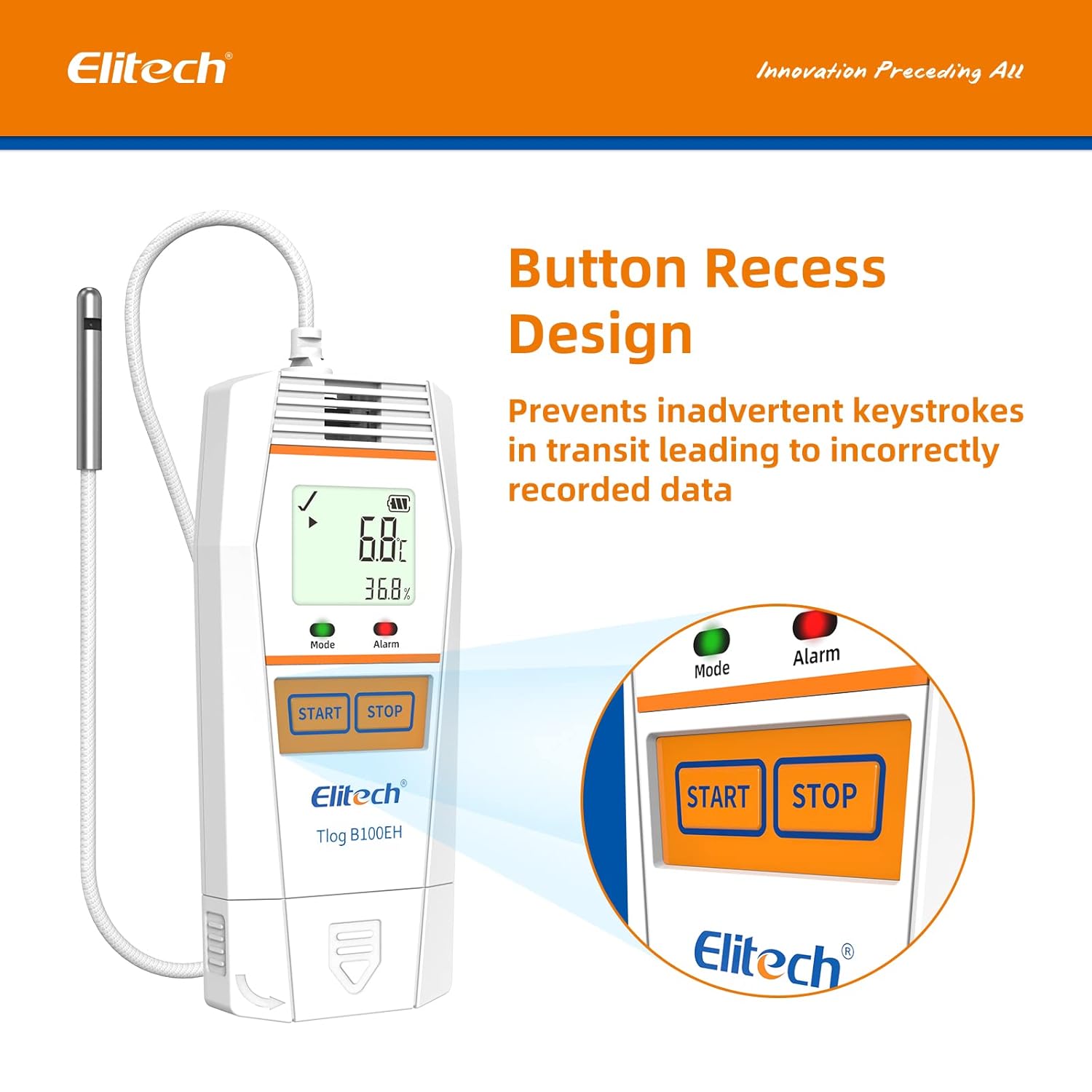
Image 4.1: Close-up view of the recessed START and STOP buttons on the data logger.
- To Start Logging: Press and hold the START button until the 'Mode' LED flashes green, indicating logging has begun.
- To Stop Logging: Press and hold the STOP button until the 'Mode' LED stops flashing, indicating logging has ceased.
4.2 Monitoring Data
The LCD screen displays real-time temperature and humidity readings, battery level, and logging status. The 'Alarm' LED will illuminate if readings exceed configured thresholds.
4.3 Data Export and Report Generation
After logging is complete, connect the data logger to a computer via USB or use the Elitech App to download the recorded data.

Image 4.2: Data export interface showing the data logger connected to a computer and a mobile device, illustrating multi-format data export options.

Image 4.3: Icons representing the available data report formats: PDF, Excel, and TXT.
The software/app allows you to generate reports in various formats, including PDF, Excel, and TXT, for analysis and record-keeping.
5. Maintenance
5.1 Battery Replacement
When the battery indicator on the LCD shows low power, replace the lithium battery to ensure continuous operation. Refer to Section 3.1 for battery access.
5.2 Cleaning
Wipe the device with a soft, dry cloth. Do not use abrasive cleaners or immerse the device in water.
5.3 Storage
Store the data logger in a cool, dry place away from direct sunlight and extreme temperatures when not in use.
6. Troubleshooting
- Device not turning on: Check battery installation and charge level. Replace battery if necessary.
- Cannot connect via Bluetooth: Ensure Bluetooth is enabled on your mobile device and the data logger is within range. Restart both devices and try pairing again.
- Data not logging: Verify that logging was initiated correctly by checking the 'Mode' LED. Ensure sufficient memory is available.
- Inaccurate readings: Ensure the external sensor is clean and unobstructed. Avoid placing the sensor in direct sunlight or near heat sources.
- Software/App issues: Ensure you have the latest version of the software/app. Refer to the Elitech support website for common software issues.
For further assistance, contact Elitech customer support.
7. Specifications

Image 7.1: Physical dimensions and operational temperature/humidity ranges of the data logger.

Image 7.2: Details on sensor accuracy, resolution, and total data logging capacity.

Image 7.3: Visual representation of the temperature and humidity sensor accuracy.
| Feature | Detail |
|---|---|
| Model Number | Tlog B100EH |
| Temperature Range | -40°F to 185°F (-40°C to 85°C) |
| Humidity Range | 10% to 90% RH |
| Temperature Accuracy | ±0.6℉ (±0.3°C) |
| Humidity Accuracy | ±3% RH |
| Recording Capacity | 32,000 points |
| Battery Type | 1 Lithium Metal battery (included) |
| Product Dimensions | 6.12 x 1.85 x 0.64 inches |
| Item Weight | 4.97 ounces (0.14 Kilograms) |
| Mounting Type | Tabletop |
7.1 Quality Certifications

Image 7.4: Overview of Elitech's quality certifications, including WHO PQS, FDA, and NIST compliance.
The Elitech Tlog B100EH complies with various quality standards, including:
- World Health Organization PQS Approved
- FDA21 CFR Part 11 Compliance
- ISO9001:2015

Image 7.5: Example of a calibration certificate, showing calibration and expiration dates.
Calibration certificates are available upon request. Please contact Elitech customer support for details.
8. Warranty
Elitech provides a standard manufacturer's warranty for this product. Please refer to the warranty card included with your purchase or visit the official Elitech website for detailed warranty terms and conditions.
9. Support
For technical assistance, troubleshooting, or any inquiries regarding your Elitech Tlog B100EH data logger, please contact Elitech customer support. 24/7 US Technician Support is available via email and phone.
- Email: Refer to your product packaging or the Elitech website for contact information.
- Phone: Refer to your product packaging or the Elitech website for contact information.
- Online Resources: Visit the official Elitech website for FAQs, software downloads, and additional support materials.


