
1. Introduction
This manual provides essential information for the safe and efficient operation of your LEPOTEC 54 LED Motion Sensor Under Cabinet Light. Please read these instructions thoroughly before use and retain for future reference.
The LEPOTEC Under Cabinet Light features 54 hidden LED lamp beads, offering up to 350 lumens of glare-free illumination. It includes an infrared motion sensor, a 2500mAh rechargeable battery, and magnetic installation for versatile use in various indoor settings.
2. Package Contents
Verify that all items listed below are included in your package:
- LEPOTEC 54 LED Motion Sensor Light (2 units)
- USB Charging Cable (2 units)
- 3M Adhesive Magnetic Strips (4 units)
- Instruction Manual

Image: Contents of the LEPOTEC 54 LED Motion Sensor Light package, including two light bars, USB cables, and adhesive magnetic strips.
3. Product Features
- Super Bright & Glare-free LED: Equipped with 54 hidden LED lamp beads, providing up to 350 lumens of natural, soft, and non-blinding light.
- Infrared Motion Sensor: Features a motion sensor with three modes: Motion Sensor Mode (G mode), Always-On Mode (ON mode), and Off Mode. In G mode, the light automatically turns on when motion is detected within 16 feet in dark conditions and turns off after 20 seconds of no motion.
- Easy Installation: Built-in magnets allow direct attachment to iron surfaces. For non-iron surfaces, use the included 3M adhesive magnetic strips. No tools, screws, or nuts are required.
- Rechargeable Battery: Integrated 2500mAh high-capacity battery provides up to 6 hours of continuous light in ON mode or 2-4 weeks in G mode on a full charge. Easily rechargeable via USB.
- Versatile Application: Ideal for various indoor locations such as bedrooms, bathrooms, kitchens, closets, cabinets, corridors, workshops, basements, garages, and stairwells.
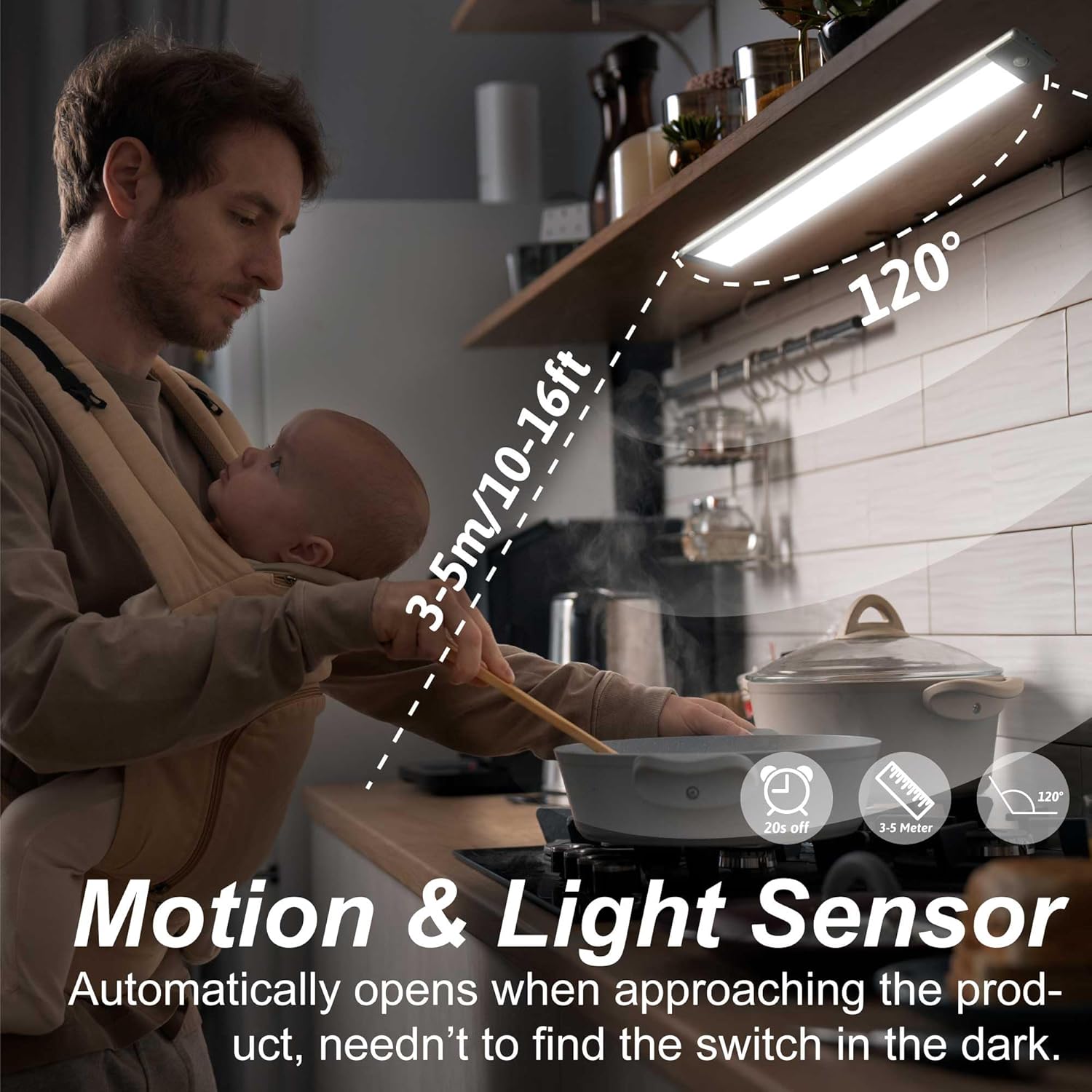
Image: Diagram illustrating the motion and light sensor's detection range of 3-5 meters (10-16 feet) and its 120-degree sensing angle.

Image: Illustration of intelligent sensing, showing the light remaining off during strong daylight and activating automatically when light is weak and motion is detected at night.

Image: Detailed view of the light bar, highlighting the three working modes (OFF, G for motion sensor, ON for constant lighting), the USB charging port, and product dimensions (12.67 inches long, 1.69 inches wide, 0.43 inches thick).
4. Setup & Installation
4.1 Initial Charge
Before first use, fully charge the light using the provided USB cable. The charging port is located on the side of the light bar. A red indicator light signifies charging, and a green light indicates a full charge.
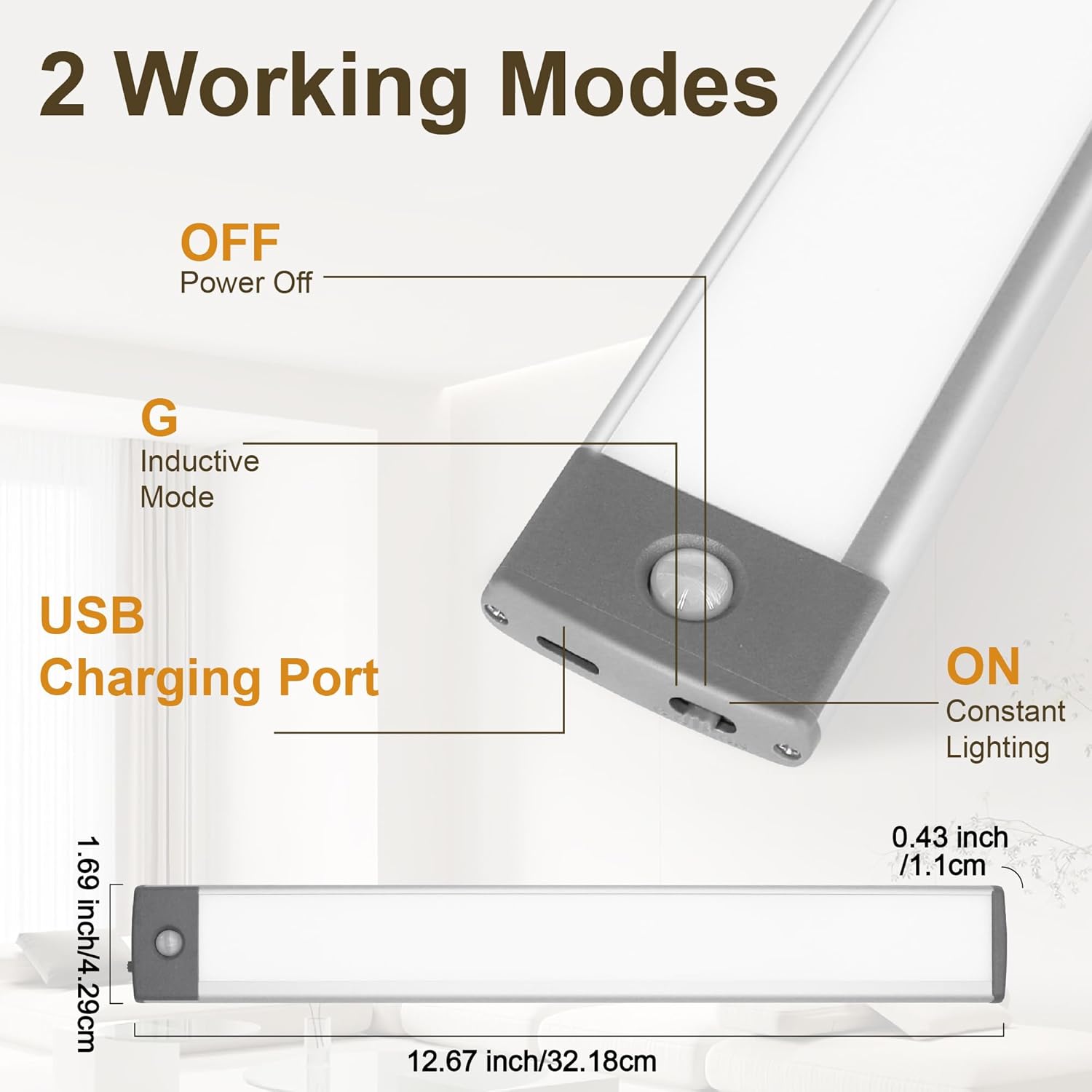
Image: Close-up of the light's end, showing the USB charging port and indicator lights (red for charging, green for fully charged).
4.2 Mounting the Light
The LEPOTEC light offers two convenient installation methods:
- Method 1: Magnetic Adsorption (for iron surfaces)
The light has a built-in magnet on its back. Simply place the light directly onto any iron surface (e.g., metal shelves, refrigerator sides). No additional accessories are needed.
- Method 2: Adhesive Magnetic Strip (for non-iron surfaces)
For non-iron surfaces (e.g., wood cabinets, walls), use the included 3M adhesive magnetic strips. Peel off the protective film from one side of the magnetic strip and firmly press it onto the desired clean, dry surface. Then, attach the light bar to the magnetic strip. The light can be easily removed for charging or repositioning.

Image: Visual guide demonstrating both magnetic installation methods: direct attachment to an iron surface and using the adhesive magnetic strip for non-iron surfaces.
5. Operating Instructions
The LEPOTEC light features a three-position switch to select its operating mode:
- OFF Mode: Slide the switch to the "OFF" position to turn off the light completely.
- ON Mode (Constant Lighting): Slide the switch to the "ON" position for continuous illumination. In this mode, the light will remain on until manually switched off or to another mode.
- G Mode (Motion Sensor Mode): Slide the switch to the "G" position to activate the motion sensor.
- The light will automatically turn on when motion is detected within 10-16 feet (3-5 meters) in low-light conditions.
- It will automatically turn off approximately 20 seconds after no motion is detected.
- The sensor is designed to activate only in low-light environments to conserve battery life.
Video: An official LEPOTEC video demonstrating the motion sensor lighting in various applications, including opening a closet and walking into a hallway, showcasing the automatic light activation.
6. Maintenance
- Charging: Recharge the light when the brightness diminishes or the indicator light signals low battery. Use the provided USB cable and a standard USB power source (e.g., computer, power bank, USB wall adapter).
- Cleaning: Wipe the light's surface with a soft, dry cloth. Avoid using abrasive cleaners or solvents that could damage the finish or electronic components.
- Storage: If storing the light for an extended period, ensure it is fully charged and stored in a cool, dry place.
7. Troubleshooting
| Problem | Possible Cause | Solution |
|---|---|---|
| Light does not turn on. | Low battery; Incorrect mode selection; Ambient light too bright (in G mode). | Charge the light fully; Ensure switch is in "ON" or "G" mode; Test in a darker environment for G mode. |
| Light turns on unexpectedly. | Motion detected; Sensor is too sensitive or in a high-traffic area. | Ensure no motion is present; Reposition the light or switch to "OFF" mode if not needed. |
| Short battery life. | Frequent activation; Constant "ON" mode usage; Battery degradation over time. | Use "G" mode for energy saving; Ensure full charge; Battery life naturally decreases with age. |
| Light does not stick firmly. | Surface is dirty or uneven; Adhesive strip is worn. | Clean and dry the surface thoroughly before applying; Replace with new 3M adhesive strips if necessary. |
8. Specifications
| Feature | Detail |
|---|---|
| Brand | LEPOTEC |
| Model Number | 54 LED Motion Sensor Light |
| Light Source Type | LED (54 beads) |
| Brightness | 350 Lumens |
| Color Temperature | 7000 Kelvin (Cool White) |
| Power Source | Battery Powered |
| Battery Capacity | 2500 mAh (Rechargeable) |
| Charging Port | USB |
| Sensor Technology | Infrared (Photosensitive + Thermosensitive induction) |
| Motion Detection Range | Up to 16 feet (3-5 meters) |
| Auto-off Time (G Mode) | 20 seconds (after no motion) |
| Material | Acrylonitrile Butadiene Styrene, Aluminum |
| Product Dimensions | 12.6 inches (W) x 1.7 inches (D) x 0.5 inches (H) |
| Item Weight | 6.6 ounces |
| Installation Type | Magnetic / Surface mounting |
| Indoor/Outdoor Usage | Indoor |
| Water Resistance Level | Not Water Resistant |
9. Warranty & Support
For warranty information or technical support, please refer to the product packaging or contact LEPOTEC customer service directly. Keep your purchase receipt for warranty claims.


