
Jackery Explorer 300
Jackery Explorer 300 Portable Power Station User Manual
Model: Explorer 300
Brand: Jackery
1. Introduction
The Jackery Explorer 300 is a portable power station designed to provide reliable power for various outdoor activities, emergencies, and off-grid living. Equipped with a 293Wh lithium-ion battery pack, it offers multiple output ports to charge and power a wide range of electronic devices and small appliances. Its compact and lightweight design makes it an ideal companion for camping, road trips, hunting, and as a backup power source during blackouts.
This manual provides essential information on the setup, operation, maintenance, and troubleshooting of your Jackery Explorer 300 Portable Power Station. Please read it thoroughly before use to ensure safe and efficient operation.
2. Product Overview
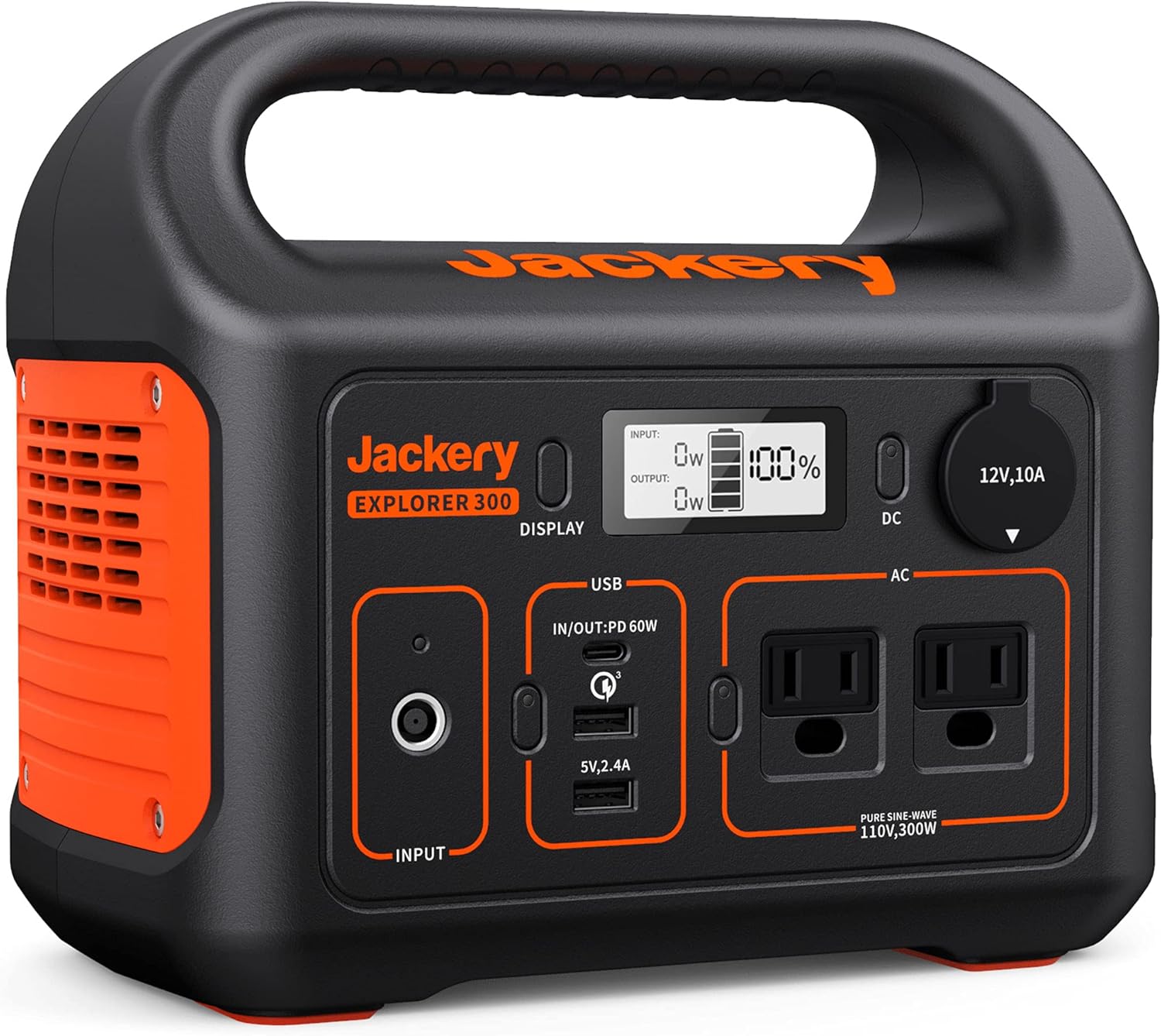
Figure 2.1: Front view of the Jackery Explorer 300 showing input/output ports and display.

Figure 2.2: Jackery Explorer 300 powering multiple devices, including a camera and drone.
2.1 Key Features
- 293Wh Lithium-ion Battery: Provides substantial power capacity for extended use.
- Multiple Output Ports: Includes 2 AC outlets (300W Pure Sine Wave), 1 PD 60W USB-C port (input/output), 1 Fast Charge 3.0 port, 1 USB-A port, and 1 DC car port.
- Fast Recharging: Can recharge 80% battery in just 2 hours using simultaneous wall outlet and 60W PD USB-C input.
- Solar Charging Capability: Compatible with Jackery SolarSaga 100 solar panel, featuring an integrated MPPT controller for efficient solar energy conversion.
- Lightweight and Portable: Weighs only 7.1 pounds, making it easy to transport for various applications.
- Safe & Steady Power Supply: Pure Sine Wave AC outlets ensure stable and safe power for sensitive electronics.
2.2 Package Contents
- 1x Jackery Explorer 300 Portable Power Station
- 1x AC Adapter
- 1x Car Charger Cable
- 1x User Guide (This Manual)
3. Setup
3.1 Initial Charge
Before first use, it is recommended to fully charge your Jackery Explorer 300. This ensures optimal battery performance and longevity.
- Connect the provided AC adapter to the "INPUT" port on the power station.
- Plug the AC adapter into a standard wall outlet.
- The LCD display will show the charging status and battery percentage. The unit is fully charged when the display shows 100%.
- For faster charging, simultaneously connect a 60W PD USB-C cable (not included) to the USB-C port and a compatible PD charger.

Figure 3.1: Jackery Explorer 300 being charged by a Jackery SolarSaga 100 solar panel.
3.2 Charging Options
- Wall Outlet: Use the included AC adapter. Takes approximately 4-5 hours for a full charge.
- Car Charger: Use the included car charger cable to charge from your vehicle's 12V outlet. Ensure the vehicle engine is running to avoid draining the car battery.
- Solar Panel (Optional): Connect a Jackery SolarSaga 100W solar panel (sold separately) to the "INPUT" port. The integrated MPPT controller optimizes solar charging efficiency. Charging time varies based on sunlight intensity.
4. Operating Instructions
4.1 Powering On/Off
To turn on the main unit, press the "DISPLAY" button. The LCD screen will illuminate, showing the battery level and output/input wattage.
To activate specific output ports (DC, USB, AC), press the corresponding button next to the port. A green indicator light will confirm activation.
To turn off a specific output port, press its button again. To turn off the entire unit, press and hold the "DISPLAY" button for a few seconds until the screen turns off.
4.2 Connecting Devices
- AC Outlets: Plug your AC-powered devices (up to 300W continuous, 500W peak) into the two AC outlets. Ensure the AC button is pressed and the green indicator is on.
- USB Ports: Connect your USB devices to the USB-A (5V, 2.4A), Fast Charge 3.0, or PD 60W USB-C ports. Press the USB button to activate.
- DC Car Port: Plug 12V DC devices into the car port. Press the DC button to activate.

Figure 4.1: Close-up view of the Jackery Explorer 300's ports in use.
4.3 Pass-Through Charging
The Jackery Explorer 300 supports pass-through charging, meaning you can charge the power station while simultaneously powering other devices. This is useful for continuous power supply.
5. Maintenance
- Storage: Store the power station in a dry, cool place, away from direct sunlight and extreme temperatures (ideal 32-104°F / 0-40°C).
- Recharge Frequency: To prolong battery life, fully charge the unit every 3-6 months, or keep it plugged in when not in use and discharge to 50% every 3-4 months. Avoid completely draining the battery for extended periods.
- Cleaning: Use a soft, dry cloth to clean the exterior of the unit. Do not use abrasive cleaners or immerse the unit in water.
- Temperature Considerations: The Battery Management System (BMS) prevents recharging in temperatures outside of 32-95°F (0-35°C) and outputting power in temperatures outside of 14-104°F (-10-40°C).
6. Troubleshooting
| Problem | Possible Cause | Solution |
|---|---|---|
| Unit not turning on | Battery is completely drained. | Connect to AC adapter or solar panel for charging. |
| AC output not working | AC button not activated; device draws too much power (overload). | Press the AC button to activate. Reduce load to below 300W continuous (500W peak). Reset by turning off/on AC output. |
| USB/DC output not working | Corresponding button not activated. | Press the DC or USB button to activate. |
| Slow charging via solar panel | Insufficient sunlight; panel not optimally positioned. | Ensure direct sunlight exposure. Adjust panel angle for maximum sun absorption. Clean panel surface. |
| Display shows "Error" | Overload, overcharge, or short-circuit protection activated. | Turn off the respective output, remove the device, and turn it back on. If error persists, contact customer support. |
7. Specifications
| Feature | Detail |
|---|---|
| Model Name | Jackery Explorer 300 |
| Battery Capacity | 293Wh (20.4Ah, 14.4V) |
| Cell Chemistry | Lithium-ion |
| AC Output | 2x 110V, 300W (500W Peak) Pure Sine Wave |
| USB-A Output | 1x 5V, 2.4A; 1x Quick Charge 3.0 (5V-6.5V/3A, 6.5V-9V/2A, 9V-12V/1.5A) |
| USB-C Output/Input | 1x PD 60W (5V/3A, 9V/3A, 12V/3A, 15V/3A, 20V/3A) |
| DC Output | 1x 12V, 10A (Car Port) |
| Input (DC) | 12V-30V, 90W Max (8mm port) |
| Dimensions (LWH) | 9.1" x 5.2" x 7.8" |
| Weight | 7.1 lbs |
| Operating Temperature | 14-104°F (-10-40°C) |
| Recharge Temperature | 32-95°F (0-35°C) |
8. Warranty and Support
The Jackery Explorer 300 comes with a 2-year warranty. Jackery is known for its excellent customer service and technical support. For any issues not covered in the troubleshooting section, or for warranty claims, please contact Jackery customer service.
You can find more information and contact details on the official Jackery website or through your purchase platform.
User Manual (PDF): Download Here
9. Safety Information
- Do not disassemble, repair, or modify the unit.
- Do not expose the unit to fire or high temperatures.
- Do not use or store the unit in bathrooms or areas exposed to water or moisture.
- Keep the unit away from children and pets.
- Do not use the unit if it is damaged or has been dropped.
- Ensure proper ventilation during use to prevent overheating.
- Use only original or certified accessories with the unit.
Related documentsExplorer 300


Ask a question about this manual
Ask about setup, troubleshooting, compatibility, parts, safety, or missing instructions. Manuals+ will review the question and use this page’s manual context to help answer it.