
Sharper Image 207072
Sharper Image Wireless TV Speaker Instruction Manual
Model: 207072
Introduction
The Sharper Image Wireless TV Speaker provides a personalized listening experience for television audio. Designed for convenience, this cordless and rechargeable speaker allows you to enjoy clear sound at a comfortable volume, even if you are away from the main TV speakers. Its 100-foot wireless range ensures flexibility in placement, and it is compatible with a wide range of televisions, including Smart TVs and streaming services. Additionally, it features a built-in FM radio and a digital clock display, enhancing its utility beyond just TV audio.
What's in the Box
- Cordless and rechargeable speaker
- AC power adapter
- LCD display screen
- Audio cables (RCA and Optical)
Setup
Follow these steps to set up your Wireless TV Speaker:
- Connect the Transmitter Base: Identify the audio output ports on your TV. The speaker's transmitter base supports RCA (red and white) and Optical audio inputs. Connect the appropriate audio cable from your TV's audio output to the corresponding input on the transmitter base.
- Power the Transmitter Base: Plug the AC power adapter into the DC 9V port on the transmitter base, then plug the adapter into a standard wall outlet.
- Charge the Speaker: Place the portable speaker onto the transmitter base. Ensure the speaker is properly seated for charging. The speaker will begin to charge automatically.
- Power On Speaker: Once charged, lift the speaker from the base. Turn the ON/OFF VOLUME knob clockwise to power on the speaker. The speaker will automatically connect to the transmitter base.

The speaker can be easily lifted from its base for portable use.

Detailed view of the audio input ports on the transmitter base.
This video demonstrates the setup and key features of the Sharper Image Wireless TV Speaker, including connecting the base to your TV and using the portable speaker.
Operating Instructions
Volume Control
The speaker features an independent volume control knob (ON/OFF VOLUME) on its front panel. This allows you to adjust the speaker's volume without affecting the main TV volume. You can turn down or even mute your TV's built-in speakers while still enjoying clear audio from the wireless speaker placed near you.
Charging
To recharge the speaker, simply place it back onto the transmitter base. The base will automatically charge the speaker. Ensure the speaker is properly aligned with the charging contacts on the base. A battery icon on the LCD display will indicate charging status.
FM Radio and Digital Clock
The speaker includes a built-in FM radio. Use the 'FM' button to switch to radio mode. The '+' and '-' buttons can be used to tune frequencies. The LCD display also functions as a digital clock. Use the 'SET' button to adjust the time.
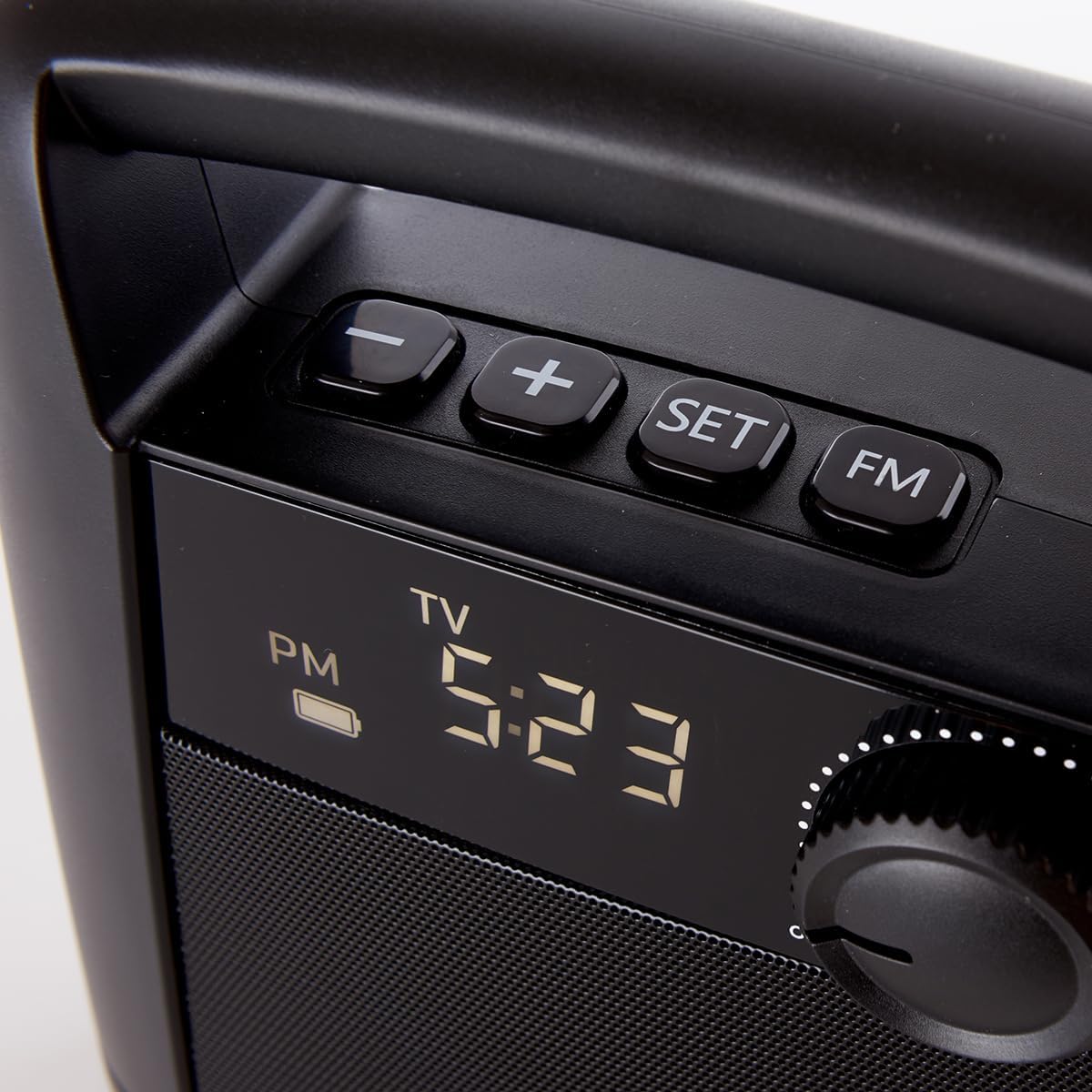
The control panel with volume knob, function buttons, and digital display.

The speaker provides clear audio for an enhanced TV viewing experience.
Maintenance
To ensure the longevity and optimal performance of your Wireless TV Speaker, follow these maintenance guidelines:
- Cleaning: Use a soft, dry cloth to clean the exterior of the speaker and the transmitter base. Do not use liquid cleaners or abrasive chemicals, as they may damage the finish or internal components.
- Battery Care: For best battery life, avoid fully discharging the speaker frequently. Recharge it regularly, especially if it will not be used for an extended period.
- Storage: When not in use for a long time, store the speaker and base in a cool, dry place away from direct sunlight and extreme temperatures.
- Handle with Care: Avoid dropping the speaker or subjecting it to strong impacts, which can damage internal components.
Troubleshooting
If you encounter issues with your Wireless TV Speaker, refer to the following common problems and solutions:
- No Sound from Speaker:
- Ensure the speaker is powered on and the volume is turned up.
- Verify that the transmitter base is properly connected to your TV's audio output and powered on.
- Check the audio output settings on your TV to ensure audio is being sent to the connected port (RCA or Optical). Some TVs require you to enable external audio output.
- Confirm the speaker is within the 100-foot wireless range of the transmitter base.
- Sound is Distorted or Intermittent:
- Move the speaker closer to the transmitter base to improve signal strength.
- Ensure there are no major obstructions (like thick walls or large metal objects) between the speaker and the base.
- Check for potential interference from other wireless devices (e.g., Wi-Fi routers, cordless phones). Try moving the speaker or base away from such devices.
- Speaker Not Charging:
- Ensure the AC power adapter is securely plugged into both the wall outlet and the transmitter base.
- Verify that the speaker is correctly seated on the charging contacts of the base.
- Check if the power outlet is functional.
- FM Radio Not Working:
- Ensure you are in FM radio mode by pressing the 'FM' button.
- Try adjusting the speaker's position to improve reception.
Specifications
| Feature | Detail |
|---|---|
| Model Name | Wireless TV Speaker |
| Speaker Type | Wireless |
| Special Feature | Radio |
| Compatible Devices | Television |
| Surround Sound Channel Configuration | 2.0 |
| Maximum Range | 100 Feet |
| Control Method | Remote (via TV), Manual Knob |
| Wireless Communication Technology | Radio Frequency |
| Power Source | Corded Electric |
| Audio Output Mode | Stereo |
| Mounting Type | Tabletop Mount |
| Item Weight | 2.64 pounds |
| Item Model Number | 207072 |
| UPC | 810022140543 |
Warranty and Support
This Sharper Image Wireless TV Speaker comes with a Limited Warranty. For specific details regarding warranty coverage, duration, and claims, please refer to the documentation included with your product or contact Sharper Image customer support.
Manufacturer: Sharper Image
For additional support or to explore other Sharper Image products, visit the official Sharper Image store: Sharper Image Store on Amazon
Related documents207072


Ask a question about this manual
Ask about setup, troubleshooting, compatibility, parts, safety, or missing instructions. Manuals+ will review the question and use this page’s manual context to help answer it.