
1. Introduction
This manual provides detailed instructions for the setup, operation, and maintenance of your Bestol KT-9018E Universal Air Conditioner Remote Control. Designed for broad compatibility, this remote can operate a wide range of air conditioning units. Please read this manual thoroughly to ensure proper usage and to maximize the remote's functionality.
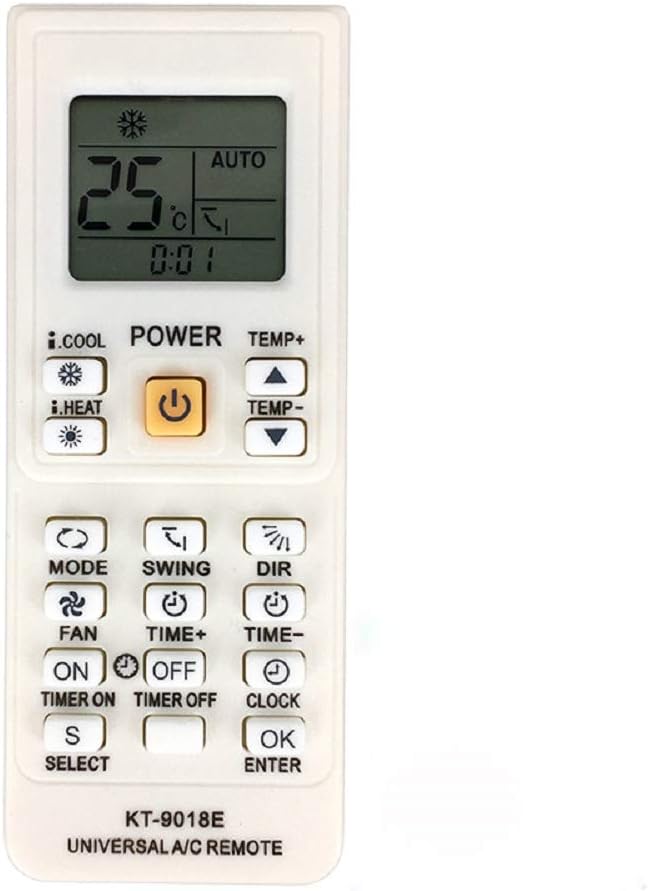
Front view of the Bestol KT-9018E universal air conditioner remote control, displaying its LCD screen and primary function buttons.
2. Key Features
- Universal compatibility with over 4000 air conditioner models.
- Large LCD display for clear visibility of settings.
- Functions include temperature control, mode selection (Cool, Heat, Fan, Dry, Auto), fan speed adjustment, and swing control.
- Timer ON/OFF functions for scheduled operation.
- Built-in clock function.
3. Setup
3.1. Battery Installation
- Open the battery compartment cover on the back of the remote control.
- Insert two AAA batteries, ensuring correct polarity (+/-).
- Close the battery compartment cover securely.
Demonstration of battery insertion and initial setup for a universal air conditioner remote, providing a visual guide for users of the Bestol KT-9018E.
3.2. Programming the Remote Control
There are two primary methods to program your remote control:
Method 1: Manual Code Input
- Locate your air conditioner brand in the provided code list.
- Press and hold the 'SET' button for approximately 3 seconds until the code digits on the LCD display start flashing.
- Use the 'TEMP+' or 'TEMP-' buttons to input the 4-digit code for your air conditioner brand.
- Once the correct code is displayed, press the 'OK' or 'ENTER' button to confirm. The code will stop flashing.
- Test the remote by pressing the 'ON/OFF' button. If the air conditioner responds, the programming is successful. If not, repeat the process with the next code for your brand or try the auto-search method.

A detailed list of brand codes for various air conditioner manufacturers, used for programming the Bestol KT-9018E universal remote control.
Method 2: Auto Search
- Ensure your air conditioner is powered on.
- Press and hold the 'SET' button for approximately 5 seconds until the code digits on the LCD display start flashing.
- Release the 'SET' button. The remote will now automatically search for the correct code, indicated by the flashing digits changing rapidly.
- Point the remote at your air conditioner. When the air conditioner responds (e.g., turns on/off or makes a sound), immediately press the 'OK' or 'ENTER' button to save the code.
- Test all functions to ensure proper operation. If some functions do not work, repeat the auto-search process to find a more compatible code.
4. Operating Instructions
Once programmed, your Bestol KT-9018E remote control offers comprehensive control over your air conditioner. Below are the functions of the main buttons:
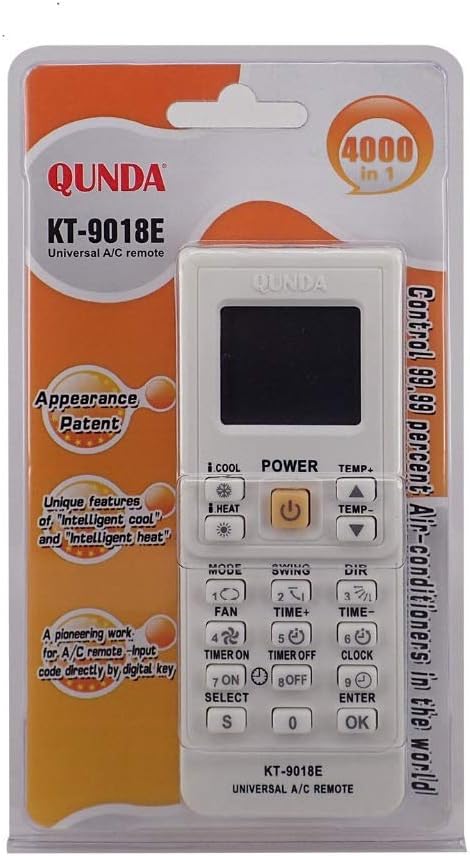
A close-up view of the Bestol KT-9018E remote control, highlighting the temperature, mode, fan, and other control buttons, along with the LCD screen.
- POWER (ON/OFF): Turns the air conditioner on or off.
- TEMP+ / TEMP-: Adjusts the desired temperature up or down.
- MODE: Cycles through operating modes: Cool, Heat, Fan, Dry, Auto.
- FAN: Adjusts the fan speed (Auto, Low, Medium, High).
- SWING: Activates or deactivates the automatic louver swing function.
- TIME ON / TIME OFF: Sets a timer for the air conditioner to turn on or off automatically.
- CLOCK: Sets the current time on the remote's display.
- LIGHT: Activates the backlight for the LCD display (if available).
A user demonstrating the functionality of a universal air conditioner remote control with an older Toshiba AC unit, showcasing how it can power on/off and adjust settings, similar to the Bestol KT-9018E.
5. Maintenance
- Cleaning: Wipe the remote control with a soft, dry cloth. Do not use liquid cleaners or abrasive materials.
- Battery Replacement: Replace batteries when the display becomes dim or the remote's range decreases. Always replace both batteries simultaneously with new ones of the same type.
- Storage: If the remote will not be used for an extended period, remove the batteries to prevent leakage. Store in a cool, dry place away from direct sunlight.
6. Troubleshooting
- Remote not responding: Check if batteries are inserted correctly and have sufficient power. Replace if necessary. Ensure there is a clear line of sight between the remote and the air conditioner's receiver.
- Air conditioner not responding after programming: The programmed code may be incorrect. Try re-programming the remote using a different code from the list for your brand, or use the auto-search method again.
- Some functions not working: This may indicate a partial code match. Try re-programming with another code for your brand. Universal remotes may not support all advanced functions of every air conditioner model.
- LCD display is dim or blank: Replace the batteries.
7. Specifications
| Feature | Specification |
|---|---|
| Model Number | KT-9018E |
| Compatibility | Universal (4000 in 1) for Air Conditioners |
| Power Source | 2 x AAA Batteries (not included) |
| Control Distance | Up to 8 meters |
| Item Weight | 2.11 ounces |
| Package Dimensions | 10.43 x 3.43 x 0.98 inches |
| Color | Black/Gray |
8. Warranty and Support
For warranty information or technical support, please refer to the documentation provided with your purchase or contact the retailer. Keep your proof of purchase for any warranty claims.