
1. Introduction
The Bestol Universal Remote Control LR-LCD-707E is designed to operate a wide range of LCD televisions from various manufacturers. This manual provides comprehensive instructions for setting up, operating, and troubleshooting your new remote control, ensuring seamless control over your compatible TV.

Image 1.1: Front view of the Bestol Universal Remote Control LR-LCD-707E, showcasing its button layout.
2. Setup
2.1 Battery Installation
Locate the battery compartment on the back of the remote control. Slide the cover open. Insert two AAA batteries (not included), ensuring that the positive (+) and negative (-) terminals align correctly with the markings inside the compartment. Replace the battery cover securely.
2.2 Initial Pairing and Brand Code Setup
The LR-LCD-707E remote control is designed for ease of use and typically does not require complex programming. For most compatible TV brands, you can activate the remote by holding down the 'POWER' button and a specific brand key simultaneously. Refer to the table below for common brand combinations.
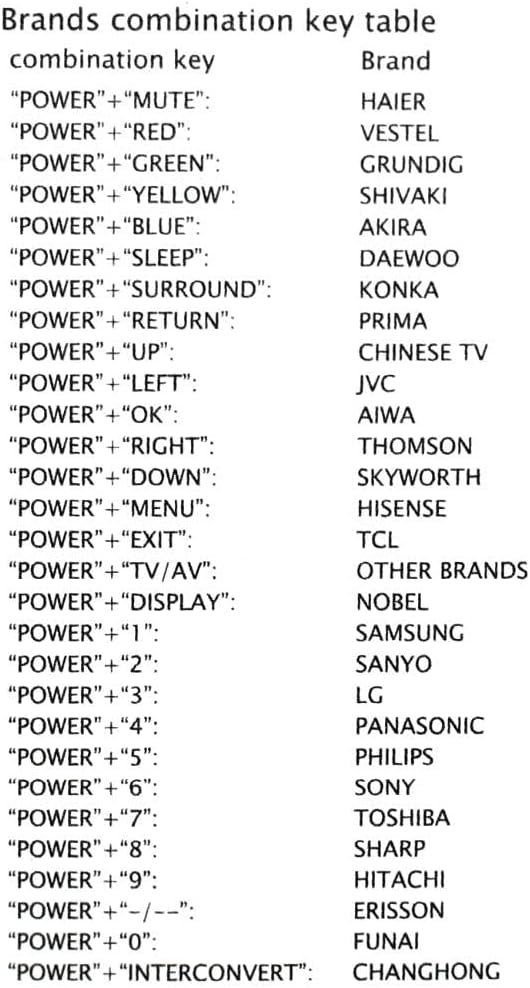
Image 2.1: Brands combination key table for pairing the remote with various TV brands.
To pair your remote:
- Ensure your TV is powered on.
- Press and hold the POWER button on the remote.
- While holding POWER, simultaneously press the corresponding key for your TV brand from the table above (e.g., MUTE for HAIER, RED for VESTEL).
- Release both buttons once your TV responds (e.g., turns off, displays a menu).
- Test the remote's basic functions (Power, Volume, Channel). If it works, the pairing is successful. If not, repeat the process or try another key combination if your brand has multiple options.
For brands not listed or if the initial pairing is unsuccessful, the remote may automatically search for a compatible code. Point the remote at the TV and press a function button. If the TV responds, the remote is paired.
3. Operating Instructions
Once successfully paired, the LR-LCD-707E remote control functions similarly to your original TV remote. Below are the primary functions:
- POWER: Turns the TV on or off.
- VOL +/-: Increases or decreases the volume.
- CH +/-: Changes the channel up or down.
- MUTE: Mutes or unmutes the TV sound.
- INPUT / TV/AV: Selects the input source (e.g., HDMI, AV).
- MENU: Accesses the TV's main menu.
- Directional Arrows (UP, DOWN, LEFT, RIGHT): Navigates through menus and options.
- OK/PP: Confirms selections in menus.
- EXIT: Exits the current menu or function.
- SLEEP: Activates the TV's sleep timer function.
- SOUND: Accesses sound settings.
- WIDE: Adjusts screen aspect ratio.
- PC/GAME: Switches to PC or Game mode.
- AV MODE: Cycles through various AV modes.
- FREEZE: Pauses the current image.
- DISPLAY: Shows current channel information or TV status.
Additional buttons such as 'BASS', 'MIX', 'SURROUND', 'RETURN', and numerical keys (0-9) provide further control depending on your TV's capabilities.
4. Maintenance
To ensure the longevity and optimal performance of your Bestol Universal Remote Control LR-LCD-707E, follow these maintenance guidelines:
- Cleaning: Use a soft, dry cloth to gently wipe the surface of the remote control. Avoid using liquid cleaners, abrasive materials, or chemical solvents, as these can damage the remote's finish or internal components.
- Battery Replacement: Replace batteries when the remote's response becomes sluggish, the infrared signal weakens, or it stops working entirely. Always replace both batteries at the same time with new ones of the same type (AAA).
- Storage: Store the remote in a cool, dry place away from direct sunlight, extreme temperatures, and high humidity.
- Handling: Avoid dropping the remote control or exposing it to strong impacts, which can damage its internal circuitry.
5. Troubleshooting
If you encounter issues with your universal remote control, refer to the following troubleshooting steps:
- Remote Not Responding:
- Check battery installation. Ensure batteries are inserted with correct polarity.
- Replace old batteries with new AAA batteries.
- Ensure there are no obstructions between the remote's infrared emitter and the TV's infrared receiver.
- Confirm you are within the effective range and line of sight of the TV.
- Limited Functionality (Only some buttons work):
- The remote may not be fully paired with your specific TV model. Re-attempt the initial pairing process using the brand combination key method (Section 2.2).
- Some advanced functions may not be supported by all TV models or may require specific TV settings.
- TV Not Responding to Pairing:
- Ensure you are pressing the correct brand key combination for your TV.
- Try holding the POWER button and cycling through different brand keys if your TV brand is not explicitly listed or if the first attempt fails.
- Verify that your TV is an LCD model, as this remote is specifically designed for LCD TVs.
If these steps do not resolve the issue, the remote may not be compatible with your specific TV model, or there may be a defect. Please refer to the warranty and support section for further assistance.
6. Specifications
| Feature | Detail |
|---|---|
| Model Number | LR-LCD-707E (Item model number: 52001936541) |
| Package Dimensions | 6.85 x 1.89 x 0.94 inches |
| Item Weight | 2.46 ounces |
| Power Source | 2 x AAA Batteries (not included) |
| Compatible Devices | Various LCD TVs from brands such as HAIER, VESTEL, GRUNDIG, Daewoo, HISENSE, JVC, TCL, Philips, LG, Sony, Toshiba, Panasonic, Samsung, Hitachi, Sanyo, Sharp, Erisson, Funai, Changhong. |
| Max Number of Supported Devices | 1 |
| Special Feature | Universal |
7. Warranty and Support
Information regarding warranty coverage and customer support for the Bestol Universal Remote Control LR-LCD-707E is not available in this instruction manual. For details concerning product warranty, technical assistance, or customer service, please refer to the product packaging, contact the retailer from whom you purchased the device, or visit the manufacturer's official website if available.