
1. Introduction
This manual provides essential information for the safe and effective use of your Kircuit AC Power Cord Cable Plug. Please read these instructions carefully before use and retain them for future reference. This power cord is designed to provide reliable power to compatible devices, specifically GPX CD AM/FM Radio Boombox Disc Player Audio Series BCD1806, BCD2805, and BT780B.
2. Product Overview
The Kircuit AC Power Cord is a 2-prong USA outlet compatible power extension cable, measuring 6 feet (approximately 1.8 meters) in length. It is constructed from high-quality materials to ensure durability and consistent performance. Each unit undergoes testing to ensure proper functionality.
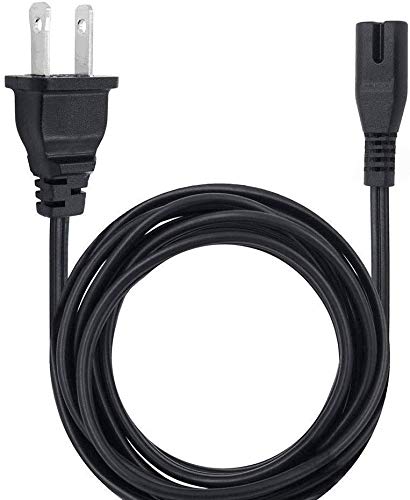
A black two-prong AC power cord with a standard US plug on one end and a figure-8 connector on the other, designed for various electronic devices.

An image showcasing the durable design of the Kircuit power cable, highlighting its high-quality materials, thick insulation layer, and abrasion-resistant outer sheathing. It also mentions the cable's ability to withstand high temperatures.
The plugs are designed for a secure and stable connection, capable of handling electrical loads without overheating, reducing the risk of fire hazards.

A comparison image demonstrating the secure and stable connection provided by Kircuit's well-made power plugs versus other plugs that are prone to breaking. It emphasizes UL Standard Quality, durability, and safety.
3. Safety Information
Your Kircuit AC Power Cord is equipped with multiple safety features to protect your devices and ensure safe operation:
- OVP (Over Voltage output Protection): Prevents damage from excessive voltage.
- OCP (Over Current output Protection): Safeguards against damage from excessive current.
- SCP (Short Circuit output Protection): Protects against short circuits.

An image displaying 'POWER SAFE WITH KIRCUT' text alongside a stylized circuit board graphic, emphasizing the product's safety features.

A diagram illustrating the built-in safety protections of Kircuit products, including Short Cut protection, Excess Voltage protection, Overcurrent protection, and Over Temperature protection, arranged around a central Kircuit logo.
Always ensure the power cord is fully inserted into both the device and the wall outlet. Do not use the cord if it appears damaged or frayed. Avoid placing heavy objects on the cord or exposing it to extreme temperatures or moisture.
4. Setup
- Identify the power input port on your compatible GPX device (e.g., BCD1806, BCD2805, BT780B). This is typically a figure-8 shaped port.
- Connect the figure-8 end of the Kircuit AC Power Cord firmly into the power input port of your device.
- Plug the 2-prong end of the power cord into a standard USA wall outlet.
- Ensure all connections are secure before powering on your device.
5. Operating Instructions
Once the Kircuit AC Power Cord is correctly connected to your device and a live electrical outlet, it will supply the necessary power to operate your device. No further action is required for the power cord itself. Refer to your device's instruction manual for specific operating procedures.
6. Maintenance
- Cleaning: Disconnect the power cord from both the device and the wall outlet before cleaning. Wipe the cord and plugs with a dry, soft cloth. Do not use liquid cleaners or abrasive materials.
- Storage: When not in use, store the power cord in a cool, dry place, away from direct sunlight and moisture. Avoid tightly coiling the cord to prevent damage.
- Inspection: Periodically inspect the power cord for any signs of damage, such as cuts, fraying, or bent prongs. If any damage is observed, discontinue use immediately and replace the cord.
7. Troubleshooting
If your device is not powering on after connecting the Kircuit AC Power Cord, consider the following:
- Check Connections: Ensure both ends of the power cord are securely plugged into the device and the wall outlet.
- Verify Outlet: Test the wall outlet with another known working appliance to confirm it is supplying power.
- Inspect Cord: Examine the power cord for any visible damage. If damaged, do not use it.
- Device Power: Confirm that the power switch on your GPX device is in the 'ON' position.
If the issue persists after these steps, consult the instruction manual for your GPX device or contact the device manufacturer for further assistance.
8. Specifications
| Feature | Detail |
|---|---|
| Manufacturer | Kircuit |
| Item Weight | 8 ounces |
| Cable Length | 6 feet (1.8 meters) |
| Plug Type | 2-prong USA Outlet Saver |
| Protection Features | Over Voltage Protection (OVP), Over Current Protection (OCP), Short Circuit Protection (SCP) |
| Compatibility | GPX CD AM/FM Radio Boombox Disc Player Audio Series BCD1806, BCD2805, BT780B |
9. Warranty and Support
Kircuit products are manufactured to high standards of quality and performance. Specific warranty details are not provided in this manual. For warranty information, technical support, or any inquiries regarding your Kircuit AC Power Cord, please refer to the product packaging or contact Kircuit customer service directly.