
1. Introduction
This manual provides essential information for the Kircuit replacement power cord, specifically designed for use with Stanley PPRH5KL FatMax portable jump starters and power stations. This high-quality replacement cable ensures reliable power delivery and charging for your compatible Stanley device, maintaining its functionality for jump-starting vehicles, inflating tires, and powering USB devices.
2. Product Overview
The Kircuit replacement power cord is engineered to meet the power requirements of your Stanley PPRH5KL FatMax unit. It features a durable design with built-in safety protections to ensure efficient and secure operation.
Key Features:
- High-Quality Construction: Manufactured with durable materials for longevity and consistent performance.
- Integrated Safety: Includes dynamic IC, charger IC, and power fuse for rapid charging and overcharge protection, safeguarding your Stanley unit.
- Reliable Connection: Designed for a secure and stable connection to your Stanley power station.

Image: Diagram illustrating Kircuit's built-in safety protections, including short circuit, excess voltage, over temperature, and overcurrent protection.

Image: Close-up of the Kircuit power cable, highlighting its durable design with thick insulation and abrasion-resistant outer sheathing.
3. Safety Information
Always prioritize safety when handling electrical components. This replacement cord is designed with safety features, but proper handling is crucial.
- Ensure the power cord is fully inserted into both the Stanley unit and the power outlet.
- Do not use the cord if it is damaged, frayed, or has exposed wires.
- Keep the cord away from water, heat sources, and sharp objects.
- Always disconnect the cord by pulling the plug, not the cable itself.
- Refer to your Stanley PPRH5KL FatMax user manual for specific safety instructions related to the jump starter unit.

Image: Comparison showing the robust design of Kircuit power plugs versus others, emphasizing secure connection and ability to handle high electrical loads.
4. Setup and Installation
This Kircuit power cord is a direct replacement for the original charging cable of your Stanley PPRH5KL FatMax Portable Power Station.
Connecting the Power Cord:
- Locate the charging input port on your Stanley PPRH5KL FatMax unit. This is typically a recessed port designed for a standard AC power cable.
- Ensure the Stanley unit is turned off before connecting the power cord.
- Insert the female end of the Kircuit replacement power cord firmly into the charging input port of the Stanley unit.
- Plug the male end of the power cord into a standard 120V AC wall outlet.
- The Stanley unit should indicate that it is charging (refer to your Stanley manual for specific charging indicators).
5. Operating Instructions
Once your Stanley PPRH5KL FatMax unit is fully charged using the Kircuit replacement power cord, it is ready to perform its various functions. This power cord facilitates the charging process, enabling the core operations of your Stanley device.
Using the Stanley Unit (after charging with Kircuit cord):
- Jump-Starting: Connect the jump starter clamps to your vehicle's battery terminals as instructed in the Stanley manual.
- Air Compressor: Attach the air hose to your tire valve and set the desired PSI on the Stanley unit.
- USB Power: Plug your USB devices into the USB ports on the Stanley unit for charging.
Always refer to the original Stanley PPRH5KL FatMax user manual for detailed operating instructions for each specific function of the jump starter and power station.
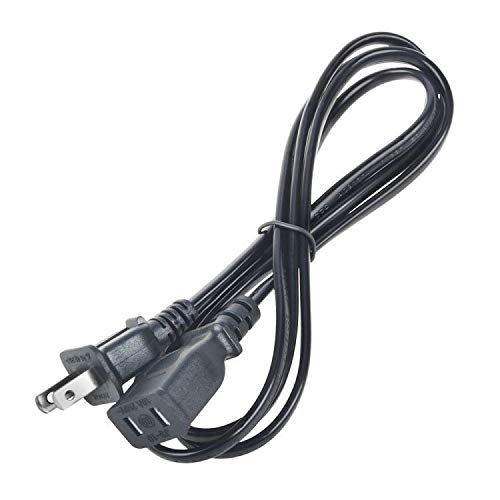
Image: The Stanley PPRH5KL FatMax Portable Power Station, which the Kircuit replacement power cord is designed to charge and power.
6. Maintenance
Proper maintenance of your Kircuit replacement power cord will extend its lifespan and ensure continued safe operation.
- Storage: Store the power cord in a cool, dry place, away from direct sunlight and extreme temperatures.
- Cleaning: Wipe the cord with a dry, soft cloth. Do not use liquid cleaners or immerse the cord in water.
- Inspection: Regularly inspect the cord for any signs of damage, such as cuts, abrasions, or bent prongs. Replace immediately if damage is found.
- Coiling: Coil the cord loosely when storing to prevent kinks and damage to the internal wiring.
7. Troubleshooting
If you encounter issues with your Kircuit replacement power cord, consider the following common troubleshooting steps:
- Unit Not Charging: Ensure the cord is securely plugged into both the Stanley unit and a functional wall outlet. Check if the outlet is receiving power.
- Loose Connection: Verify that both ends of the power cord are fully inserted and making proper contact.
- Cord Damage: Inspect the entire length of the cord for any visible damage. A damaged cord should not be used.
- Stanley Unit Issues: If the cord appears functional, the issue might be with the Stanley PPRH5KL FatMax unit itself. Refer to its original manual for troubleshooting specific to the device.
8. Specifications
The Kircuit replacement power cord is designed to be compatible with the following specifications of the Stanley PPRH5KL FatMax Portable Power Station:
- Compatible Model: Stanley PPRH5KL FatMax Jumpit Powerit Airit Portable Professional Power Station
- Connector Gender: Male-to-Female
- Plug Format: Type B
- Number Of Conductors: 2
- Color: Black
- Manufacturer: Kircuit
Note: These specifications pertain to the replacement power cord and its compatibility. For detailed specifications of the Stanley PPRH5KL FatMax unit itself, please refer to its original product documentation.
9. Warranty and Support
For warranty information and customer support regarding your Kircuit replacement power cord, please contact the manufacturer directly. Keep your purchase receipt as proof of purchase.