
1. Important Safety Instructions
Please read all instructions carefully before using your AVERA PIV2 induction cooktop. Keep this manual for future reference.
- Electrical Safety: Ensure the cooktop is connected to a properly grounded 120V power outlet. Do not use extension cords or adapters.
- Cookware: Only use induction-compatible cookware (magnetic base). Non-compatible cookware will not heat.
- Placement: Install the cooktop on a stable, flat, and heat-resistant surface. Ensure adequate ventilation around the unit.
- Children: Keep children away from the cooktop during operation and while it is cooling down. The cooktop surface remains hot after use.
- Cleaning: Always unplug the cooktop before cleaning. Allow it to cool completely.
- Overheating Protection: The cooktop features an automatic shut-off system to prevent overheating.
2. Product Overview
The AVERA PIV2 is a horizontal 2-zone induction cooktop designed for efficient and safe cooking. It can be used as a countertop unit or built into your kitchen.
Key Features:
- Two independent heating zones.
- Total power output of 2000W (1000W per zone).
- 8 temperature/power levels for precise cooking control.
- Programmable timer up to 240 minutes.
- Touch control panel.
- Automatic pan detection for enhanced safety.
- Child safety lock.
- High-resistance enameled glass surface for easy cleaning.

Figure 1: Top view of the AVERA PIV2 Induction Cooktop.
3. Installation
The AVERA PIV2 cooktop offers flexible installation options: as a freestanding countertop unit or built into your kitchen counter.
Dimensions:
- Product Dimensions: 68 cm (Width) x 38 cm (Depth) x 8 cm (Height)
- Cut-out Dimensions (for built-in): 65 cm (Width) x 35 cm (Depth) x 6 cm (Height)

Figure 2: Product and cut-out dimensions for installation.
Ventilation:
Ensure proper ventilation around the cooktop, especially if built-in, to allow for heat dissipation. The unit features an integrated ventilation system.

Figure 3: Underside view illustrating the ventilation system.
4. Operating Instructions
The AVERA PIV2 induction cooktop features an intuitive touch control panel.
Basic Operation:
- Power On/Off: Press the 'ON/OFF' button to turn the cooktop on or off.
- Place Cookware: Place an induction-compatible pot or pan on the desired cooking zone. The cooktop will only activate if a suitable utensil is detected.
- Adjust Power/Temperature: Use the '+' and '-' buttons to select one of the 8 power/temperature levels (e.g., 100W, 300W, up to 1000W per zone).
- Timer Function: Press the 'Timer' button and use '+' and '-' to set the desired cooking time (up to 240 minutes). The cooktop will automatically turn off when the timer expires.
- Child Lock: Activate the 'Lock' function to prevent accidental changes to settings or activation by children.
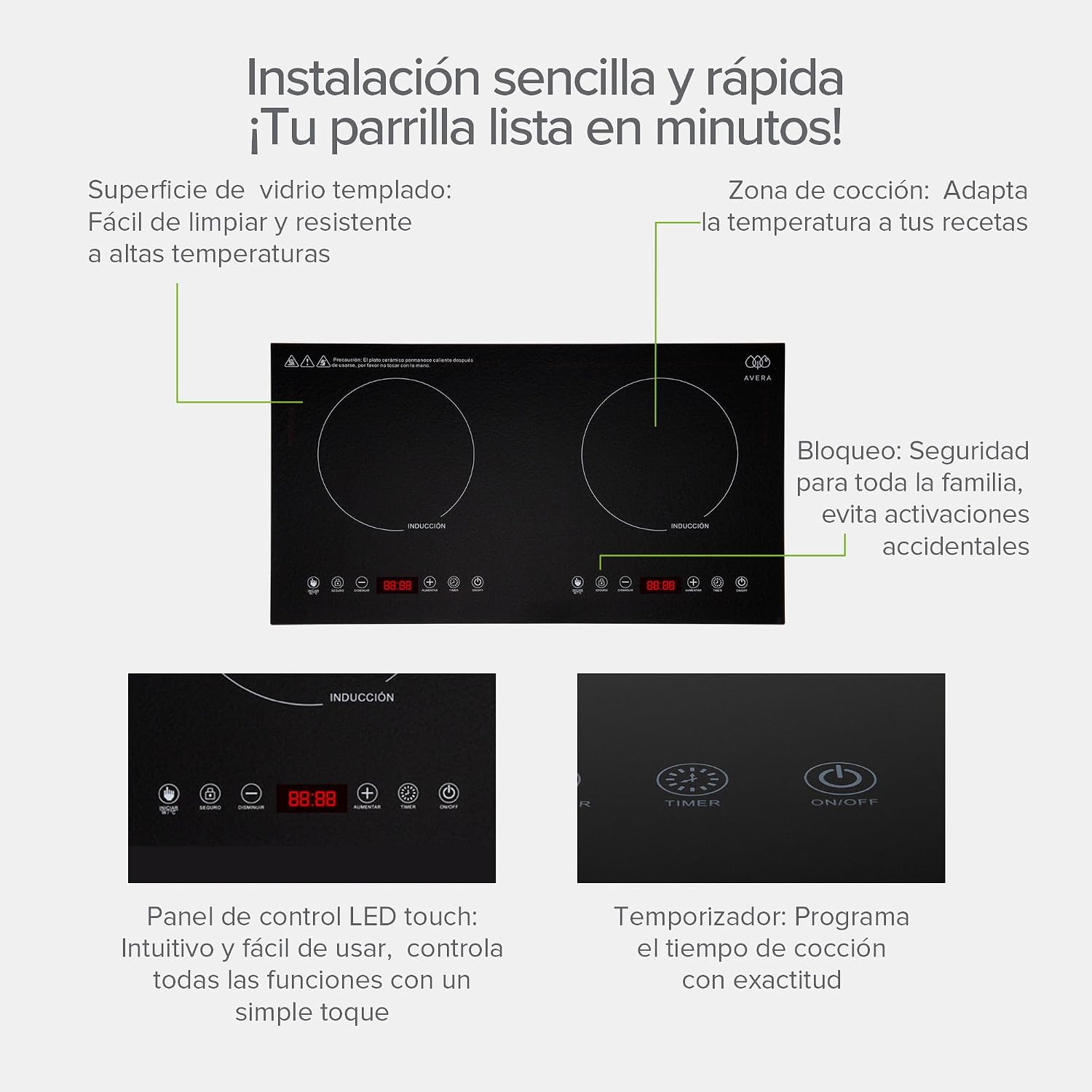
Figure 4: Detailed view of the touch control panel.
5. Cookware Compatibility
Induction cooktops require cookware with a magnetic base. Compatible materials include cast iron and stainless steel. Non-compatible materials like aluminum, copper, glass, or ceramic will not work unless they have an induction-compatible base.
How to Check Compatibility:
A simple test is to place a magnet on the bottom of your cookware. If the magnet sticks firmly, the cookware is compatible with your induction cooktop.
Video 1: This video demonstrates how to check cookware compatibility for induction cooktops using a magnet. It shows examples of compatible materials like cast iron and stainless steel. (Note: This video is a general guide for induction cooktops and may feature other brands.)
6. Cleaning and Maintenance
The glass surface of your AVERA PIV2 cooktop is designed for easy cleaning.
- Always ensure the cooktop is unplugged and completely cool before cleaning.
- Use a soft cloth dampened with water and a mild, neutral detergent.
- Wipe the surface gently to remove spills and stains.
- Avoid abrasive cleaners, scouring pads, or harsh chemicals, as these can damage the glass surface.
- For stubborn stains, a ceramic hob scraper can be used carefully.

Figure 5: Cleaning the cooktop surface.
7. Troubleshooting
If you encounter issues with your AVERA PIV2 cooktop, refer to the following common problems and solutions:
| Problem | Possible Cause | Solution |
|---|---|---|
| Cooktop does not turn on. | No power, or not plugged in correctly. | Check power connection and wall outlet. |
| Cooktop turns on but does not heat. | Incompatible cookware, or no cookware detected. | Use induction-compatible cookware. Ensure the pot/pan is centered on the cooking zone. |
| Display shows "E0" error. | No cookware or incompatible cookware on the zone. | Place suitable cookware on the cooking zone. If the error persists, contact support. |
| Unusual noise during operation. | Normal operation sound (fan, magnetic field). | This is typically normal. If the noise is excessively loud or unusual, contact support. |
8. Specifications
| Feature | Specification |
|---|---|
| Model Number | PIV2 |
| Power | 2000 Watts (1000W per zone) |
| Voltage | 120 V |
| Number of Heating Elements | 2 |
| Material | Glass (Enameled Crystal) |
| Color | Black |
| Product Dimensions (W x D x H) | 68 x 38 x 8 cm |
| Cut-out Dimensions (W x D x H) | 65 x 35 x 6 cm |
| Weight | 7.44 kg |
| Special Features | Timer, Safety System, Touch Controls |
9. Warranty and Support
Your AVERA PIV2 Induction Cooktop comes with a manufacturer's warranty. Please refer to the warranty card included with your product for specific terms and conditions. For technical support, service, or warranty claims, please contact AVERA customer service.
