
1. Introduction
This manual provides essential information for the proper installation, operation, and maintenance of your Knowtek AVR 100A Automatic Voltage Regulator. This device is designed to stabilize the AC voltage output of bush-type 3-phase diesel generators. Please read this manual thoroughly before use to ensure safe and efficient operation.
2. Safety Information
Always observe the following safety precautions to prevent injury or damage to the equipment:
- Installation and maintenance should only be performed by qualified personnel.
- Ensure the generator is completely shut down and disconnected from all power sources before installing or servicing the AVR.
- Verify all wiring connections are secure and correct according to the generator's wiring diagram and this manual.
- Do not operate the AVR in wet or excessively humid conditions.
- Never bypass safety features or modify the AVR.
- Wear appropriate personal protective equipment (PPE) during installation and maintenance.
3. Product Overview
The Knowtek AVR 100A is a robust automatic voltage regulator engineered for reliable performance in demanding generator applications. It features an integrated modular design for efficient power output and includes low-frequency protection.
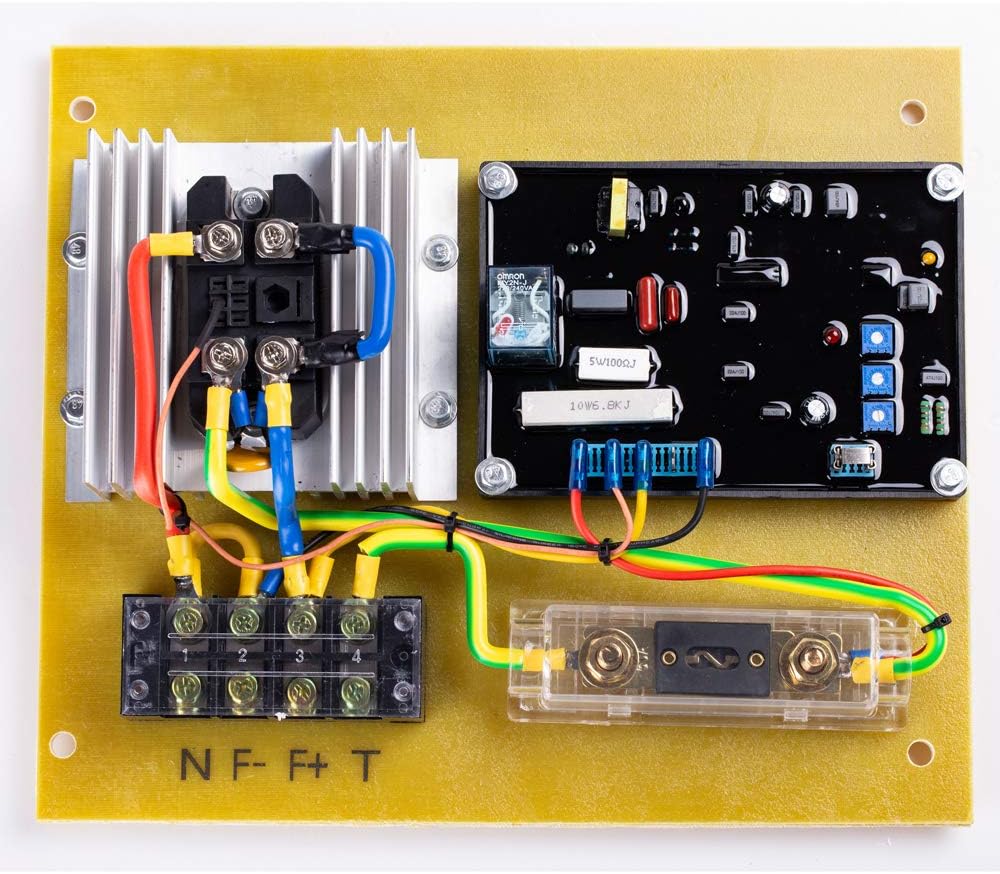
Figure 1: Top view of the Knowtek AVR 100A, illustrating the main components and wiring terminals.
Key features include:
- High Current Capacity: Designed to handle high current and power independently.
- Automatic Frequency Switching: Operates seamlessly between 50Hz and 60Hz.
- Low Frequency Protection: An LED indicator warns when the frequency drops below 45Hz (1350r/min).
- Robust Construction: Utilizes a 5mm bakelite base plate for enhanced earthquake resistance.
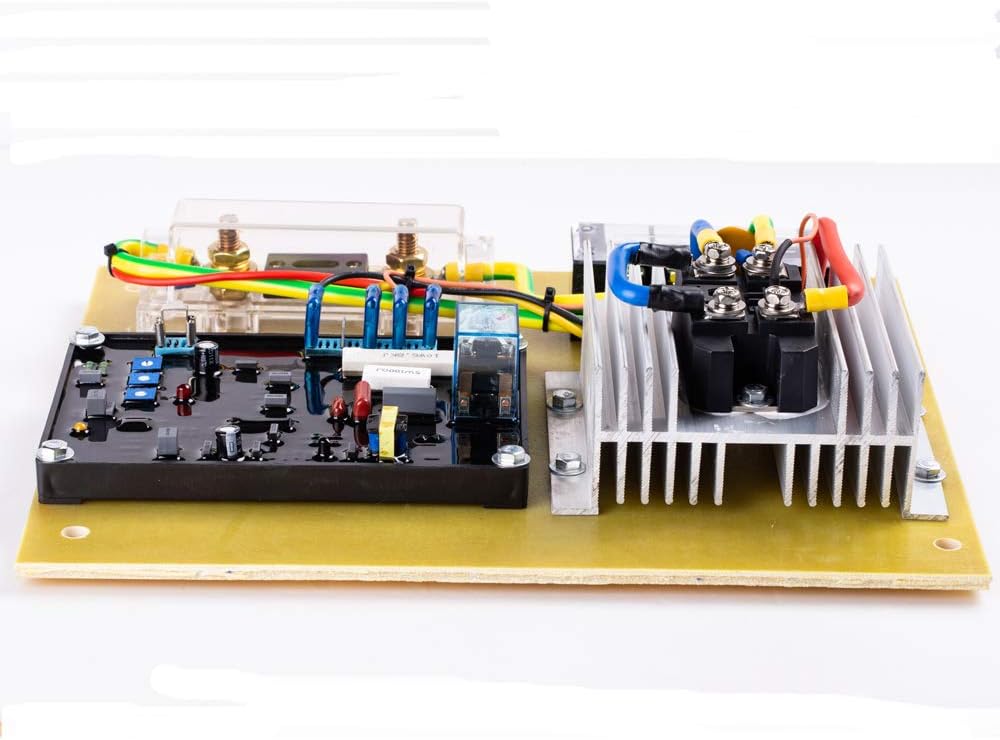
Figure 2: Side view of the AVR 100A, showing the heatsink assembly.
4. Specifications
| Parameter | Value |
|---|---|
| Model | AVR 100A |
| Power Input Voltage | 190~264V AC, 3 Phase |
| Working Frequency | Automatically switches between 50Hz and 60Hz |
| Output Voltage | 15-125V DC (continuously adjustable with 220V AC input) |
| Continuous Output DC Current | 75.3A |
| Maximum Output DC Current | 93A (within 10 seconds) |
| Voltage Ripple Peak (Regulation Rate) | <± 1.5% (engine speed variation within 4%) |
| Voltage Establishment | Residual magnetic flux of 5V AC or more at power input terminal |
| Low Frequency Protection | Red LED illuminates below 45Hz (1350r/min) |
| Self-Consumption Power | Up to 25W |
| Dimensions (L x W x H) | 300mm x 230mm x 80mm (12.99 x 9.84 x 5.91 inches) |
| Weight | 2000g (approx. 5.5 pounds) |
5. Setup and Installation
Proper installation is crucial for the correct functioning of the AVR 100A. Refer to your generator's specific wiring diagram in conjunction with these general guidelines.
5.1 Pre-Installation Checks
- Ensure the generator is completely powered off and locked out.
- Confirm the AVR 100A specifications match your generator's requirements.
- Inspect the AVR for any physical damage.
5.2 Mounting
Mount the AVR in a clean, dry location, away from excessive vibration and heat. Ensure adequate ventilation around the heatsink. The unit features mounting holes for secure attachment.

Figure 3: Bottom view of the AVR 100A, indicating mounting points.
5.3 Wiring Connections
The AVR 100A requires connections for power input (sensing and excitation) and output to the generator's exciter field. The terminals are typically labeled for clarity. Refer to Figure 1 for a visual reference of the terminal blocks.
- Power Input: Connect the 3-phase AC input (190-264V AC) to the designated input terminals. These terminals also serve as voltage sensing inputs.
- Excitation Output: Connect the DC output (15-125V DC) from the AVR to the generator's exciter field terminals (typically labeled F+ and F-). The image shows terminals labeled 'NF- F+ T'. Ensure correct polarity.
- Grounding: Ensure the AVR and generator are properly grounded according to local electrical codes.
Caution: Incorrect wiring can cause severe damage to the AVR, generator, or pose a safety hazard. If unsure, consult a qualified electrician or generator technician.
6. Operating Instructions
The Knowtek AVR 100A operates automatically to maintain a stable output voltage from your generator.
6.1 Initial Startup
- After installation, double-check all connections.
- Start the generator. The AVR will automatically begin regulating the output voltage.
- Monitor the generator's output voltage to ensure it is within the desired range.
6.2 Voltage Adjustment
The output voltage is continuously adjustable within the specified range (15-125V DC output when inputting 220V AC). There are adjustment potentiometers on the AVR board. Use a non-conductive tool to make fine adjustments to the output voltage if necessary, while monitoring with a voltmeter.
6.3 Low Frequency Protection
The AVR includes a low-frequency protection feature. If the generator's speed (and thus frequency) drops below 45Hz (approximately 1350r/min), a red LED on the AVR will illuminate, indicating a low-frequency condition. This protects the generator from potential damage due to undervoltage operation.
7. Maintenance
The Knowtek AVR 100A is designed for minimal maintenance. However, periodic checks can help ensure its longevity and reliable operation.
- Visual Inspection: Periodically inspect the AVR for any signs of dust accumulation, loose connections, or physical damage.
- Cleaning: If dust accumulates, gently clean the AVR with a soft, dry brush or compressed air. Ensure the generator is off and the AVR is disconnected from power before cleaning.
- Environmental Conditions: Ensure the operating environment remains within specified temperature and humidity ranges.
There are no user-serviceable parts inside the AVR. Do not attempt to disassemble or repair the unit yourself. Refer all servicing to qualified technicians.
8. Troubleshooting
This section provides guidance for common issues. For complex problems, contact a qualified technician.
| Problem | Possible Cause | Solution |
|---|---|---|
| No AC output voltage from generator |
|
|
| Unstable or fluctuating AC output voltage |
|
|
| Low frequency protection LED is ON |
|
|
9. Warranty Information
Knowtek products are manufactured to high-quality standards. For specific warranty terms and conditions, please refer to the documentation provided at the time of purchase or contact your vendor. Keep your purchase receipt as proof of purchase.
10. Customer Support
If you require further assistance or have questions not covered in this manual, please contact your authorized Knowtek dealer or customer support. Provide your product model (AVR 100A) and a detailed description of the issue when seeking support.
For more information, you may visit the Knowtek Store on Amazon.