
1. Introduction
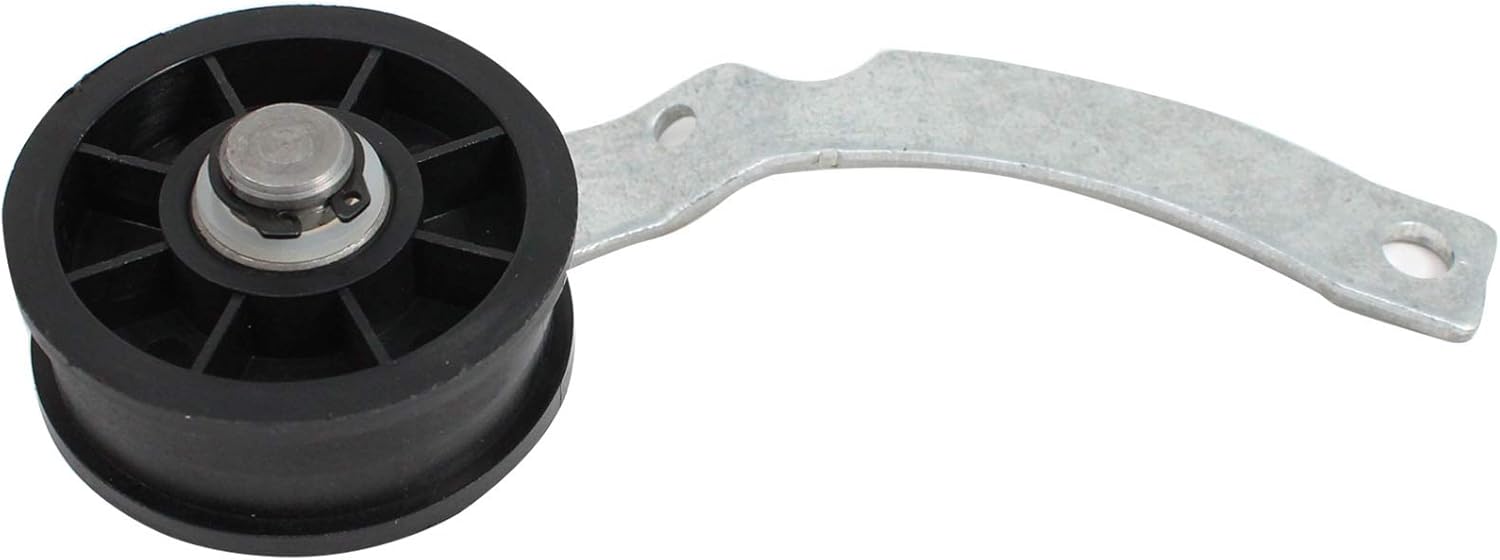
This manual provides comprehensive instructions for the installation, maintenance, and troubleshooting of the UpStart Components WP37001287 Dryer Idler Pulley. This replacement part is designed to restore proper belt tension in compatible dryer models, ensuring efficient operation. Please read this manual thoroughly before beginning any installation or repair work.
2. Safety Information
WARNING: Always disconnect power to the appliance before performing any service or maintenance to prevent electric shock or injury.
- Ensure the dryer is unplugged from the electrical outlet or the circuit breaker is turned off.
- Wear appropriate personal protective equipment, such as work gloves, to protect hands from sharp edges or moving parts.
- If you are unsure about any step, consult a qualified appliance technician.
- Keep children and pets away from the work area.
3. Product Overview and Compatibility
The UpStart Components WP37001287 Dryer Idler Pulley is a critical component in your dryer's drive system, maintaining tension on the drive belt. This ensures the drum rotates correctly. This product is a replacement part and is not an OEM (Original Equipment Manufacturer) product.
Compatible Part Numbers:
- WP37001287
- AP6008789
- 37001287
- 5-0269
- 500269
- 500269P
- PS11741930
- WP37001287VP
Compatible Dryer Models (Examples):
This idler pulley is compatible with various dryer models, including but not limited to Amana LG8121WM (PLG8121WM) dryers. Always verify compatibility with your specific dryer model by checking your original part number.



4. Installation Instructions (Setup)
The following steps provide a general guide for replacing a dryer idler pulley. Specific disassembly procedures may vary by dryer model. Always refer to your dryer's service manual for detailed instructions.
- Disconnect Power: Unplug the dryer from the wall outlet or turn off the circuit breaker.
- Access Dryer Interior: Depending on your dryer model, you may need to remove the top panel, front panel, or rear panel to gain access to the drive system. This often involves removing screws and clips.
- Locate the Idler Pulley: The idler pulley is typically found near the motor and the drive belt, often mounted on a spring-loaded arm that applies tension to the belt.
- Remove the Drive Belt: Carefully release the tension on the idler pulley and remove the drive belt from around the motor pulley and the drum. Note the belt's routing for reinstallation.
- Remove the Old Idler Pulley: Disconnect the spring (if applicable) and unbolt or unclip the old idler pulley assembly from its mounting point.
- Install the New Idler Pulley: Mount the new UpStart Components WP37001287 idler pulley in the same position as the old one. Secure it with the original fasteners. Reattach any springs.
- Reinstall the Drive Belt: Route the drive belt around the drum and the motor pulley, then apply tension with the new idler pulley. Ensure the belt is properly seated on all pulleys and the drum.
- Verify Belt Tension: Check that the belt has appropriate tension and is centered on the drum and pulleys. The idler pulley should move freely and apply consistent tension.
- Reassemble Dryer: Reattach all panels and secure them with screws and clips.
- Reconnect Power: Plug the dryer back into the electrical outlet or turn on the circuit breaker.
5. Post-Installation Check (Operating)
After installing the new idler pulley, perform the following checks before regular use:
- Visual Inspection: Ensure all panels are securely fastened and there are no loose parts.
- Test Run: Run the dryer on a short, unheated cycle. Listen for any unusual noises (squealing, grinding, thumping) that might indicate improper belt routing or pulley installation.
- Drum Rotation: Observe the drum's rotation. It should turn smoothly and consistently.
- Heat Cycle (Optional): If the test run is successful, run a normal heated cycle to confirm full functionality.
6. Maintenance
The UpStart Components WP37001287 idler pulley is designed for durability. Regular maintenance of your dryer can help prolong the life of all its components, including the idler pulley:
- Clean Lint Filter: Clean the lint filter after every load to ensure proper airflow and reduce strain on the dryer's motor and belt system.
- Inspect Drive Belt: Periodically inspect the drive belt for signs of wear, cracks, or fraying. A worn belt can put undue stress on the idler pulley.
- Check for Obstructions: Ensure no foreign objects are inside the dryer drum or near the drive system that could interfere with the belt or pulleys.
7. Troubleshooting
If your dryer exhibits issues after idler pulley replacement, consider the following:
| Symptom | Possible Cause | Solution |
|---|---|---|
| Dryer makes squealing or grinding noise | Idler pulley not installed correctly, bearing issue, or belt misalignment. | Re-check idler pulley installation and belt routing. Ensure the pulley spins freely. |
| Drum does not turn | Drive belt broken or dislodged, idler pulley not providing tension, or motor issue. | Inspect the drive belt. Verify the idler pulley is properly tensioning the belt. |
| Dryer vibrates excessively | Improperly installed idler pulley, worn drum rollers, or unbalanced load. | Ensure the idler pulley is securely mounted. Check other dryer components. |
8. Specifications
- Part Number: WP37001287 (Replacement)
- Manufacturer: UpStart Components
- Material: Ultra durable, high quality material
- Quantity: 2 per pack (as per product description)
- Installation: Easy at-home installation
9. Warranty and Support
Any warranties for this product are offered solely by UpStart Components. This product is not affiliated with any original equipment manufacturers and is not covered under any warranties offered by them. For specific warranty details or support inquiries, please refer to the UpStart Components official website or contact their customer service.