
Introduction
This manual provides detailed instructions for the setup, operation, maintenance, and troubleshooting of your AWOW AK34 Mini PC. Please read this manual thoroughly before using the device to ensure proper functionality and longevity.

Image: Front view of the AWOW AK34 Mini PC, showcasing its compact design.
Setup Guide
1. Package Contents
Verify that all components are present in the package:
- AWOW AK34 Mini PC
- Power Adapter
- HDMI Cable
- User Manual
- Screws for 2.5" HDD/SSD installation
2. Initial Connection
- Connect your monitor(s) to the Mini PC using the HDMI ports. The AK34 supports dual HDMI 1.4 outputs for 4K UHD displays.
- Connect your keyboard and mouse to the available USB 3.0 ports.
- For wired network access, connect an Ethernet cable to one of the dual Gigabit LAN ports.
- Connect the power adapter to the DC 12V input port on the Mini PC, then plug it into a power outlet.
- Press the power button to turn on the device.

Image: Rear and side view of the AWOW AK34 Mini PC, highlighting the DC 12V power input, USB 3.0 ports, HDMI ports, LAN ports, MicroSD card slot, and headphone/microphone jack.
3. Storage Expansion
The AWOW AK34 Mini PC includes a built-in M.2 SATA3 256GB SSD. Additional storage can be added:
- 2.5-inch SATA SSD/HDD: Expand storage with a 2.5-inch SATA 3 SSD or HDD (up to 7.5mm thickness, extended 2TB capacity).
- Micro SD Card: Utilize the Micro SDXC card slot for up to 512GB of additional storage.
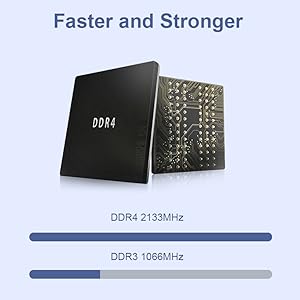
Image: Internal view of the AWOW AK34 Mini PC, illustrating the locations for 2.5" SSD/HDD installation and the MicroSD slot.
Installing a 2.5-inch SATA HDD/SSD:
Follow these steps to install an additional 2.5-inch SATA drive:
- Power off the Mini PC and disconnect all cables.
- Carefully remove the four screws on the bottom cover and detach the cover.
- Connect the provided SATA cable to your 2.5-inch SSD/HDD and then to the corresponding port on the motherboard.
- Secure the 2.5-inch drive to the inside of the bottom cover using the provided screws.
- Reattach the bottom cover and secure it with the four screws.
Video: Instructions on how to install a 2.5-inch SATA HDD/SSD in the AWOW AK34 Mini PC.
Operating Instructions
1. Power On/Off
- Power On: Press the power button located on the front panel.
- Power Off: Use the operating system's shutdown function. Alternatively, press and hold the power button for 5-7 seconds for a forced shutdown (use only when necessary).
2. Display Configuration
The AK34 supports dual HDMI outputs, allowing you to connect two monitors simultaneously. Both ports support 4K Ultra HD resolution at 30Hz, enabling extended desktop or mirrored display modes for enhanced productivity or entertainment.

Image: The AWOW AK34 Mini PC connected to two monitors, demonstrating its dual 4K display capability.
3. Network Connectivity
- Wired Network: Two Gigabit LAN ports provide stable and high-speed wired internet connections. These can be utilized for various network configurations, including software routers (e.g., OpenWRT/ddWRT/Tomato), firewalls, NAT, and network isolation.
- Wireless Network: Integrated 2.4GHz and 5.8GHz dual-band Wi-Fi offers flexible wireless connectivity options.
Image: Diagram illustrating the dual-band Wi-Fi and dual LAN features of the AWOW AK34 Mini PC for smooth data transmission.
4. Advanced Functions
- Wake-on-LAN (WoL): Allows the Mini PC to be powered on remotely over a network connection.
- Auto Power-on: Configurable in BIOS to automatically power on the device after a power outage.
- PXE Boot: Enables booting the device from a network server.
Video: An overview of the AWOW AK34 Mini PC's features and connectivity options.
Maintenance
1. Cleaning
- Regularly clean the exterior of the Mini PC with a soft, dry cloth.
- Use compressed air to gently clear dust from ventilation openings to maintain optimal airflow.
- Avoid using liquid cleaners directly on the device.
2. Thermal Management
The AK34 features a built-in silent fan designed to enhance heat dissipation. To ensure efficient cooling:
- Place the Mini PC in a well-ventilated area.
- Do not block the ventilation holes on the sides and top of the device.
- Avoid operating the device in direct sunlight or excessively hot environments.
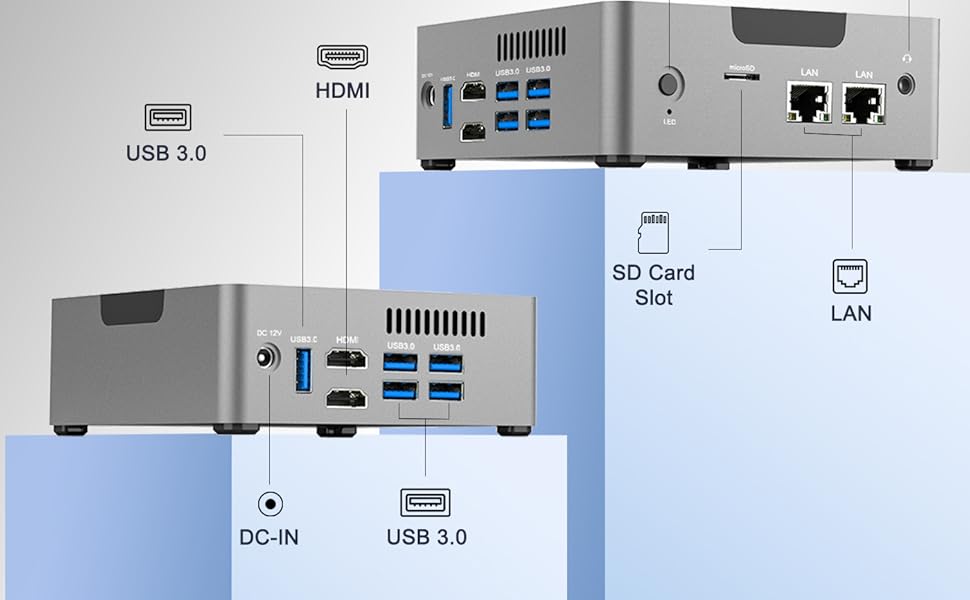
Image: Exploded view of the AWOW AK34 Mini PC, showing its metal frame and internal components including the cooling fan.
Troubleshooting
Common Issues and Solutions:
- No Power:
- Ensure the power adapter is securely connected to both the Mini PC and a working power outlet.
- Verify the power outlet is functional by plugging in another device.
- No Display:
- Check that the HDMI cable(s) are firmly connected to both the Mini PC and the monitor(s).
- Ensure the monitor is set to the correct input source (HDMI 1, HDMI 2, etc.).
- Try connecting to a different monitor or using a different HDMI cable.
- No Network Connection:
- For wired connections, ensure the Ethernet cable is properly connected and the router/modem is working.
- For Wi-Fi, check that Wi-Fi is enabled in the operating system and you are connected to the correct network with the correct password.
- Restart your router/modem and the Mini PC.
- Slow Performance:
- Close unnecessary applications running in the background.
- Ensure the operating system and drivers are up to date.
- Check for sufficient free storage space on the primary drive.
- Monitor CPU and RAM usage through Task Manager (Windows) to identify resource-intensive processes.
Specifications
| Feature | Detail |
|---|---|
| Processor | Intel Celeron J3455 (Quad Core, up to 2.3 GHz) |
| RAM | 6 GB DDR4 |
| Storage | 256 GB M.2 SATA3 SSD (expandable with 2.5" SATA SSD/HDD up to 2TB, Micro SD up to 512GB) |
| Graphics | Intel HD Graphics 500 |
| Operating System | Windows 10 Pro (64-bit), supports Linux |
| Video Output | 2 x HDMI 1.4 (4K UHD @ 30Hz) |
| USB Ports | 5 x USB 3.0 |
| Network | 2 x Gigabit Ethernet (LAN), 2.4GHz/5.8GHz Dual-Band Wi-Fi |
| Bluetooth | Yes |
| Dimensions | Approximately 10.16 x 5.59 x 2.32 inches (Package Dimensions) |
| Weight | Approximately 1.9 pounds |
| Special Features | Wake-on-LAN, Auto Power-on, PXE Boot, Silent Fan Design |
Warranty & Support
AWOW provides comprehensive support for your Mini PC:
- Warranty: The product comes with a one-year warranty.
- Technical Support: Lifetime unlimited technical consulting services are available.
- Fulfillment: This product is fulfilled by Amazon. For returns or initial support, please refer to Amazon's policies.
Image: Overview of AWOW's after-sales service, including fulfillment, technical consulting, and warranty.
For further assistance, please contact AWOW customer support through the official channels provided with your purchase.


