
1. Introduction
This manual provides detailed instructions for the setup, operation, and maintenance of your Populife Smart Keybox. The Smart Keybox is a secure, weather-resistant key storage solution designed for various applications, including homes, hotels, schools, and offices. It features Bluetooth connectivity for remote access management and a durable, waterproof design.

2. Product Features
- Bluetooth Low Energy (BLE) Technology: Utilizes BLE for efficient power consumption, allowing for extended battery life.
- Long Battery Life: Operates for approximately 12 months (up to 10,000 lock/unlock cycles) on 4 AAA alkaline batteries (sold separately), eliminating the need for frequent battery changes.
- IP65 Waterproof Rating: Designed to withstand adverse weather conditions, tested for resistance against dust and light rain.
- Wide Temperature Tolerance: Functions reliably in temperatures ranging from -25°C to 65°C (-13°F to 149°F), ensuring performance in various climates.
- Remote Access Management: Authorize access from anywhere using the mobile application by sending PIN codes and Bluetooth keys. Access can be granted even when not in close proximity to the keybox.
- Modern Design & Versatile Installation: Features a contemporary design that complements most door handles. Includes two shackle sizes to fit various door knobs. Easily attachable to doors, fences, and other locations.

3. Package Contents
Please ensure all items are present in the package:
- Populife Smart Keybox Unit
- Mounting Hardware (screws, wall anchors)
- User Manual
- USB-C Cable (for emergency power)
- Battery Cover Screws

4. Setup
4.1. Battery Installation
- Open the battery compartment cover on the back of the keybox.
- Insert 4 AAA alkaline batteries, ensuring correct polarity.
- Securely close the battery compartment cover with the provided screws.

4.2. App Download and Pairing
- Download the Populife mobile application from your device's app store.
- Create an account and log in.
- Follow the in-app instructions to add your Smart Keybox and pair it via Bluetooth.
4.3. Mounting the Keybox
The Populife Smart Keybox can be mounted in two ways:
- Wall Mount: Use the provided screws and wall anchors to securely attach the keybox to a flat surface.
- Shackle Mount: Utilize the shackle to hang the keybox on a door handle, fence, or other suitable fixture. Ensure the shackle is properly closed and locked.

5. Operating Instructions
5.1. Unlocking with PIN Code
- Enter the correct PIN code on the keypad.
- Press the unlock button (usually a checkmark or lock icon) to open the keybox.

5.2. Unlocking with Bluetooth Key via App
- Ensure Bluetooth is enabled on your smartphone and you are within range of the keybox.
- Open the Populife app and select your keybox.
- Tap the 'Unlock' button in the app to open the keybox.

5.3. Generating Access Codes (App Functions)
The Populife app allows you to generate various types of access codes:
- One-Time Codes: Valid for a single use.
- Timed Codes: Valid for a specific duration (e.g., for guests).
- Permanent Codes: Always active.
- Bluetooth Keys: Shareable digital keys for app users.
You can generate random codes remotely or customize codes when near the keybox (requires Bluetooth connection). These codes can be shared via email, phone number, or text message.
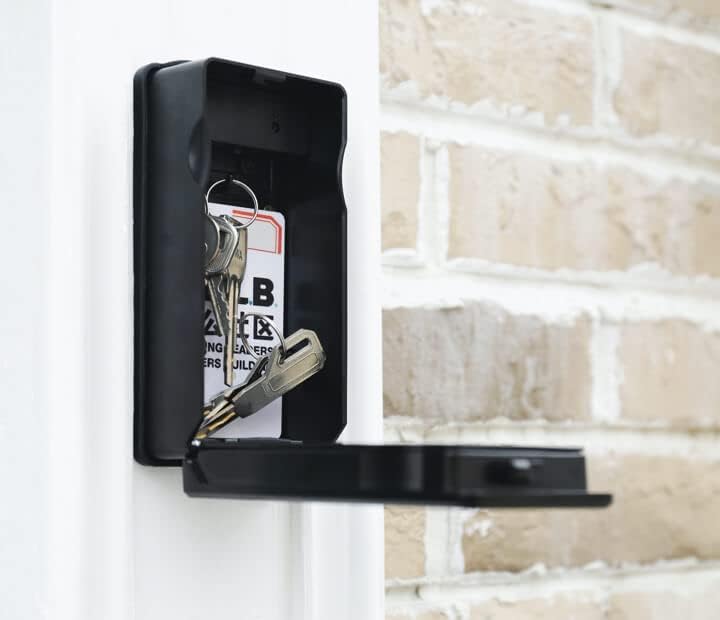
5.4. Storing Keys
The keybox provides ample space for storing multiple keys or small access cards. To store keys:
- Unlock and open the keybox.
- Place your keys inside the compartment.
- Close the keybox cover securely. It will automatically lock.
6. Maintenance
6.1. Battery Replacement
When the battery level is low, the app will notify you. Replace the 4 AAA alkaline batteries as described in Section 4.1. Prompt battery replacement ensures continuous operation.
6.2. Cleaning
Wipe the exterior of the keybox with a soft, damp cloth. Avoid using abrasive cleaners or solvents that could damage the finish or electronic components.
7. Troubleshooting
- Keybox not responding: Check battery level in the app. If batteries are low, replace them. For emergency power, connect a USB-C cable to the port on the bottom of the keybox.
- PIN code not working: Ensure you are entering the correct code. Verify the code's validity period in the app.
- Bluetooth connection issues: Ensure Bluetooth is enabled on your device and you are within close proximity to the keybox. Restart the app or your device if necessary.
- Keybox not locking: Ensure the cover is fully closed and there are no obstructions.
8. Specifications
| Brand | Populife |
| Product Dimensions (D x W x H) | 71 x 46 x 97 mm |
| Lock Type | Combination, Cylinder |
| Color | Black |
| Material | Zinc |
| Special Features | Waterproof |
| Mounting Type | Wall Mount |
| Water Resistance Level | Waterproof (IP65) |
| Control Method | Touchpad Control |
| Product Weight | 1.8 pounds |
| UPC | 803855954821 |
9. Warranty and Support
For warranty information and customer support, please refer to the official Populife website or contact your retailer. Keep your purchase receipt for warranty claims.


