
Genius Invictus One (A28111)
Genius Invictus One Handheld Vacuum Cleaner User Manual
Model: Invictus One (A28111)
Introduction
Thank you for choosing the Genius Invictus One Handheld Vacuum Cleaner. This manual provides essential information for the safe and efficient operation, maintenance, and troubleshooting of your new device. Please read this manual thoroughly before first use and keep it for future reference.
Safety Instructions
Always follow basic safety precautions when using electrical appliances to reduce the risk of fire, electric shock, and personal injury.
- Do not use the vacuum cleaner outdoors or on wet surfaces.
- Do not allow it to be used as a toy. Close attention is necessary when used by or near children.
- Use only as described in this manual. Use only manufacturer's recommended attachments.
- Do not use with damaged cord or plug. If appliance is not working as it should, has been dropped, damaged, left outdoors, or dropped into water, return it to a service center.
- Do not pull or carry by cord, use cord as a handle, close a door on cord, or pull cord around sharp edges or corners. Do not run appliance over cord. Keep cord away from heated surfaces.
- Do not unplug by pulling on cord. To unplug, grasp the plug, not the cord.
- Do not handle plug or appliance with wet hands.
- Do not put any object into openings. Do not use with any opening blocked; keep free of dust, lint, hair, and anything that may reduce air flow.
- Keep hair, loose clothing, fingers, and all parts of body away from openings and moving parts.
- Do not pick up anything that is burning or smoking, such as cigarettes, matches, or hot ashes.
- Use extra care when cleaning on stairs.
- Do not use to pick up flammable or combustible liquids, such as gasoline, or use in areas where they may be present.
- Do not pick up toxic material (chlorine bleach, ammonia, drain cleaner, etc.).
- Do not use without dust bag and/or filters in place.
- Prevent unintentional starting. Ensure the switch is in the off-position before picking up or carrying the appliance.
Package Contents
Your Genius Invictus One package includes the following components:
- 1 x Main Unit (Handheld Vacuum Cleaner)
- 1 x Dust Bin
- 1 x Brush Nozzle
- 1 x HEPA Filter
- 1 x 18/10 Stainless Steel Filter
- 1 x Charging Station
- 1 x Crevice Tool
- 1 x Charging Cable

Image: The Genius Invictus One handheld vacuum cleaner shown with its complete set of accessories, including the main unit, dust bin, various nozzles, filters, charging station, and charging cable.
Product Overview
The Invictus One is a compact and powerful handheld vacuum designed for quick and efficient cleaning tasks. Its lightweight design and cordless operation provide maximum flexibility.
Key Components:
- Main Unit: Contains the BLDC motor, battery, and control buttons.
- Dust Bin: Transparent container for collecting dust and debris.
- Filter System: Composed of a stainless steel pre-filter and a HEPA filter for efficient filtration.
- Nozzles: Includes a brush nozzle for upholstery and a crevice tool for tight spaces.
- Charging Station: Docking station for convenient charging and storage.

Image: An exploded view illustrating the main components of the Invictus One: the vacuum body, the removable dust bin, and the two-stage filtration system consisting of a stainless steel filter and a HEPA filter.
Setup
1. Initial Charging:
Before first use, fully charge the vacuum cleaner. Connect the charging cable to the charging station and plug it into a power outlet. Place the vacuum cleaner onto the charging station. The charging indicator light will illuminate to show it is charging. A full charge takes approximately [insert charging time if available, otherwise omit] and provides up to 15 minutes of operation.

Image: The Invictus One vacuum cleaner securely placed on its charging station, ready for or undergoing charging.
2. Assembling Filters:
Ensure both the stainless steel filter and the HEPA filter are correctly inserted into the dust bin before attaching the dust bin to the main unit. Refer to the 'Maintenance' section for detailed filter assembly.
Operating Instructions
1. Turning On/Off:
Press the power button located on the handle to turn the vacuum cleaner on. Press it again to turn it off.
2. Attaching Nozzles:
Select the appropriate nozzle for your cleaning task. The brush nozzle is ideal for surfaces like upholstery or keyboards, while the crevice tool is perfect for narrow gaps and corners.
- To attach: Align the nozzle with the vacuum's intake opening and push firmly until it clicks into place.
- To detach: Pull the nozzle away from the intake opening.
3. General Cleaning:
Hold the vacuum cleaner firmly and move the nozzle over the surface to be cleaned. The powerful suction will pick up dust, crumbs, and other small debris.

Image: The Invictus One in use, demonstrating its ability to quickly clean up food crumbs from a countertop.
4. Specific Applications:
- Car Interiors: Use the crevice tool to reach tight spots between seats and the brush nozzle for floor mats and upholstery.
- Pet Hair: The strong suction is effective for picking up pet hair from carpets, rugs, and furniture.

Image: The Invictus One effectively cleaning the interior of a car, reaching into tight spaces around the gear shift.

Image: The Invictus One demonstrating its capability to remove pet hair from carpeted surfaces.
Maintenance
Regular maintenance ensures optimal performance and extends the lifespan of your vacuum cleaner.
1. Emptying the Dust Bin:
The Invictus One features a hygienic, bagless design. To empty the dust bin:
- Ensure the vacuum is turned off.
- Press the release button on the dust bin to detach it from the main unit.
- Hold the dust bin over a trash can and press the dust bin release button to open the bottom flap and empty the contents.
- Close the flap securely and reattach the dust bin to the main unit.

Image: A user detaching the dust bin from the vacuum, revealing the collected debris inside.

Image: The dust bin being emptied, demonstrating the hygienic one-button release mechanism.
2. Cleaning the Filters:
The dual filter system (stainless steel pre-filter and HEPA filter) should be cleaned regularly to maintain suction power.
- Remove the dust bin as described above.
- Carefully remove both the HEPA filter and the stainless steel filter from the dust bin.
- Tap the filters gently over a trash can to remove loose dust. For a more thorough cleaning, you may rinse the filters under running water. Ensure they are completely dry before reinserting them.
- Reassemble the filters: first the stainless steel filter, then the HEPA filter, into the dust bin.
- Reattach the dust bin to the main unit.
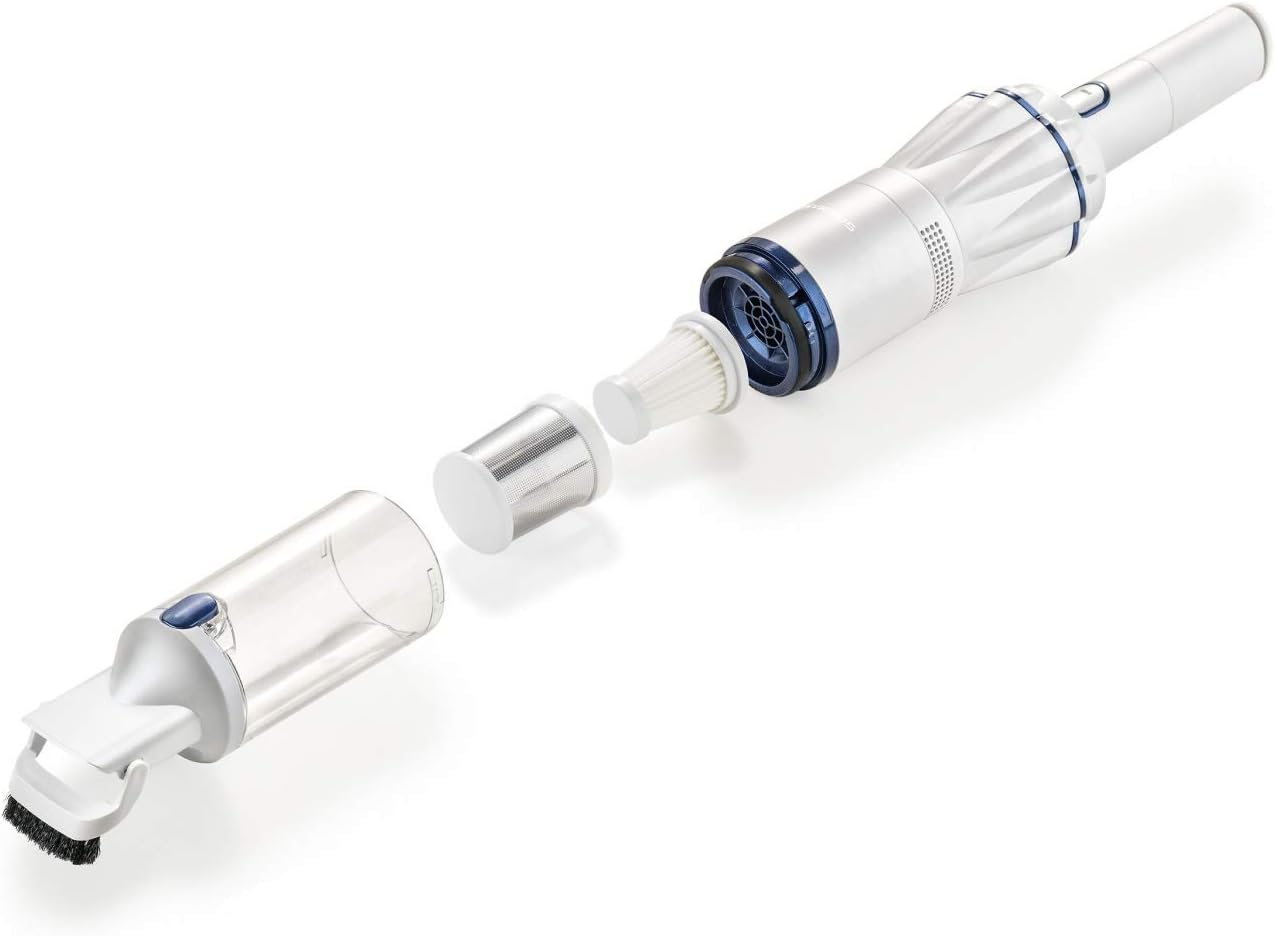
Image: A close-up of the stainless steel pre-filter, which is part of the vacuum's efficient filtration system.
Troubleshooting
If you encounter issues with your Invictus One, refer to the following common problems and solutions:
| Problem | Possible Cause | Solution |
|---|---|---|
| Vacuum does not turn on. | Battery is depleted. | Charge the vacuum cleaner fully. |
| Reduced suction power. | Dust bin is full. | Empty the dust bin. |
| Reduced suction power. | Filters are clogged. | Clean or replace the filters. Ensure they are completely dry before reinserting. |
| Reduced suction power. | Nozzle or intake is blocked. | Check and clear any blockages in the nozzle or main intake. |
| Vacuum does not charge. | Charging cable or station is not properly connected. | Ensure all connections are secure and the power outlet is functional. |
If the problem persists after trying these solutions, please contact customer support.
Specifications
- Brand: Genius
- Model Name: Invictus One
- Model Number: A28111
- Color: Pearly White/White
- Power: 90 Watts
- Noise Level: 76 dB
- Filter Type: HEPA Filter
- Battery Life: Approximately 15 minutes
- Weight: 500 grams
- Dimensions (Package): 44.4 x 16.3 x 9.4 cm
- Recommended Use: Cushion cleaning, general handheld vacuuming
Warranty and Support
For warranty information and customer support, please refer to the documentation provided with your purchase or visit the official Genius website. Information regarding spare parts availability is not provided at this time.
Related documentsInvictus One (A28111)


Ask a question about this manual
Ask about setup, troubleshooting, compatibility, parts, safety, or missing instructions. Manuals+ will review the question and use this page’s manual context to help answer it.