
1. Introduction
This manual provides essential information for the safe and efficient operation of your BESTEK 500W Pure Sine Wave Power Inverter. This device converts 12V DC power from your vehicle's battery into 110V AC household power, suitable for a wide range of electronic devices. Its pure sine wave output ensures compatibility with sensitive electronics, providing stable and clean power.
Please read this manual thoroughly before using the inverter and retain it for future reference.
2. Package Contents
Upon opening your BESTEK 500W Pure Sine Wave Power Inverter package, please ensure all the following items are present:
- 1 x BESTEK 500W Pure Sine Wave Power Inverter
- 1 x User Manual (this document)
- 2 x Battery Clamps Cable (for direct battery connection)
- 1 x 12V Cigarette Lighter Plug Cable (for vehicle accessory socket)
- 2 x Spare Fuses

Image: The BESTEK 500W Pure Sine Wave Power Inverter shown with its cigarette lighter adapter and battery clamp cables.
3. Product Features
The BESTEK 500W Pure Sine Wave Power Inverter is designed with advanced features to provide reliable and safe power conversion:
- Pure Sine Wave Output: Delivers a smooth, stable waveform identical to household AC power, ideal for sensitive electronics, reducing interference, and extending device lifespan.
- High Power Output: Provides 500W of continuous power from a 12V DC source to 110V AC.
- Multiple Charging Options: Equipped with two standard 110V AC outlets and two 4.2A dual USB charging ports that automatically detect your device for optimal charging speed.
- Advanced Protection: Features isolated voltage protection against over-voltage, under-voltage, overheating, overload, reverse polarity, and short circuits.
- Efficient Cooling System: Built-in smart cooling fan with 4 gears of rotating speed, self-adjusted by temperature and power load, ensuring efficient heat dissipation and quiet operation.
- Replaceable Fuses: Includes two 40A/32V external replaceable fuses for direct battery connection, and utilizes your vehicle's 15A fuse when connected via the cigarette lighter.
- ETL Listed: Certified for safety and quality standards.

Image: A visual comparison illustrating the clean, smooth waveform of a pure sine wave versus the stepped, rough waveform of a modified sine wave, highlighting the benefits for sensitive electronics.

Image: The inverter providing power to a laptop, tablet, and smartphone simultaneously, demonstrating its versatile charging capabilities with AC outlets and USB ports.
4. Setup
Proper setup is crucial for the safe and effective operation of your inverter. Choose the appropriate connection method based on your power needs:
4.1 Connecting via 12V Cigarette Lighter Plug
- Ensure the inverter's power switch is in the OFF position.
- Insert the 12V cigarette lighter plug cable into the inverter's DC input port.
- Plug the cigarette lighter adapter into your vehicle's 12V accessory socket.
- Important: When using the cigarette lighter plug, the maximum continuous power output is typically limited to 150W, as most vehicle accessory sockets are fused for this limit. Exceeding this limit may blow your vehicle's fuse.
4.2 Connecting via Battery Clamps Cable
For applications requiring the full 500W output, direct connection to the vehicle battery using the provided battery clamps is necessary.
- Ensure the inverter's power switch is in the OFF position.
- Connect the red battery clamp to the positive (+) terminal of your 12V battery.
- Connect the black battery clamp to the negative (-) terminal of your 12V battery.
- Connect the other end of the battery clamps cable to the inverter's DC input terminals, ensuring correct polarity (red to red, black to black).
- Tighten the terminal nuts securely.
- Note: The inverter includes two 40A/32V external replaceable fuses for protection during direct battery connection.
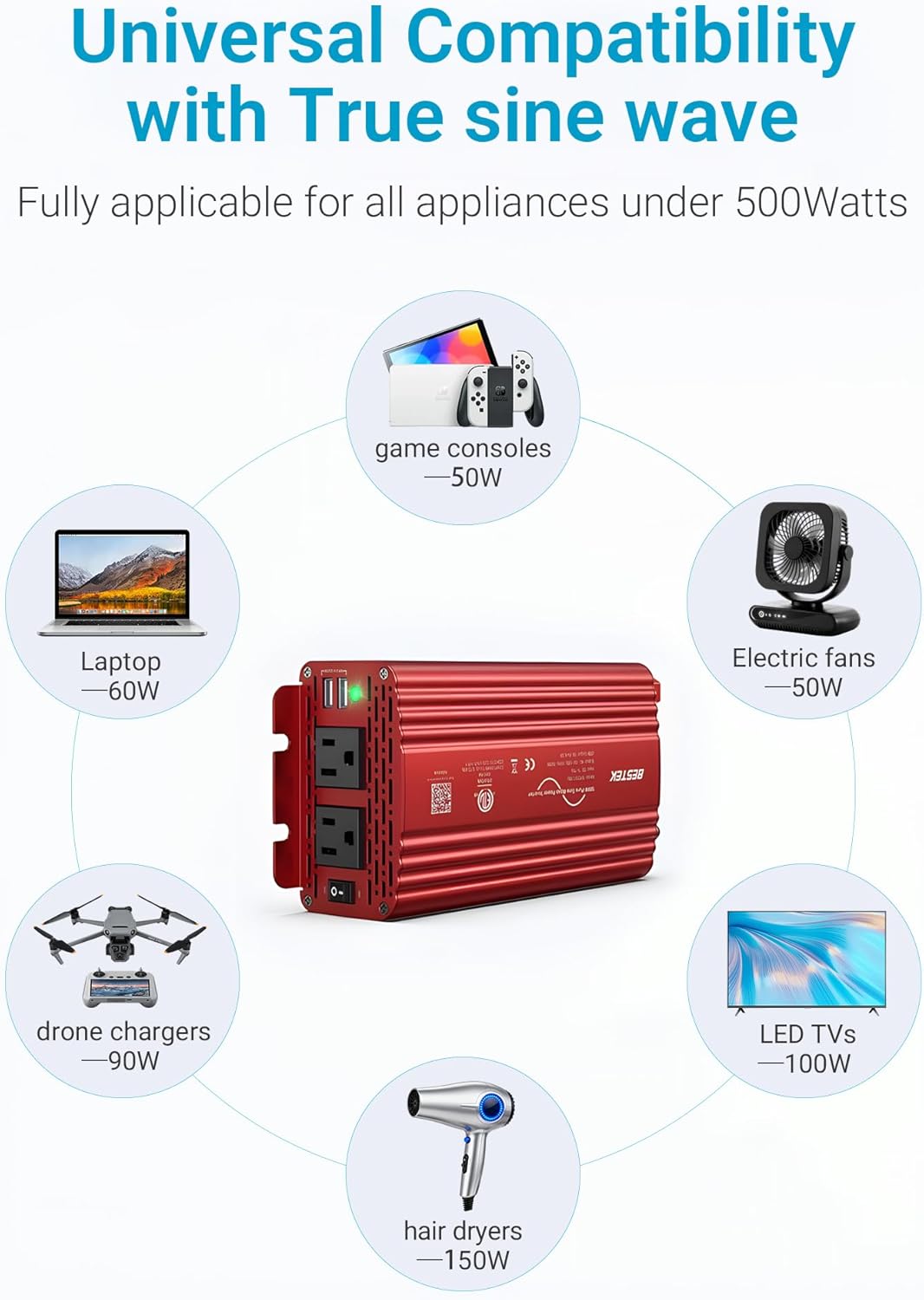
Image: The inverter demonstrating universal compatibility by powering a range of devices including game consoles, laptops, electric fans, drone chargers, LED TVs, and hair dryers.
5. Operating Instructions
Follow these steps to operate your BESTEK 500W Pure Sine Wave Power Inverter:
- After connecting the inverter to a 12V DC power source (cigarette lighter or battery), ensure all connections are secure.
- Flip the ON/OFF switch on the inverter to the 'ON' position. The green LED indicator should illuminate, signifying that the inverter is operational.
- Plug your AC devices (up to 500W total) into the 110V AC outlets.
- Connect your USB-powered devices to the dual USB charging ports. The inverter will automatically detect and deliver the fastest possible charge.
- When finished, turn the inverter's power switch to the 'OFF' position and disconnect your devices.
Overload Condition
If the total power draw from your devices exceeds 500W, the inverter will automatically shut down the AC power to prevent damage. The red indicator light may flash. To reset an overload condition, reduce the load by unplugging some devices, then turn the inverter OFF and then ON again.
Video: An overview of the BESTEK 500W Pure Sine Wave Power Inverter, demonstrating its features and basic operation.
6. Safety Precautions
Adhere to the following safety guidelines to prevent injury or damage to the inverter and connected devices:
- Ventilation: Ensure adequate ventilation around the inverter. Do not block the cooling fan or vents.
- Power Limits: Do not exceed the rated wattage of 500W. For cigarette lighter connections, limit usage to 150W.
- Polarity: Always connect the battery clamps with correct polarity (red to positive, black to negative). Incorrect connection can cause severe damage.
- Environment: Keep the inverter away from water, moisture, flammable materials, and direct sunlight. Operate in a cool, dry, and well-ventilated area.
- Children: Keep the inverter out of reach of children.
- Disassembly: Do not attempt to open or modify the inverter. There are no user-serviceable parts inside.
- Fuses: Only replace fuses with the same type and rating (40A/32V for battery clamps).

Image: An internal view diagram illustrating the various protection mechanisms, including overload, short circuit, over-voltage, low voltage, overheating, and reverse polarity protection.
7. Maintenance
To ensure the longevity and optimal performance of your inverter, follow these maintenance tips:
- Cleaning: Regularly clean the exterior of the inverter with a dry, soft cloth. Do not use liquid cleaners or solvents.
- Ventilation: Periodically check that the cooling fan and air vents are free from dust and debris. A clogged fan can lead to overheating.
- Connections: Ensure all input and output connections remain tight and free from corrosion.
- Storage: When not in use, store the inverter in a cool, dry place away from direct sunlight and extreme temperatures.

Image: A diagram illustrating the internal silent smart cooling fan, which adjusts its speed based on temperature and power load to efficiently dissipate heat.
8. Troubleshooting
If you encounter issues with your inverter, refer to the following troubleshooting guide:
| Problem | Possible Cause | Solution |
|---|---|---|
| No power output / Inverter not turning on | Loose connections, low battery voltage, blown fuse, inverter switch off. | Check all cable connections. Ensure battery voltage is sufficient (12V). Replace blown fuses (if applicable). Turn the inverter switch to 'ON'. |
| Overload shutdown (red indicator flashing) | Connected devices exceed 500W total power. | Reduce the total wattage of connected devices. Turn the inverter OFF, then ON again to reset. |
| Overheating shutdown | Poor ventilation, excessive load, high ambient temperature. | Ensure vents are clear and fan is operating. Reduce load. Move inverter to a cooler environment. |
| Noisy output waveform (for sensitive electronics) | Interference from connected devices or internal component behavior under load. | While advertised as pure sine wave, some users have reported a less-than-ideal waveform under load. For highly sensitive electronics, monitor performance and consider alternative power sources if issues persist. |
Video: A technical review demonstrating the inverter's output waveform under load, noting potential deviations from a perfect pure sine wave. This information is crucial for users with highly sensitive electronic equipment.
9. Specifications
| Feature | Detail |
|---|---|
| Model | MRZ5011BU |
| Brand | BESTEK |
| Input Voltage | DC 12V |
| Output Voltage | AC 110V |
| Continuous Wattage | 500 watts |
| USB Output | 4.2A (Dual USB) |
| Item Weight | 2.2 pounds |
| Product Dimensions | 8.7 x 4.3 x 2.4 inches |
| Certifications | ETL Listed |
10. Warranty and Support
BESTEK is committed to providing high-quality products and customer satisfaction.
- Warranty: The BESTEK 500W Pure Sine Wave Power Inverter typically comes with a 24-month protection plan. Extended 2-year and 3-year protection plans may be available for purchase.
- Return Policy: A 30-day return policy is generally offered for returns on defects.
- Customer Support: For any inquiries, technical assistance, or warranty claims, please contact BESTEK customer support via 24/7 phone or email.
For more information, visit the official BESTEK website: www.bestekdirect.com


