
Introduction
This manual provides essential information for the safe and effective use of your Kircuit Car Charger. Please read these instructions carefully before using the product and retain them for future reference. This car charger is designed to provide reliable power to compatible Cobra radar detectors.
Product Overview
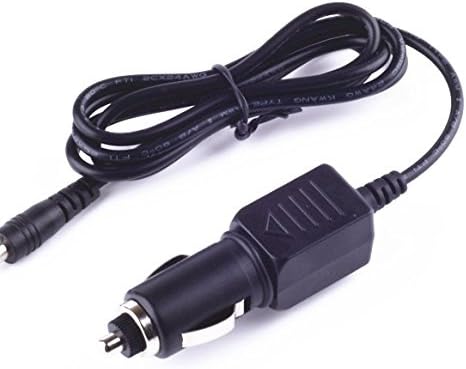
Image: The Kircuit Car Charger featuring a standard car cigarette lighter plug on one end and a barrel connector on the other, connected by a black power cord.
Key Features:
- Input Voltage: Supports DC 12-24V, suitable for most vehicle power outlets.
- Output: Provides stable DC output for compatible devices.
- Safety Protections: Built-in Dynamic IC, Charger IC, and Power fuse for rapid charging and protection against overcharge, short circuits, excess voltage, over temperature, and overcurrent.
- Durability: Constructed with high-quality materials for long-lasting performance.

Image: A circular diagram illustrating the four key safety protections: Short Cut protection, Excess Voltage protection, Over Temperature protection, and Overcurrent protection, all centered around the Kircuit brand.

Image: Visual representation of the charger's durable design, highlighting the high-quality power cable with thick insulation and abrasion-resistant outer sheathing, designed to withstand high temperatures and external factors.
Setup
- Locate Vehicle Power Outlet: Identify the 12V or 24V cigarette lighter socket in your vehicle. Ensure the socket is clean and free of debris.
- Connect Charger to Vehicle: Insert the car charger plug firmly into the vehicle's power outlet. Ensure it is seated securely to establish a proper connection.
- Connect Charger to Radar Detector: Plug the barrel connector end of the charger cord into the power input port of your Cobra ESD6200, ESD7100, ESD7330, or ESD9000 Radar Detector.
- Verify Connection: Once connected, your radar detector should power on or indicate that it is receiving power. Refer to your radar detector's manual for specific power indicators.
Operating Instructions
The Kircuit Car Charger operates automatically once connected. It provides continuous power to your compatible radar detector when the vehicle's power outlet is active.
- Ensure both ends of the charger are securely connected before starting your vehicle or operating the radar detector.
- The charger is designed for continuous use within its specified voltage range.
- Disconnect the charger from the vehicle's power outlet when not in use for extended periods to prevent battery drain, especially if your vehicle's outlet remains active when the ignition is off.
Maintenance
- Cleaning: Use a soft, dry cloth to clean the charger. Do not use liquid cleaners or abrasive materials.
- Storage: When not in use, store the charger in a cool, dry place, away from direct sunlight and extreme temperatures. Avoid kinking or tightly winding the cable.
- Inspection: Periodically inspect the cable and connectors for any signs of damage, fraying, or corrosion. Do not use the charger if any damage is observed.
Troubleshooting
| Problem | Possible Cause | Solution |
|---|---|---|
| Radar detector not powering on. | Loose connection at vehicle outlet or radar detector. | Ensure both ends of the charger are firmly plugged in. |
| Vehicle power outlet is not active (e.g., ignition off). | Turn on vehicle ignition. Test the outlet with another device if possible. | |
| Blown fuse in vehicle's power outlet circuit. | Consult your vehicle's manual to locate and replace the fuse. | |
| Charger or cable appears damaged. | Physical damage to the cord or connectors. | Discontinue use immediately. Replace the charger. |
Specifications
| Attribute | Value |
|---|---|
| Brand | Kircuit |
| Model Number (ASIN) | B082KJ4DWB |
| Compatible Devices | Cobra ESD6200, ESD7100, ESD7330, ESD9000 Radar Detectors |
| Input Voltage | DC 12-24 Volts |
| Output Voltage | DC 12-24 Volts (Matches input for compatible devices) |
| Power Source | Corded Electric |
| Main Power Connector Type | Car Cigarette Lighter Plug (2 Pin) |
| Item Weight | 8 ounces |
| Date First Available | December 10, 2019 |
Warranty and Support
Kircuit products are tested to ensure great working condition. For specific warranty information or technical support, please refer to the product packaging or contact the seller directly through the platform where the purchase was made. Keep your purchase receipt as proof of purchase.
For general inquiries or further assistance, you may visit the Kircuit brand page on Amazon or contact their customer service if available.