
Kircuit VEC137CO, VEC137R
Kircuit Car DC Adapter User Manual
Model: VEC137CO, VEC137R
1. Introduction
Thank you for choosing the Kircuit Car DC Adapter. This adapter is designed to provide reliable power for your devices in various automotive, marine, and recreational vehicle applications. It is compatible with Husky Vector VEC137CO and VEC137R models, ensuring your equipment receives stable and efficient power.
This manual provides essential information on the adapter's features, setup, operation, maintenance, and troubleshooting to ensure safe and optimal performance.
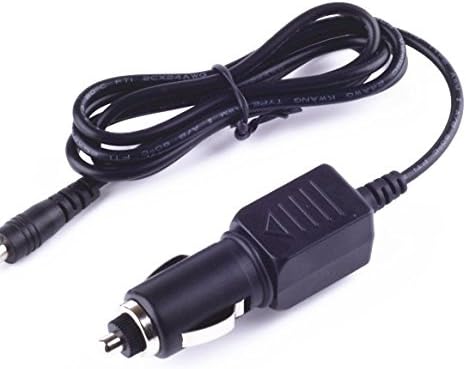
Figure 1: Kircuit Car DC Adapter with cigarette lighter plug and barrel connector.
2. Important Safety Information
Please read all safety instructions carefully before using the adapter. Failure to follow these instructions may result in electric shock, fire, or serious injury.
- Voltage Compatibility: Ensure the input voltage of your vehicle (12-24V DC) matches the adapter's specifications. Do not use with incompatible voltage sources.
- Device Compatibility: Verify that your device's power requirements (voltage and current) are compatible with the adapter's output.
- Overload Protection: The adapter features built-in dynamic IC, charger IC, and power fuse for overcharge protection. However, avoid connecting devices that exceed the adapter's maximum output capacity.
- Environmental Conditions: Do not expose the adapter to water, moisture, extreme temperatures, or direct sunlight. Use in a well-ventilated area.
- Physical Damage: Do not use the adapter if the cord or plug is damaged. Do not attempt to open or modify the adapter.
- Children and Pets: Keep the adapter out of reach of children and pets.

Figure 2: Illustration of the adapter's built-in safety protections, including short circuit, excess voltage, over temperature, and overcurrent protection.
3. Package Contents
The Kircuit Car DC Adapter package typically includes:
- 1 x Kircuit Car DC Adapter (compatible with Husky Vector VEC137CO / VEC137R)
Please inspect the contents upon opening the package to ensure all items are present and undamaged.
4. Setup Instructions
Setting up your Kircuit Car DC Adapter is a straightforward process:
- Identify Vehicle DC Outlet: Locate the 12V or 24V DC power outlet (cigarette lighter socket) in your vehicle, boat, or RV.
- Connect Adapter: Firmly insert the car cigarette lighter plug of the Kircuit DC Adapter into the vehicle's DC outlet. Ensure it is securely seated.
- Connect Device: Plug the barrel connector end of the adapter into the power input port of your Husky Vector VEC137CO or VEC137R device.
- Power On: Once connected, your device should receive power. Some vehicles may require the ignition to be in the "ACC" or "ON" position for the DC outlet to be active.
Ensure all connections are snug to prevent intermittent power supply.
5. Operating Instructions
The Kircuit Car DC Adapter operates automatically once connected. It provides a stable DC output to power your compatible devices.
- Continuous Power: The adapter is designed for continuous use within its specified voltage and current limits.
- Monitoring: While the adapter has built-in protections, it is good practice to periodically check the adapter and your device for any signs of overheating during prolonged use.
- Disconnection: When not in use, it is recommended to disconnect the adapter from both the vehicle's DC outlet and your device to conserve vehicle battery power and prevent unnecessary wear.

Figure 3: Close-up of the adapter's durable cable design, highlighting its high-quality materials and thick insulation for enhanced protection and longevity.

Figure 4: Comparison demonstrating the secure and stable connection provided by the Kircuit adapter's plug design, contrasting it with less reliable alternatives.
6. Care and Maintenance
Proper care and maintenance will extend the life of your Kircuit Car DC Adapter:
- Cleaning: Use a soft, dry cloth to clean the adapter. Do not use liquid cleaners or aerosols.
- Storage: Store the adapter in a cool, dry place away from direct sunlight and extreme temperatures when not in use. Avoid tightly coiling the cable to prevent damage.
- Inspection: Periodically inspect the cable and connectors for any signs of wear, cuts, or damage. If damage is found, discontinue use immediately.
- Avoid Stress: Do not pull on the cable to disconnect the adapter. Always grasp the plug firmly.
7. Troubleshooting
If you encounter issues with your Kircuit Car DC Adapter, refer to the following common problems and solutions:
| Problem | Possible Cause | Solution |
|---|---|---|
| No power to device |
|
|
| Intermittent power |
|
|
| Adapter or device overheating |
|
|
If the problem persists after trying these solutions, please contact Kircuit customer support.
8. Specifications
| Feature | Detail |
|---|---|
| Input Voltage | DC 12-24V |
| Output | DC Output (specific voltage/current depends on model, compatible with VEC137CO/VEC137R) |
| Compatibility | Husky Vector VEC137CO, VEC137R |
| Built-in Protections | Dynamic IC, Charger IC, Power Fuse (Overcharge, Short Circuit, Excess Voltage, Over Temperature, Overcurrent) |
| Item Weight | 8 ounces (approx.) |
| Manufacturer | Kircuit |
9. Warranty and Support
Kircuit products are manufactured to high quality standards and are tested to ensure great working condition. While specific warranty details are not provided in this manual, please refer to the product packaging or the retailer's website for the most up-to-date warranty information.
For technical support, troubleshooting assistance, or inquiries regarding your Kircuit Car DC Adapter, please contact Kircuit customer service through the platform where you purchased the product or visit the official Kircuit website for contact details.
When contacting support, please have your product model (VEC137CO, VEC137R compatible adapter) and purchase information ready.
Ask a question about this manual
Ask about setup, troubleshooting, compatibility, parts, safety, or missing instructions. Manuals+ will review the question and use this page’s manual context to help answer it.