
Kircuit B082KFWVXZ
Kircuit Car DC Adapter Charger User Manual
Model: B082KFWVXZ
Introduction
This manual provides essential information for the safe and effective use of your Kircuit Car DC Adapter Charger. This adapter is designed to provide reliable power to compatible devices such as the Radio Shack 20-308 Scanning Receiver and PRO-51 Scanner. Please read this manual thoroughly before operation and retain it for future reference.
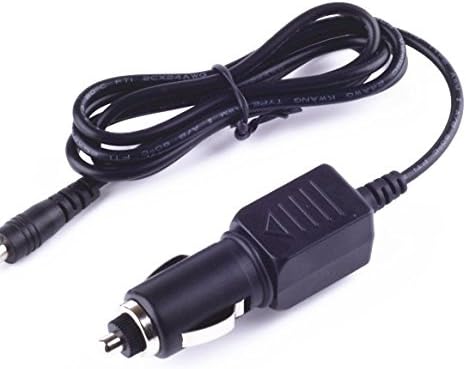
Image: The Kircuit Car DC Adapter Charger, featuring a car cigarette lighter plug on one end and a barrel connector on the other, connected by a black cable.
Safety Information
Always observe the following safety precautions to prevent injury or damage to the product and connected devices:
- Do not expose the adapter to water, moisture, or extreme temperatures.
- Do not disassemble or modify the adapter. Refer all servicing to qualified personnel.
- Ensure the adapter's input and output specifications match your vehicle's power outlet and your device's power requirements.
- Avoid placing the adapter in direct sunlight or near heat sources.
- Keep out of reach of children.
- Unplug the adapter from the vehicle's power outlet when not in use.

Image: Diagram illustrating the built-in safety protections of Kircuit adapters, including short circuit protection, excess voltage protection, overcurrent protection, and over temperature protection.
Product Overview
The Kircuit Car DC Adapter Charger is designed for convenience and durability. It features a robust construction to ensure long-lasting performance.
Key Features:
- DC Input: 12-24V, compatible with most vehicle power outlets.
- Built-in Dynamic IC, Charger IC, and Power Fuse for rapid charging and overcharge protection.
- High-quality materials for durability and resistance to wear and tear.
- Secure and stable connection plugs.

Image: Visual representation of the adapter's durable design, highlighting the high-quality power cable materials and its ability to withstand high temperatures.

Image: Comparison showing the robust and secure design of Kircuit's power cable plugs versus less durable alternatives, emphasizing UL standard quality.
Setup
- Verify Compatibility: Ensure your device (e.g., Radio Shack 20-308 Scanning Receiver, PRO-51 Scanner) requires a DC input within the adapter's output specifications.
- Locate Vehicle Power Outlet: Identify the 12V or 24V DC power outlet (cigarette lighter socket) in your vehicle.
- Connect Device: Insert the barrel connector end of the Kircuit adapter into the power input port of your scanning receiver or scanner.
- Insert into Vehicle Outlet: Firmly insert the car cigarette lighter plug end of the adapter into your vehicle's DC power outlet.
- Power On Device: Once connected, power on your device. The adapter will begin supplying power.
Operating Instructions
The Kircuit Car DC Adapter Charger operates automatically once connected. It provides a stable power supply for your compatible electronic devices while in your vehicle.
- Charging/Powering: The adapter will supply power to your device for operation or charging its internal battery (if applicable).
- Overcharge Protection: The built-in ICs protect your device from overcharging, ensuring battery longevity.
- Usage Environment: Use the adapter only in a well-ventilated area within your vehicle.
Maintenance
Proper maintenance ensures the longevity and optimal performance of your adapter:
- Cleaning: Disconnect the adapter from both the vehicle and the device before cleaning. Use a soft, dry cloth to wipe the surface. Do not use liquid cleaners or solvents.
- Storage: When not in use, store the adapter in a cool, dry place, away from direct sunlight and extreme temperatures. Avoid tangling the cable tightly.
- Inspection: Periodically inspect the cable and connectors for any signs of damage, fraying, or corrosion. If damage is observed, discontinue use immediately.
Troubleshooting
| Problem | Possible Cause | Solution |
|---|---|---|
| Adapter not providing power. |
|
|
| Device not charging or charging slowly. |
|
|
| Adapter feels hot during use. |
|
|
Specifications
| Feature | Detail |
|---|---|
| Brand | Kircuit |
| Model Number | B082KFWVXZ |
| Input Voltage | DC 12-24V |
| Output Voltage | DC 24V |
| Compatible Devices | Radio Shack 20-308 Scanning Receiver, PRO-51 Scanner, and other compatible scanners. |
| Connector Type | Barrel Connector |
| Item Weight | 8 ounces |
| Manufacturer | Kircuit |
Warranty and Support
This product is tested and in great working condition. For specific warranty information or technical support, please refer to the seller's policy on the purchase platform or contact Kircuit customer service directly. Details regarding warranty duration and terms are typically provided at the point of purchase.

Image: Graphic highlighting reasons to choose Kircuit, emphasizing a wide range of product offerings and strong quality control processes.

Image: A Kircuit adapter on a desk next to its packaging, suggesting a professional and reliable product.
Ask a question about this manual
Ask about setup, troubleshooting, compatibility, parts, safety, or missing instructions. Manuals+ will review the question and use this page’s manual context to help answer it.