
Kircuit BW-SDB1
Kircuit AC Power Cord User Manual
For Blitzwolf 2.0 Channel Wireless Soundbar 60W (BW-SDB1)
Introduction
This manual provides essential information for the safe and effective use of your Kircuit AC Power Cord, designed specifically for the Blitzwolf 2.0 Channel Wireless Soundbar 60W (BW-SDB1). Please read this manual thoroughly before use and retain it for future reference.
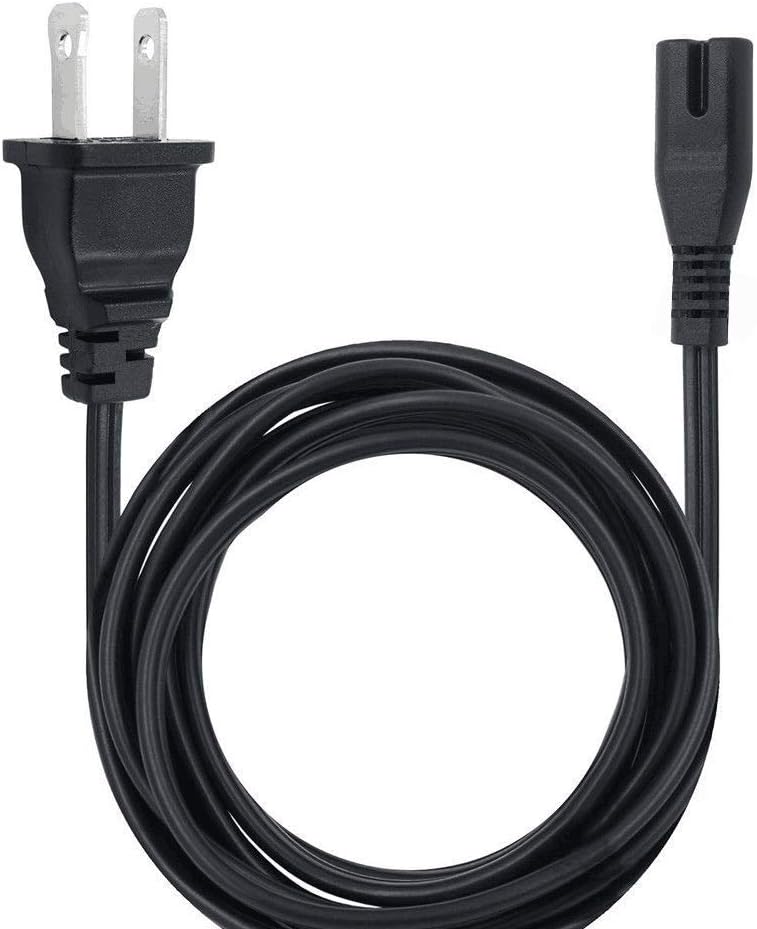
Figure 1: Kircuit AC Power Cord. This 6-foot (1.8 meter) cable features a standard 2-prong USA outlet plug on one end and a C7 (figure-8) connector on the other, designed for compatible devices like the Blitzwolf BW-SDB1 soundbar.
Key Features
- Protection Features: Equipped with Over Voltage output Protection (OVP), Over Current output Protection (OCP), and Short Circuit output Protection (SCP) to ensure device safety.
- Cable Length: Generous 6 feet (approximately 1.8 meters) for flexible placement.
- Plug Type: Standard USA Outlet Saver Power Extension Cord Cable with 2-prong 2 Outlets.
- Quality Assurance: Tested units in great working condition, ensuring reliability and performance.

Figure 2: Built-in Safety Protections. The Kircuit power cord incorporates multiple safety mechanisms including short circuit protection, excess voltage protection, overcurrent protection, and over temperature protection to safeguard connected devices.

Figure 3: Durable Cable Design. The power cable is constructed from high-quality materials with a thick insulation layer for protection against wear and tear. It is abrasion-resistant and designed to withstand high temperatures without degradation, ensuring longevity and safety.

Figure 4: Secure Plug Design. The plugs on the power cable are well-made to provide a secure and stable connection. They are designed to handle high electrical loads without overheating, reducing fire hazards and ensuring reliable power delivery.
Setup Instructions
- Unpack: Carefully remove the Kircuit AC Power Cord from its packaging.
- Identify Connectors: Locate the 2-prong plug (Type B) and the C7 (figure-8) connector on the cable.
- Connect to Device: Insert the C7 connector firmly into the power input port of your Blitzwolf 2.0 Channel Wireless Soundbar 60W (BW-SDB1). Ensure it is fully seated.
- Connect to Power Outlet: Plug the 2-prong plug into a standard USA wall outlet (120V AC). Ensure the outlet is easily accessible and not overloaded.
- Verify Connection: Confirm that both ends of the power cord are securely connected.
Note: Always ensure the power outlet is compatible with the cable's specifications and that the soundbar is turned off before connecting or disconnecting the power cord.
Operating Guidelines
Once the power cord is properly connected, the soundbar is ready for operation according to its own user manual. The Kircuit AC Power Cord provides a stable and protected power supply to your device.
- Do not bend or crimp the power cord excessively.
- Avoid placing heavy objects on the power cord.
- Ensure the power cord is not a tripping hazard.
- Do not use the power cord if it appears damaged or frayed.
Maintenance and Care
Proper maintenance ensures the longevity and safe operation of your power cord.
- Cleaning: Disconnect the power cord from the wall outlet and the device before cleaning. Wipe the cord and plugs with a dry, soft cloth. Do not use liquid cleaners or abrasive materials.
- Storage: When not in use, coil the power cord loosely. Avoid tight coiling or kinking, which can damage the internal wires. Store in a cool, dry place away from direct sunlight and extreme temperatures.
- Inspection: Periodically inspect the power cord for any signs of damage, such as cuts, fraying, exposed wires, or discolored insulation. If any damage is observed, discontinue use immediately and replace the cord.
Troubleshooting
| Problem | Possible Cause | Solution |
|---|---|---|
| Device not powering on. | Power cord not fully connected. Wall outlet is not active. Power cord is damaged. | Ensure both ends of the power cord are securely plugged in. Test the wall outlet with another device. Inspect the power cord for damage; replace if necessary. |
| Power cord feels warm. | Normal operation (slight warmth). Overload or faulty connection. | Slight warmth is normal. If it's excessively hot, disconnect immediately. Ensure the device's power requirements do not exceed the cord's rating. Check for loose connections. |
| Visible damage to the cord. | Physical stress or wear. | Discontinue use immediately. Replace the power cord. Do not attempt to repair. |
Specifications
| Attribute | Detail |
|---|---|
| Product Name | AC Power Cord |
| Brand | Kircuit |
| Compatible Model | Blitzwolf 2.0 Channel Wireless Soundbar 60W (BW-SDB1) |
| Cable Length | 6 feet (approx. 1.8 meters) |
| Connector Type (Wall) | USA 2-prong (Type B) |
| Connector Type (Device) | C7 (Figure-8) |
| Protection Features | OVP, OCP, SCP (Over Voltage, Over Current, Short Circuit Protection) |
| Item Weight | 8 ounces |
| Manufacturer | Kircuit |
Warranty and Support
For information regarding warranty coverage and customer support, please refer to the documentation provided with your original purchase or contact Kircuit customer service directly. Ensure you have your purchase details and product information readily available.
Note: The provided JSON input does not contain specific warranty details. Please consult the manufacturer's official website or your purchase receipt for the most accurate and up-to-date warranty information.
Ask a question about this manual
Ask about setup, troubleshooting, compatibility, parts, safety, or missing instructions. Manuals+ will review the question and use this page’s manual context to help answer it.