
1. Introduction
This manual provides essential instructions for the safe and effective use of your Kircuit DC Car Adapter. This adapter is designed to provide power to Nextbase 7-inch Portable TV models TUM57-D and TVM57-D from a vehicle's 12-24V DC power outlet. Please read this manual thoroughly before use and retain it for future reference.
2. Product Overview
The Kircuit Car Adapter is a reliable power supply solution for compatible portable televisions. It features a standard car cigarette lighter plug on one end and a DC output connector on the other, designed to fit the power input of your Nextbase portable TV.
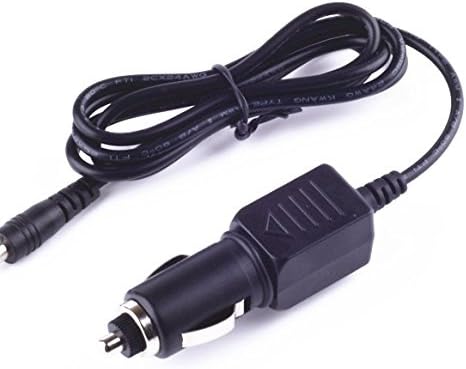
Image 2.1: The Kircuit Car Adapter, showing the car lighter plug and the DC output connector.
3. Setup
- Verify Compatibility: Ensure your portable TV is a Nextbase 7-inch model TUM57-D or TVM57-D.
- Locate Power Outlet: Identify the 12-24V DC power outlet (cigarette lighter socket) in your vehicle.
- Connect to TV: Insert the DC output connector of the Kircuit adapter firmly into the power input port of your Nextbase portable TV.
- Connect to Vehicle: Insert the car lighter plug of the Kircuit adapter firmly into your vehicle's 12-24V DC power outlet.
- Secure Placement: Ensure the cable is routed safely and does not interfere with driving controls or passenger movement.
4. Operating Instructions
- Once connected, the adapter will supply power to your Nextbase portable TV.
- Turn on your portable TV using its power button.
- To disconnect, first turn off your portable TV, then carefully remove the car lighter plug from the vehicle's power outlet, followed by the DC output connector from the TV.
5. Safety Features
The Kircuit Car Adapter is designed with multiple safety protections to ensure reliable operation and protect your devices.

Image 5.1: Overview of Kircuit's built-in safety protections.
- Short Circuit Protection: Prevents damage from electrical shorts.
- Excess Voltage Protection: Safeguards against voltage spikes.
- Over Temperature Protection: Monitors and regulates internal temperature to prevent overheating.
- Overcurrent Protection: Protects against excessive current flow.
5.1 Durable Design
The adapter features a robust construction for longevity and safety.

Image 5.2: Illustration of the durable cable and secure plug design.
- High-Quality Cable: The power cable is made with thick insulation to resist wear and tear, and an abrasion-resistant outer sheathing for protection against external factors.
- Temperature Resistance: The cable is designed to withstand high temperatures without melting or degrading, crucial for handling current loads safely.
- Secure Plugs: The plugs are well-made to provide a stable and secure connection, capable of handling electrical loads without overheating.
6. Maintenance
- Keep the adapter clean and free from dust and debris.
- Store the adapter in a cool, dry place when not in use.
- Avoid bending or kinking the cable excessively, as this can damage internal wires.
- Do not expose the adapter to moisture or extreme temperatures.
- Inspect the cable and connectors periodically for any signs of damage. If damage is found, discontinue use immediately.
7. Troubleshooting
- No Power to TV:
- Ensure both the car lighter plug and the DC output connector are fully inserted.
- Check the vehicle's 12-24V DC power outlet for power (e.g., by testing with another device).
- Verify the vehicle's fuse for the power outlet is not blown.
- Ensure the portable TV's power button is pressed.
- Adapter Overheating:
- Disconnect the adapter immediately.
- Ensure the adapter is not covered or in an enclosed space that restricts airflow.
- Verify the portable TV is compatible and not drawing excessive power.
- If issues persist, discontinue use and contact Kircuit customer support.
8. Specifications
| Brand | Kircuit |
| Model Compatibility | Nextbase 7" Portable TV (TUM57-D, TVM57-D) |
| DC Input | 12-24V |
| DC Output | Compatible with Nextbase 7" Portable TV TUM57-D, TVM57-D power requirements. |
| Item Weight | 8 ounces |
| Special Feature | Travel-friendly design |
9. Warranty and Support
Kircuit products are manufactured with quality and reliability in mind. For specific warranty information or technical support, please refer to the product packaging or contact Kircuit customer service directly. Keep your purchase receipt for warranty claims.