
Kircuit USB 2.0 Data Cord Cable
USB 2.0 Data Cord Cable User Manual
Model: Korg D-888, D1600 MKII, D3200 Compatible
1. Introduction
This manual provides essential information for the proper use and maintenance of your Kircuit USB 2.0 Data Cord Cable. This cable is designed to facilitate data transfer between compatible Korg Digital Recording Studio models, including the D-888, D1600 MKII, and D3200, and a computer or other USB-enabled device.
The Kircuit USB 2.0 Data Cord Cable ensures reliable and efficient connectivity for your digital recording studio equipment.
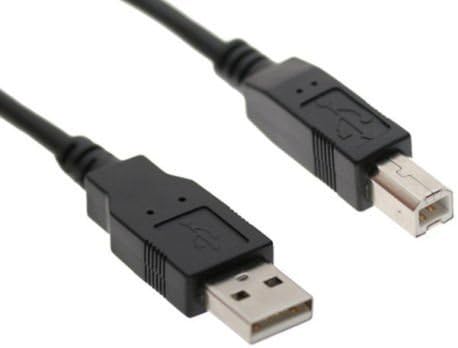
Image 1.1: The Kircuit USB 2.0 Data Cord Cable, featuring a standard USB-A connector on one end and a USB-B connector on the other, designed for connecting digital recording studio equipment.
2. Safety Information
Please read and understand all safety instructions before using the cable. Failure to follow these instructions may result in damage to the cable, connected devices, or personal injury.
- Do not expose the cable to extreme temperatures, direct sunlight, or excessive moisture.
- Avoid bending or twisting the cable excessively, as this can damage internal wires.
- Do not attempt to modify or repair the cable. Refer to qualified personnel for any issues.
- Keep the cable away from children and pets.
- Ensure connectors are clean and free of debris before plugging them in.
- Always grasp the connector, not the cable, when plugging or unplugging.

Image 2.1: Illustration of Kircuit's built-in safety protections, including safeguards against short circuits, excess voltage, over temperature, and overcurrent, ensuring safe operation.
3. Setup
Setting up your Kircuit USB 2.0 Data Cord Cable is straightforward. Follow these steps to connect your Korg Digital Recording Studio to a computer or other compatible device:
- Identify Ports: Locate the USB-B port on your Korg D-888, D1600 MKII, or D3200 Digital Recording Studio. This port is typically square-shaped.
- Connect to Korg Device: Insert the square (USB-B) end of the Kircuit cable firmly into the USB-B port on your Korg device.
- Identify Computer Port: Locate an available standard USB-A port on your computer (PC or Mac) or other host device. This port is typically rectangular.
- Connect to Computer: Insert the rectangular (USB-A) end of the Kircuit cable firmly into the USB-A port on your computer.
- Power On: Ensure both your Korg device and computer are powered on.
- Driver Installation (if necessary): Your operating system may automatically install necessary drivers. If prompted, follow the on-screen instructions. For specific Korg device drivers, refer to your Korg product's manual or the Korg official website.
4. Operating
Once connected, the Kircuit USB 2.0 Data Cord Cable enables data communication between your Korg Digital Recording Studio and your computer. The primary function is for data transfer, such as:
- File Transfer: Transferring audio files, project data, or system updates between your Korg device and computer.
- MIDI Communication: Facilitating MIDI data exchange for controlling software instruments or sending/receiving MIDI messages.
- Firmware Updates: Using the cable to update the firmware of your Korg Digital Recording Studio, if supported by the manufacturer.
Refer to your Korg Digital Recording Studio's specific user manual for detailed instructions on how to initiate data transfer, MIDI communication, or firmware updates, as these functions are controlled by the Korg device's software and operating system.
5. Maintenance
Proper care and maintenance will extend the lifespan of your Kircuit USB 2.0 Data Cord Cable.
- Cleaning: Use a soft, dry cloth to wipe the cable and connectors. Do not use liquid cleaners or solvents.
- Storage: When not in use, coil the cable loosely. Avoid tight coiling or sharp bends, which can damage the internal wiring. Store in a cool, dry place away from direct sunlight.
- Inspection: Periodically inspect the cable for any signs of damage, such as frayed insulation, exposed wires, or bent connectors. If damage is found, discontinue use immediately.
- Handling: Always pull by the connector housing, not the cable itself, when disconnecting.

Image 5.1: Depiction of the cable's durable design, emphasizing its high-quality materials, thick insulation layer for protection against wear and tear, and ability to withstand high temperatures.
6. Troubleshooting
If you encounter issues while using your Kircuit USB 2.0 Data Cord Cable, try the following troubleshooting steps:
| Problem | Possible Cause | Solution |
|---|---|---|
| Device not recognized by computer. | Loose connection, faulty port, missing drivers. |
|
| Slow data transfer. | Using a USB 1.1 port, background processes, cable damage. |
|
| Intermittent connection. | Loose connection, damaged cable, power fluctuations. |
|
7. Specifications
| Feature | Detail |
|---|---|
| Brand | Kircuit |
| Connector Type | USB Type A, USB Type B |
| Cable Type | USB 2.0 Data Cable |
| Color | Black |
| Connector Gender | Male-to-Male |
| Shape | Round |
| Item Weight | 8 Ounces (approx. 226.8 grams) |
| Indoor/Outdoor Usage | Indoor, Outdoor |
| Compatible Korg Models | D-888, D1600 MKII, D3200 Digital Recording Studio |
8. Warranty and Support
Kircuit products are manufactured to high-quality standards. While specific warranty details are not provided in this manual, please retain your proof of purchase for any warranty claims.
For technical support, product inquiries, or warranty information, please contact Kircuit customer service through the retailer where the product was purchased or refer to the official Kircuit website for contact details.
When contacting support, please be prepared to provide the product name (USB 2.0 Data Cord Cable), the model it is used with (Korg D-888, D1600 MKII, D3200), and a detailed description of the issue.
Ask a question about this manual
Ask about setup, troubleshooting, compatibility, parts, safety, or missing instructions. Manuals+ will review the question and use this page’s manual context to help answer it.