Please read these instructions carefully before using the appliance and keep them for future reference. Incorrect operation can lead to damage to the appliance and injury to the user.
Always unplug the toaster from the power outlet when not in use, before cleaning, or if a malfunction occurs.
Do not touch hot surfaces. Use handles or knobs.
Do not immerse the appliance, cord, or plug in water or other liquids.
Ensure the crumb tray is correctly inserted before use. Empty the crumb tray regularly.
Never insert metal objects into the toaster slots.
Do not toast food items with runny fillings or glazes, as these can drip and cause a fire hazard.
Use the toaster on a stable, heat-resistant surface, away from flammable materials.
This appliance is not intended for use by persons (including children) with reduced physical, sensory or mental capabilities, or lack of experience and knowledge, unless they have been given supervision or instruction concerning use of the appliance by a person responsible for their safety.
2. Product Overview
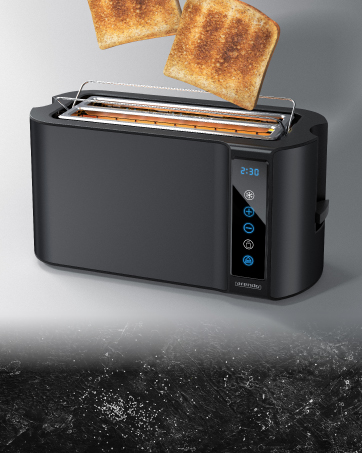
The Arendo Frukost Long Slot Toaster is designed for efficient and even toasting of various bread types. It features a double-walled, heat-insulated housing for safety and optimal performance.
Long Slot: Accommodates two slices of toast side-by-side or larger bread types like baguettes and bagels.
Double-Walled Housing: Heat-insulated for user safety.
Automatic Bread Centering: Ensures even browning on both sides.
Integrated Bun Warmer: Foldable accessory for warming croissants, rolls, etc.
Removable Crumb Tray: Located at the bottom for easy cleaning.
Cord Wrap: For tidy storage.
Rubber Feet: For stable positioning.
Controls
Figure 2: Toaster Control Panel. Features Cancel, Reheat, Defrost buttons, browning level dial, and digital display.
Browning Level Dial (1-6): Adjusts the desired level of toast crispness.
CANCEL Button (with blue LED): Stops the toasting process immediately.
REHEAT Button (with blue LED): Warms up already toasted bread.
DEFROST Button (with blue LED): Thaws and toasts frozen bread.
Digital Display: Shows the selected browning level and remaining toasting time.
Operating Lever: Lowers the bread into the toasting slots and initiates the selected function.
3. Setup
Unpacking: Carefully remove the toaster from its packaging. Remove all packaging materials, including any protective films or stickers.
Placement: Place the toaster on a stable, flat, heat-resistant surface, ensuring adequate ventilation around the appliance. Keep it away from curtains, walls, and other flammable materials.
First Use: Before toasting bread for the first time, operate the toaster without bread for a few cycles at the highest browning setting (level 6) to burn off any manufacturing residues. This may produce a slight odor or smoke, which is normal. Ensure the area is well-ventilated.
Power Connection: Plug the power cord into a grounded electrical outlet (220-240V, 50/60Hz).
4. Operating Instructions
4.1. Basic Toasting
Insert up to two slices of bread into the toasting slots. The automatic bread centering feature will hold them in place.
Select your desired browning level using the browning dial (1 for light, 6 for dark). The digital display will show the selected level and estimated remaining time.
Press the operating lever down until it locks into place. The toasting process will begin, and the selected function's LED will illuminate.
Once toasting is complete, the bread will automatically pop up, and the toaster will switch off.
4.2. Defrost Function
Use this function to thaw and toast frozen bread.
Insert frozen bread into the slots.
Select the desired browning level.
Press the operating lever down.
Press the DEFROST button. The blue LED will light up, and the toaster will adjust the toasting time for frozen bread.
4.3. Reheat Function
Use this function to warm up already toasted bread without further browning.
Insert the cold, toasted bread into the slots.
Press the operating lever down.
Press the REHEAT button. The blue LED will light up, and the toaster will gently warm the bread.
4.4. CANCEL Function
To stop any toasting process at any time, simply press the CANCEL button. The bread will pop up, and the toaster will switch off.
4.5. Using the Integrated Bun Warmer
Figure 3: Integrated Bun Warmer Accessory. Simply position items on the accessory and use browning levels 4-6.
The toaster features an integrated, foldable bun warmer for heating croissants, rolls, or other pastries.
Fold up the bun warmer accessory located on top of the toaster.
Place the items to be warmed on the bun warmer.
Select a browning level between 4 and 6.
Press the operating lever down to start the warming process.
Monitor the items to prevent over-browning. Use the CANCEL button if needed.
Video: Arendo Toaster Modern 2022. This video demonstrates the toaster's features, including browning levels, defrost, reheat, bread extraction, remaining time display, bun warmer, and double-wall design.
5. Cleaning and Maintenance
Regular cleaning ensures optimal performance and extends the life of your toaster.
Unplug: Always unplug the toaster and allow it to cool completely before cleaning.
Exterior Cleaning: Wipe the exterior of the toaster with a soft, damp cloth. Do not use abrasive cleaners or scouring pads, as these can scratch the surface.
Crumb Tray:Figure 4: Removable Crumb Tray. Easily remove the tray from the bottom for quick cleaning. Pull out the removable crumb tray from the bottom of the toaster. Dispose of the crumbs. Wipe the tray clean with a damp cloth and dry thoroughly before reinserting.
Interior Cleaning: Never insert metal objects into the toaster slots to clean them. If bread gets stuck, unplug the toaster, let it cool, and carefully remove the bread using non-metallic tongs.
Storage: When not in use, store the toaster in a clean, dry place. Use the cord wrap feature to keep the power cord tidy.
6. Troubleshooting
Problem
Possible Cause
Solution
Toaster does not turn on.
Not plugged in; power outage; faulty outlet.
Check power cord connection; check circuit breaker; try a different outlet.
Bread does not toast evenly.
Uneven bread thickness; crumb buildup.
Ensure bread slices are of uniform thickness; clean crumb tray.
Bread is stuck in the toaster.
Bread too large or thick; mechanism jammed.
Unplug the toaster, let it cool, and carefully remove bread with non-metallic tongs.
Smoke or burning smell.
Crumb buildup; food stuck; first use residue.
Press CANCEL, unplug, let cool, clean crumb tray. If first use, it's normal. If persistent, contact support.
Browning level is inconsistent.
Incorrect browning setting; toaster not preheated.
Adjust browning dial; for consistent results, allow toaster to complete one cycle before adding new bread.
7. Specifications
Model: 56464846848
Brand: Arendo
Power Consumption: 1000 W
Voltage: 220-240 V, 50/60 Hz
Material: Stainless Steel, Plastic
Color: Matte Black
Number of Slices: 2 (long slot)
Browning Levels: 1-6
Special Features: Heat-insulated double-walled housing, automatic bread centering, removable bun warmer, removable crumb tray, automatic shut-off, digital display with remaining time indicator, 3 function buttons (CANCEL/REHEAT/DEFROST) with blue LED.
Dimensions (without bun warmer): 38.5 cm (L) x 15.5 cm (W) x 20 cm (H)
Power Cord Length: Approx. 85 cm
Weight: 1652 g
8. Warranty and Support
For warranty information, please refer to the documentation included with your purchase or contact Arendo customer support directly. Keep your proof of purchase for any warranty claims.
For technical support or further assistance, please visit the official Arendo website or contact their customer service department.
Ask about setup, troubleshooting, compatibility, parts, safety, or missing instructions. Manuals+ will review the question and use this page’s manual context to help answer it.