
1. Introduction
This manual provides detailed instructions for the setup, operation, and maintenance of your Tilta Nucleus Nano Wireless Follow Focus Motor Kit. This kit is designed to provide precise wireless focus control for various camera setups, enhancing your filmmaking capabilities.
2. Package Contents
- Tilta Nucleus-Nano Wireless Follow Focus Motor (0.8 mod, 32 pitch, 26-tooth gear)
- 15mm x 100mm Black Aluminum Rod
- Nucleus-Nano Micro USB to Micro USB Nano Motor Power Cable
- Lens gear belt (1)
3. Key Features
- Compact and Powerful: Motor mounts to a 15mm rod and delivers high torque with low noise.
- Wireless Control: Operates wirelessly from up to 300 feet (approximately 91 meters) away via the Hand Wheel Controller.
- Broad Compatibility: Compatible with most lenses using the motor's 0.8 gear pitch or the included gear rings.
- Wired Connection Option: Allows for power and control via a Tilta Side Focus Handle.
- Integrated Motor Drive: Eliminates the need for a separate Motor Drive Receiver (MDR), simplifying your camera rig.
- Flexible Power Input: Supports 5-18V power input via a Micro USB port.
- Calibration Options: Features automatic lens calibration and manual A-B limit setting for lenses without hard end stops.
- Run/Stop Functionality: Provides record Run/Stop control for various camera systems (requires optional cables).
4. Product Overview
The image below illustrates the Tilta Nucleus Nano Wireless Follow Focus Motor, highlighting its compact design and key components.
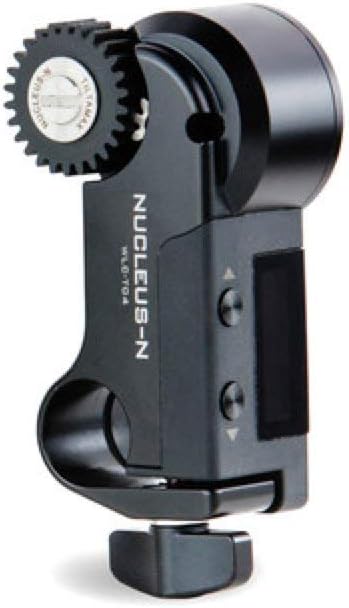
Image: The Tilta Nucleus Nano Wireless Follow Focus Motor, featuring its integrated 0.8 mod gear, 15mm rod clamp, and control buttons.
5. Setup Guide
5.1. Mounting the Motor
Attach the Nucleus Nano Motor to a 15mm rod using its integrated 15mm rod adapter. Ensure the clamp is securely tightened to prevent movement during operation.
5.2. Powering the Motor
Connect the Nucleus-Nano Micro USB to Micro USB Nano Motor Power Cable to the motor's Micro USB port. Power can be supplied from a compatible source, such as a Tilta G2X tilt motor's 5V Micro USB output or a P-tap to 5V Micro USB cable (sold separately). The motor supports a wide input voltage range of 5-18V.
5.3. Attaching to Lens
Position the motor's 0.8 mod gear against the focus ring of your camera lens. If your lens does not have standard cinema gears, use the included lens gear belt to create a compatible geared surface. Ensure the motor gear engages smoothly with the lens gear.
5.4. Pairing with Controller
Set the Nucleus Nano Motor and your Tilta Nano Hand Wheel Controller (or other compatible Tilta controllers like Nucleus M FIZ, Hand Grips, or Side Focus Handles) to the same wireless channel. Refer to your specific controller's manual for detailed instructions on channel selection and pairing procedures.
6. Operating Instructions
6.1. Lens Calibration
The motor supports both automatic and manual lens calibration for optimal performance.
- Automatic Calibration: Power on the motor and controller. The motor will attempt to automatically detect the lens's end stops by rotating the focus ring through its full range.
- Manual Calibration (A-B Limits): For lenses without hard end stops, you can set specific A-B limits. Move the lens to your desired 'A' point (e.g., close focus) and activate the 'A' limit function on your controller. Then, move the lens to your desired 'B' point (e.g., infinity) and activate the 'B' limit function. Consult your controller's manual for precise button presses and procedures.
6.2. Focus Control
Once calibrated, use the Hand Wheel Controller to precisely adjust the lens focus. The motor provides smooth and responsive control, allowing for accurate focus pulls.
6.3. Run/Stop Functionality
The Nano Motor can provide record Run/Stop functionality for various camera systems. This feature requires specific cables, sold separately, that connect the motor to your camera's control port. Refer to Tilta's accessory list for compatible cables for your specific camera model.
7. Maintenance
- Keep the motor clean and free from dust, dirt, and debris. Use a soft, dry cloth for cleaning.
- Avoid exposing the motor to extreme temperatures, high humidity, or direct water contact.
- Regularly inspect all connections and cables for any signs of wear, fraying, or damage. Replace damaged components immediately.
- Ensure the gears are free of obstructions and operate smoothly. Do not force the motor if resistance is encountered.
8. Troubleshooting
8.1. Motor Not Responding
- Check Power Connection: Ensure the motor is receiving adequate power (5-18V) via the Micro USB port.
- Verify Cable Integrity: Inspect the power cable for any damage or loose connections.
- Check Wireless Channel: Confirm that both the motor and its controller are set to the same wireless channel.
- Re-pair Devices: Attempt to re-pair the motor with its controller according to the controller's manual.
8.2. Inaccurate Focus or Calibration Issues
- Re-calibrate the Lens: Perform automatic or manual calibration again, ensuring the lens moves freely.
- Check Gear Engagement: Ensure the motor's gear is properly seated against the lens focus ring or gear belt and is not slipping.
- Inspect Lens Gear Belt: If using, ensure the gear belt is securely attached to the lens and is not loose or damaged.
8.3. Motor Noise
- Ensure Proper Mounting: Excessive vibration or loose mounting can contribute to noise. Securely fasten the motor.
- Check for Obstructions: Make sure nothing is interfering with the motor's movement or gears.
9. Specifications
| Feature | Detail |
|---|---|
| Model | Nano Motor Kit |
| Product Dimensions | 5.5 x 4.4 x 2.8 inches |
| Item Weight | 7 ounces |
| Gear Mod | 0.8 |
| Power Input | 5-18V via Micro USB |
| Torque (5.5V) | 0.65N·m |
| Torque (14.8V) | 1N·m |
| Wireless Range | 300 feet (approx. 91 meters) |
| Manufacturer | TILTA |
| First Available | November 26, 2019 |
10. Warranty and Support
For detailed warranty information, technical support, and service inquiries, please refer to the official Tilta website or contact their customer service department directly. It is recommended to retain your proof of purchase for any warranty claims.
Online resources, FAQs, and product registration may also be available on the Tilta support page: www.tilta.com/support
