
Introduction
This manual provides detailed instructions for the installation, operation, and maintenance of your MPC Remote Start Kit for the Toyota Camry (2012-2014 models with G-Key ignition). Please read this manual thoroughly before attempting installation or operation to ensure proper function and safety.
Important Vehicle Requirements
Before proceeding with installation, verify that your vehicle meets the following requirements:
- G-Key Ignition Only: This kit is designed exclusively for vehicles with a conventional key-start ignition system. It is not compatible with push-to-start vehicles.
- Automatic Transmission ONLY: This system is for automatic transmission vehicles only.
- Factory Immobilizer System: The kit requires a vehicle equipped with a factory immobilizer system to function correctly.
- Gas Engine Only: This kit is for gas engine vehicles only and is not compatible with hybrid models.

Setup and Installation
Package Contents
Verify that all components are present in your kit:
- RF Remote System
- All-in-one Remote Starter Data Interface Module
- T-Harness (pre-wired for your vehicle)
- (2) Ultra-compact 1-Button Extended Range Transmitters (Remotes)
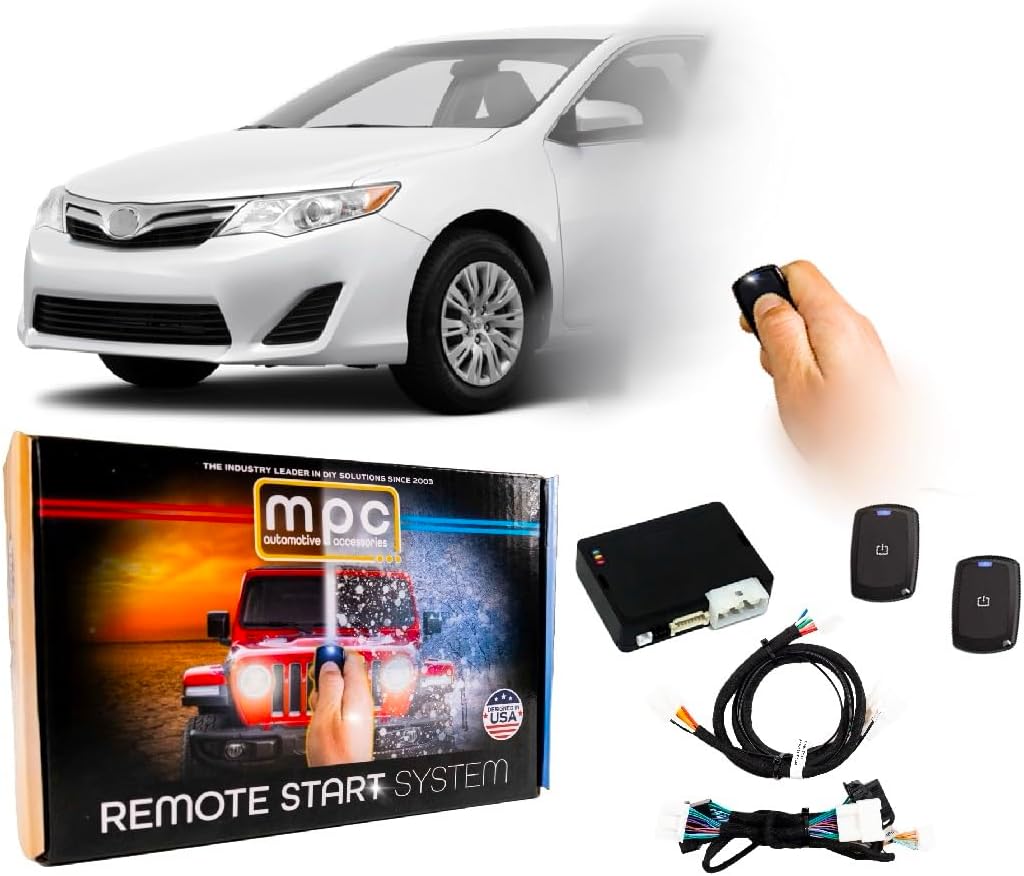
Installation Overview
This kit features a semi plug-and-play installation process, significantly reducing the number of wiring connections typically required. The included T-Harness simplifies integration with your vehicle's existing wiring. While many connections are plug-in, some direct wiring connections are still necessary.
Detailed, concise directions with specific wire colors and locations are provided. A person with basic knowledge of automotive electronics wiring should be able to install this product successfully.

Programming
The firmware for your specific vehicle is preloaded onto the data interface module. However, an initial programming sequence may be required during installation to synchronize the module with your vehicle's systems. Follow the specific programming steps outlined in the detailed instructions provided with your kit. If you encounter difficulties, refer to the Troubleshooting section or contact technical support.
Operation
Remote Start/Stop
To remotely start your vehicle, press the button on your 1-button remote transmitter. The vehicle will start and run for a preset duration (typically 15 minutes) or until the remote stop command is issued. To remotely stop the vehicle, press the button on your remote again.
The remote transmitters provide an extended range of up to 1,500 feet.
Lock and Unlock Functions
Depending on your vehicle and data module configuration, your remote may also control door lock and unlock functions. Refer to your specific installation guide for details on these features.
Entering the Vehicle After Remote Start
Once the vehicle is remotely started, the factory key fob may not function for unlocking the doors on some Toyota models. You may need to use the physical key to unlock the driver's door. Upon entering the vehicle, insert your key into the ignition and turn it to the 'ON' position before pressing the brake pedal. The vehicle will remain running. Pressing the brake pedal before inserting the key will typically shut off the engine.
For this specific kit, the vehicle will not shut off when you open the door after a remote start, allowing for a seamless transition to driving.
Maintenance
Remote Transmitter Battery Replacement
If the range of your remote transmitter decreases or the indicator light fails to illuminate, the battery may need replacement. Refer to the remote's specific instructions for battery type and replacement procedure.
General Care
Keep the remote transmitters dry and avoid exposing them to extreme temperatures or direct sunlight for prolonged periods. Ensure all wiring connections remain secure.
Troubleshooting
If you experience issues with your remote start system, consider the following:
- Vehicle Fails to Start: Ensure all wiring connections are secure. Check that the vehicle's battery is charged. Verify that the programming sequence was completed correctly.
- Car Cranks but Won't Turn Over: This can indicate a programming issue or an unsecured connection to the data module. Re-check all connections, especially the main plugs. A module reset may be required; consult technical support for guidance.
- Reduced Remote Range: Replace the remote transmitter battery. Ensure there are no significant obstructions between the remote and the vehicle.
- Remote Start Not Activating: Confirm all vehicle doors, hood, and trunk are closed. Ensure the vehicle is in park.
For persistent issues, please contact MPC Technical Support.
Specifications
| Item Model Number | B-4816-437 |
| Item Weight | 3 pounds |
| Product Dimensions | 12 x 15.5 x 0.5 inches |
| Wireless Remote | Yes |
| Remote Range | Up to 1,500 feet |
Warranty Information
MPC remote starters and alarms carry a limited lifetime warranty through the manufacturer. Physical damage or damage due to improper installation will void the manufacturer's warranty.
- First Year: For warranty issues within the first year, you may contact MPC directly. The product must be returned at the customer's expense for warranty service.
- After First Year: After the first year, warranty issues must be handled directly through the manufacturer. The manufacturer will require a receipt from the original purchase.
The product is warranted to the original purchaser, when properly installed and under normal conditions of use, to be free from defects in workmanship and materials for a period of one year from the date of purchase. This warranty does not cover abuse, operation inconsistent with the product's design, or damage from environmental exposure. If a defect is deemed 'under warranty', MPC will, at its option, repair or replace the product free of charge. MPC is not liable for installation charges, loss, or damage incurred during replacement or repair of any warranted product.
Technical Support
MPC provides expert technical support based in Tucson, AZ, USA. Several different methods of support are available to assist you with installation and troubleshooting. QR code instructions are included with your kit to ensure access to the most up-to-date information and support resources.
Support Hours: Monday - Friday, 9 AM - 5 PM (MST)

Optional Accessories
Enhance your remote start experience with optional accessories:
- Smartphone App Interface Module: Available separately, this module allows you to control your remote start system from your smartphone, offering limitless range (shipping limited to the continental U.S.).
- Additional Remote Options:
- EVO-REMOTE-1 Ready: Add (2) Ultra-Compact 1-Button 1-Way Keyless Entry Remotes.
- EVO-REMOTE-4 Ready: Add (2) Long-Range 4-Button 2-Way Keyless Entry Remotes.
