
1. Product Overview
The Haier HWM65-826NZP is a 6.5 Kg fully-automatic top load washing machine designed for efficient and convenient laundry care. This appliance combines advanced features with user-friendly controls to deliver effective cleaning results for various fabric types.
The washing machine features a compact design, making it suitable for various living spaces. Its Moonlight Grey finish provides a sleek and modern aesthetic.
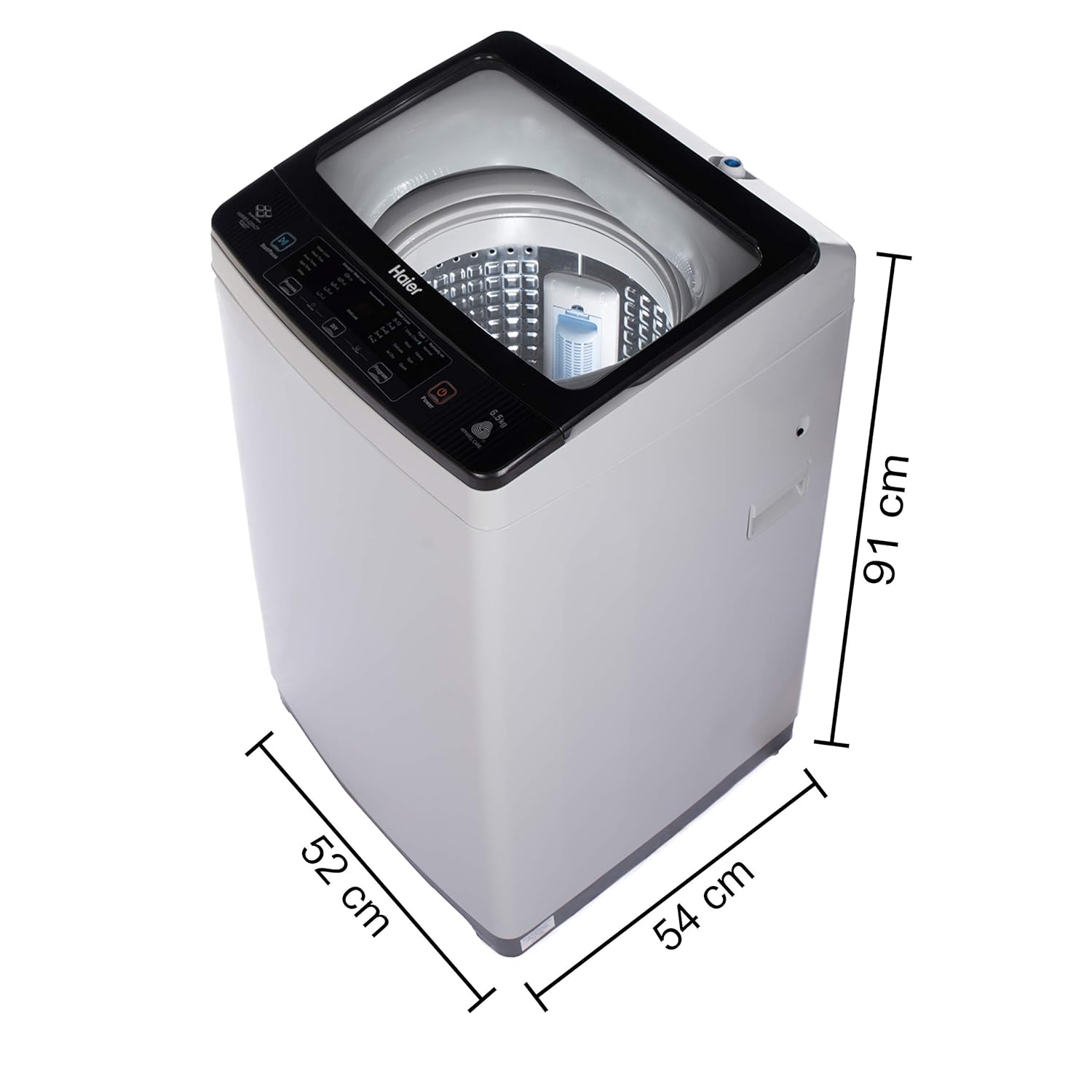
Figure 1: Haier HWM65-826NZP Washing Machine
2. Key Features
This section highlights the primary features of your Haier HWM65-826NZP washing machine, designed to enhance your laundry experience.
2.1 Softfall Technology
The transparent glass lid is equipped with Softfall Technology, ensuring a slow and gentle closure. This feature prevents accidental drops and reduces noise, enhancing safety and durability.

Figure 2: Softfall Technology in action, showing the lid closing gently.
2.2 Balance Clean Pulsator
The Balance Clean Pulsator is engineered to create a powerful motion within the drum, effectively combining water and detergent to penetrate fabrics. This ensures thorough cleaning for both light and heavy laundry loads.

Figure 3: The Deep Plate Pulsator design for enhanced cleaning.
2.3 8 Wash Programs
The washing machine offers 8 distinct wash programs to cater to various fabric types and cleaning needs. These programs include options such as Deep Clean, Wool, Delicate, Air Dry, Spin, Normal, Heavy, and Quick Wash, providing versatility for your laundry.

Figure 4: Overview of the 8 wash programs available on the control panel.
2.4 Bionic Magic Filter
Equipped with a Bionic Magic Filter, this washing machine effectively captures lint and debris from your clothes during the wash cycle. This ensures cleaner laundry and helps maintain the machine's performance.

Figure 5: The Dual Magic Filter system for lint collection.
2.5 Near Zero Pressure (NZP) Technology
The Near Zero Pressure (NZP) Technology allows the washing machine to operate efficiently even with extremely low water pressure (as low as 0.001-0.002 MPa). This ensures consistent performance regardless of your home's water supply conditions.

Figure 6: Visual representation of Near Zero Pressure Technology.
2.6 Oceanus Wave Drum
The Oceanus Wave Drum is designed with a unique pattern that creates a stronger water flow for gentle yet effective washing. This design minimizes abrasion on clothes while ensuring thorough cleaning.

Figure 7: The Oceanus Wave Drum's textured surface.
2.7 Child Lock
For added safety, the washing machine includes a Child Lock feature. Once activated, this function freezes the control panel settings, preventing accidental changes by children during operation.
2.8 LED Digital Display
The intuitive LED digital display provides clear information about the selected wash program, remaining time, and other settings, allowing for easy monitoring and control of the wash cycle.
2.9 Product Overview Video
Watch this video for a quick overview of the Haier HWM65-826NZP washing machine, including its design and key features.
Video 1: Haier HWM65-826NZP Washing Machine Overview
3. Setup Instructions
Proper installation is crucial for the optimal performance and longevity of your washing machine. Please follow these steps carefully.
3.1 Unpacking
- Carefully remove all packaging materials, including the base packaging and any protective films.
- Ensure all included components are present: 1 Washing Machine, User Manual, Components of Water Inlet Hose, Tapping Screw, Warranty Card.
3.2 Placement
- Place the washing machine on a firm, level surface to prevent excessive vibration and noise during operation.
- Ensure there is adequate ventilation around the machine.
- Avoid direct sunlight or placing the machine in excessively damp areas.

Figure 8: Product dimensions for proper placement.
3.3 Water Inlet Connection
- Connect the water inlet hose to the water tap and the inlet valve on the back of the washing machine.
- Ensure all connections are tight to prevent leaks.
- Open the water tap fully.
3.4 Drain Hose Connection
- Position the drain hose to ensure proper water drainage. It can be hooked over a sink or connected to a dedicated drain pipe.
- Ensure the drain hose is not kinked or blocked.
3.5 Power Connection
- Plug the power cord into a grounded electrical outlet.
- Ensure the voltage matches the machine's requirements (220 Volts).
4. Operating Instructions
Follow these steps to operate your Haier HWM65-826NZP washing machine effectively.
4.1 Loading Laundry
- Open the top lid.
- Load clothes loosely into the drum, ensuring not to overload the machine. The maximum capacity is 6.5 Kg.
- Close the lid gently using the Softfall Technology.
4.2 Adding Detergent
- Add the appropriate amount of detergent to the detergent dispenser according to the load size and soil level.
- Refer to the detergent manufacturer's instructions for recommended quantities.
4.3 Selecting a Program
- Press the 'Power' button to turn on the machine.
- Use the 'Program' button to cycle through the available wash programs (Deep Clean, Wool, Delicate, Air Dry, Spin, Normal, Heavy, Quick Wash).
- The selected program will be indicated on the LED digital display.
4.4 Adjusting Settings
Depending on the selected program, you may adjust settings such as:
- Water Level: Adjust according to the load size.
- Wash Time: Modify the duration of the wash cycle.
- Rinse Times: Select the number of rinse cycles.
- Spin Time: Adjust the duration of the spin cycle for drying.
- Delay: Set a delayed start time for the wash cycle.
4.5 Starting the Wash Cycle
- Once the program and settings are selected, press the 'Start/Pause' button to begin the wash cycle.
- To pause the cycle, press 'Start/Pause' again. Press it once more to resume.
4.6 Child Lock Function
- To activate Child Lock, press and hold the designated Child Lock button (or combination of buttons as indicated on the control panel) for a few seconds until the Child Lock indicator appears on the display.
- To deactivate, repeat the same action.
4.7 Tub Clean Program
Regularly use the 'Tub Clean' program to maintain the cleanliness of the washing machine drum and prevent odor buildup. Refer to the control panel for initiating this program.
5. Maintenance
Regular maintenance ensures the longevity and efficient operation of your washing machine.
5.1 Cleaning the Bionic Magic Filter
- Periodically remove and clean the Bionic Magic Filter to ensure effective lint collection.
- Rinse the filter under running water to remove accumulated lint and debris.
- Reinsert the clean filter securely into its position.
5.2 Cleaning the Drum
- Utilize the 'Tub Clean' program monthly to clean the inner drum and remove detergent residue or mold.
- You may use a washing machine cleaner specifically designed for this purpose.
5.3 Exterior Cleaning
- Wipe the exterior of the machine with a soft, damp cloth.
- Avoid using abrasive cleaners or solvents that could damage the finish.
5.4 Water Inlet Filter Cleaning
- If water supply is slow, check and clean the filter screen at the water inlet hose connection.
- Turn off the water supply before disconnecting the hose.
6. Troubleshooting
If you encounter issues with your washing machine, refer to the following common troubleshooting tips before contacting customer service.
6.1 Machine Not Starting
- Ensure the power cord is securely plugged in.
- Check if the power supply is active.
- Verify that the lid is properly closed.
- Confirm that the 'Start/Pause' button has been pressed.
6.2 Water Not Filling or Draining
- Ensure the water tap is fully open.
- Check if the water inlet hose is kinked or blocked.
- Inspect the drain hose for kinks or blockages.
- Clean the water inlet filter if water flow is restricted.
6.3 Excessive Vibration or Noise
- Ensure the machine is placed on a level and stable surface. Adjust the leveling feet if necessary.
- Verify that the transit bolts (if any) have been removed during installation.
- Distribute the laundry evenly inside the drum to prevent imbalance.
6.4 Poor Wash Results
- Ensure you are using the correct amount and type of detergent for your load.
- Select the appropriate wash program for the fabric type and soil level.
- Avoid overloading the machine, as this can hinder proper cleaning.
- Clean the Bionic Magic Filter regularly.
7. Specifications
| Feature | Specification |
|---|---|
| Brand | Haier |
| Model Name | HWM65-826NZP |
| Capacity | 6.5 Kilograms |
| Product Dimensions (D x W x H) | 54D x 51W x 91H Centimeters |
| Access Location | Top Load |
| Controls Type | Fully Automatic |
| Max Rotational Speed | 800 RPM |
| Voltage | 220 Volts |
| Number of Programs | 8 |
| Item Weight | 31000 Grams |
| Colour | Moonlight Grey |
| Material Type | Steel (Body), Plastic/Glass (Drum) |
| Special Features | 10 Year Warranty on motor, Oceanus Wave Drum, Softfall Technology, Near Zero Pressure, Two Bionic Magic Filter, Balance Clean Pulsator |
8. Warranty and Support
8.1 Warranty Information
Your Haier HWM65-826NZP washing machine comes with a comprehensive warranty:
- 2 Years Comprehensive Warranty on the product.
- 10 Years Warranty on the motor.

Figure 9: Warranty details for the Haier HWM65-826NZP.
Please retain your purchase receipt and warranty card for any future claims.
8.2 Customer Support
For any assistance, service requests, or further information, please contact Haier customer support:
- Manufacturer Contact Information: 18001029999


